
 Catch Pokémon
 Top-Views
 New-Updates


Want joystick control without replacing the official Pokémon GO app? AnyTo works on iOS and Android with manual movement, adjustable speed, and route controls.
While teleportation instantly jumps you across the globe and auto-walk simulates real movement, a Pokémon GO joystick gives you total control—letting you "walk" anywhere at your own pace.
In this guide, we'll compare the best Pokémon GO joystick apps and mods for iOS and Android, then help you choose based on your device, budget, and the setup you're willing to complete.

Quick Navigation
- Can You Still Play Pokémon GO with A Joystick in 2026?
- How Do You Get a Joystick on Pokémon GO?
- Pokémon GO Joystick App vs Joystick Mod: Which is Better?
- Best Pokémon GO Joystick Apps for Android/iOS [Recommended]

- Top 4 Pokémon GO with Joystick Mods APK/IPA [Use with Caution]
- FAQs about GPS Joystick for Pokémon GO
- Conclusion

Quick answer
On iPhone, the main choices are an external GPS changer like AnyTo or Bluetooth hardware like iTools BT Joystick 2.5; on Android, you can also use a mock-location app or a modified APK.
Can You Still Play Pokémon GO with A Joystick in 2026?
Yes, you can still play Pokémon GO with a joystick in 2026.
A joystick for Pokémon GO is a virtual controller that lets you move in Pokémon GO without walking.
Instead of relying on real GPS movement, you can navigate the game world by dragging a joystick on your screen—just like in a traditional video game.
How Do You Get a Joystick on Pokémon GO?
| Device | Method | Installation | Game Client | Typical Cost |
|---|---|---|---|---|
| iPhone | Location changer | Mobile setup or computer connection | Official app | Free trial / paid |
| iPhone | Bluetooth GPS hardware | Pair a compatible device | Official app | Hardware purchase |
| Android | Mock-location joystick | Developer Options and mock-location setup | Official app | Free / paid |
| iOS / Android | IPA or APK mod | Sideload or install a separate package | Modified client | Free / paid tier |
Pokémon GO Joystick App vs Joystick Mod: Which is Better?
| Method | How It Works | Main Trade-off |
|---|---|---|
| Official-app | Controls device location while you keep the official Pokémon GO app. | May require a computer, Developer Options, or Bluetooth hardware. |
| Mod | Adds joystick and gameplay tools inside an APK or IPA client. | Depends on sideloading and a compatible release after game updates. Usually higher ban risk. |
Best Pokémon GO Joystick Apps for Android/iOS [Recommended]
The six tools below cover iPhone and Android setups, from guided location changers and Bluetooth hardware to free Android mock-location apps.
| App | Platform | Control | Joystick | Auto Walk | Teleportation | Safety |
|---|---|---|---|---|---|---|
| AnyTo iOS | iOS & Android | Up to 10 devices | ✅ | ✅ | ✅ | 99% |
| Bluetooth Joystick 2.5 | iOS | 1 Device | ✅ | ✅ | ✅ | 90% |
| iRocket LocSpoof | iOS & Android | Up to 10 devices | ✅ | ✅ | ✅ | 85% |
| AnyTo Android | iOS & Android | Up to 10 devices | ✅ | ✅ | ✅ | 99% |
| Fake GPS location by Lexa | Android | 1 Device | ✅ | ✅ | ✅ | 80% |
| GPS JoyStick by The App Ninjas | Android | 1 Device | ✅ | ✅ | ✅ | 75% |
1 Top 3 iOS Pokémon GO Joysticks
#1 AnyTo iOS
AnyTo iOS Pokémon GO Joystick is one of the most trusted Pokémon GO spoofing tools for iPhone in 2026. Its joystick mode offers precise and real-time control over your avatar's direction and speed, simulating real-world walking behavior to help avoid detection.
What sets it apart is its Bluetooth-based method, which avoids risky sideloading or PC tethering. This is crucial, especially now that many users on forums have warned against using USB-based solutions or cracked Pokémon GO versions—which are more likely to get flagged.


What AnyTo Can Offer
- Joystick Control: Provides a GPS joystick for smooth and precise navigation within the simulated location.
- GPS Teleportation: Easily fakes your Pokémon GO GPS location to anywhere in the world with a single click.
- Simulated Movement: Lets you auto walk in Pokémon GO with Two-spot or Multi-spot Mode to complete Routes and hatch eggs without moving.
- No Jailbreak or Root Required: A major plus for users who prioritize device safety and warranty.
- Cross-Platform Compatibility: Works on both iOS (26.4 included) and Android, including the latest system versions.
- Additional Features for Gamers: Includes cooldown timers, built-in game maps (PokéStop map and Gym map), Pokémon location search, and Virtual Go Plus.
After completing the iPhone setup, open Joystick Mode, set the movement speed, and drag the control in the direction you want to move.

Explore AnyTo’s Pokémon GO Joystick to see the dedicated feature, setup choices, and trial options.
#2 Bluetooth Joystick 2.5
Bluetooth Joystick 2.5 is an iOS hardware option for players who do not want to jailbreak or sideload an IPA. Pair the dongle with an iPhone or iPad to control movement while using the official game app.
The main trade-off is price: you need to buy and carry the hardware rather than install a standalone joystick app.
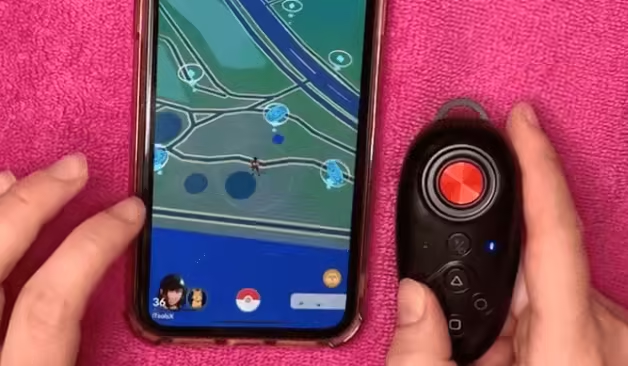
Bluetooth Joystick 2.5 key points
- Best for: iPhone players who prefer hardware over sideloading.
- Client type: Works with the official Pokémon GO app.
- Standout control: A physical 360-degree joystick with route and GPX support.
- Main limitation: Requires a separate hardware purchase.
#3 iRocket LocSpoof
iRocket LocSpoof is a location changer for iOS and Android with joystick movement, custom routes, and speed controls.
It does not require rooting or jailbreaking, although setup and available controls differ by device and operating system.

iRocket LocSpoof key points
- Best for: Players who switch between iOS and Android devices.
- Setup: No root or jailbreak on supported devices.
- Standout feature: Multi-device control with custom routes and GPX import.
- Main limitation: Controls and setup vary by device and operating system.
2 Top 3 Android Pokémon GO APK Joysticks
Free Android choices exist, but they solve different problems. Lexa is a simple mock-location app, while GPS JoyStick adds manual controls and routes. Both use Android's mock-location setup; AnyTo offers a more guided Pokémon GO experience with free trial limits and paid features.
#1 AnyTo Android
AnyTo's Android version is a fan favorite for players who want joystick control without risking root access or complicated setups. It's designed for stability and safety, especially for spoofing in Pokémon GO.
Whether you want to simulate walking, teleport across the world, or auto-hatch eggs, AnyTo for Android gets the job done with minimal risk.
Features of AnyTo Pokémon GO Joystick Android
- Built-In Joystick Control: Control your avatar freely with an overlay joystick.
- Simulated Walking with Smart Routes: Auto-move along a custom route or complete Pokémon GO Route tasks to collect Zygarde cells.
- Integrated Cooldown Reminder: Avoid soft bans with a built-in cooldown timer that adjusts based on travel distance.
- Instant GPS Spoofing: Teleport anywhere with one tap—no root access required.
- Reliable & Safe to Use: Fully compatible with the latest official Pokémon GO app.
Complete the Android Game Mode setup, tap the joystick icon, and choose the movement speed before using the on-screen control.
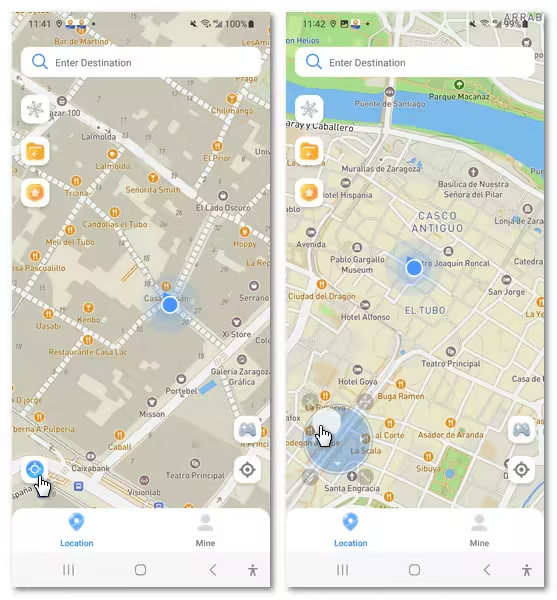
Explore AnyTo’s Pokémon GO Joystick for the feature overview, setup choices, and trial options.
#2 Fake GPS location by Lexa
Fake GPS Location by Lexa is best for Android players who want a free, lightweight mock-location app with joystick control and no root requirement.

Fake GPS Location by Lexa key points
- Platform: Android with no root requirement.
- Cost: Free.
- Standout feature: Floating joystick plus coordinate search and location history.
- Main limitation: Availability may vary on newer Android devices.
#3 GPS JoyStick by The App Ninjas
GPS JoyStick by The App Ninjas is a general Android mock-location app with an on-screen joystick, saved routes, and movement controls.
It is free to install from Google Play, but setup requires Developer Options and selecting it as the mock-location app. It is not a Pokémon GO-specific client, so compatibility can vary by Android setup.

GPS JoyStick key points
- Best for: Android players who want a free, configurable joystick.
- Setup: Requires Developer Options and mock-location selection.
- Standout feature: Detailed route, GPX, speed, and location-update controls.
- Main limitation: Compatibility depends on the Android and Pokémon GO setup.
Top 4 Pokémon GO with Joystick Mods APK/IPA [Use with Caution]
Pokémon GO joystick mods are modified versions of the game app (APK for Android, IPA for iOS).
These downloads place the joystick inside the game interface, but installation, update timing, account exposure, and platform support vary by tool.
| Feature | PGSharp | iSpoofer | iPogo | Spoofer Go |
|---|---|---|---|---|
| Platform | Android only | iOS only (IPA) | iOS & Android | Android only |
| Joystick Support | ✅ | ✅ | ✅ | ✅ |
| Teleportation | ✅ | ✅ | ✅ | ✅ |
| Auto Walk & Routes | ✅ | ✅ | ✅ | ✅ |
| Install Format | Android APK | IPA / Android package | IPA / Android package | Android APK |
| Jailbreak | Optional | ❌ | Optional | ❌ |
1 PGSharp
PGSharp is best for Android players who want joystick controls and encounter tools in one client. It has free and paid tiers, requires an APK installation, and currently supports Android 9 or later. iPhone users can compare alternatives in this PGSharp iOS guide.

PGSharp key points
- Platform: Android 9 or later through an APK installation.
- Cost: Free tier plus a paid Standard plan.
- Standout feature: Nearby feeds, IV data, and shiny scanning.
- Main limitation: A compatible build is required after Pokémon GO updates.
2 iSpoofer
iSpoofer is best for iOS and Android players who want movement controls plus IV, sniping, and map tools. Its free plan covers basic movement, but release availability can pause after Pokémon GO updates.
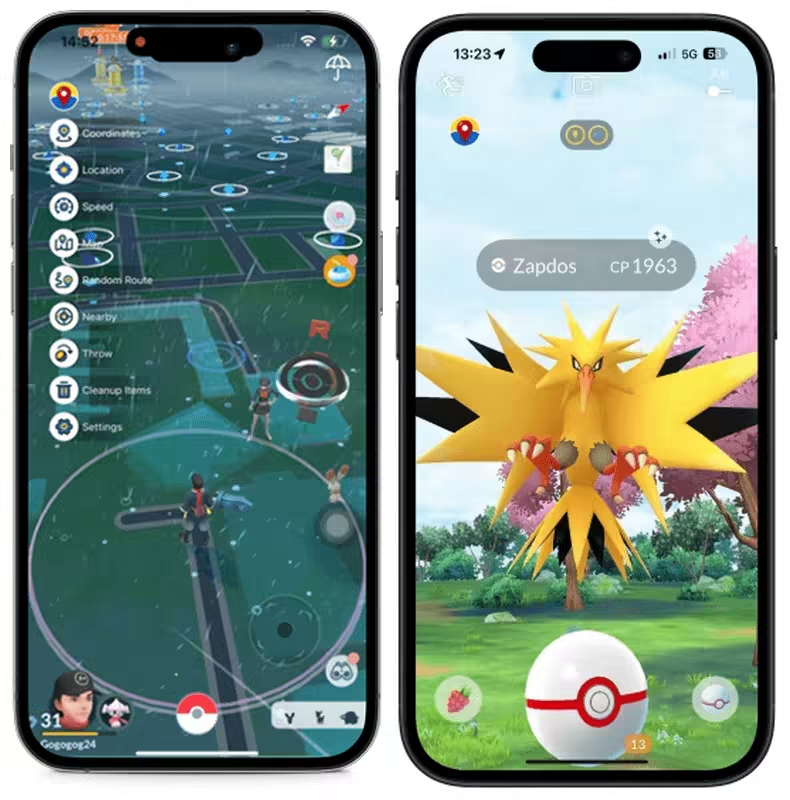
iSpoofer key points
- Platform: iOS and Android.
- Installation: Signing or sideloading on iOS; installable package on Android.
- Standout feature: IV checker, sniping, fast catch, and built-in map tools.
- Main limitation: Availability depends on a build matching the current game version.
3 iPogo
iPogo is best for iOS and Android players who want live feeds and catching tools alongside joystick movement. The free tier includes core controls; premium adds automation and filters. See installation choices in our iPogo review.

iPogo key points
- Platform: iOS and Android.
- Installation: APK on Android; signing, sideloading, or a supported jailbreak setup on iOS.
- Standout feature: Live Pokémon, raid, and quest feeds with auto-catch options.
- Main limitation: Premium automation and filters require a subscription.
4 Spoofer Go
Spoofer Go is best for Android players who want a free package with joystick controls, routes, and nearby Pokémon tools. It requires a compatible Android build for the current Pokémon GO release.

Spoofer Go key points
- Platform: Android through an installable package.
- Cost: Free.
- Standout feature: Nearby radar, GPX routes, and an interactive POI map.
- Main limitation: Requires a build compatible with the current game version.
FAQs about GPS Joystick for Pokémon GO
1. Is there a free joystick for Pokémon GO?
Yes. Android users can try free mock-location apps or free tiers from joystick tools and APK options. iPhone choices are more limited because signing services and Bluetooth hardware may add a cost.
2. Can you get banned for using a Pokémon GO GPS joystick?
Yes. Location manipulation can violate Pokémon GO's rules and may lead to warnings, suspensions, or account termination. No joystick app, APK, IPA, or hardware method can guarantee account safety.
Conclusion
Choose AnyTo for a guided official-app setup on iPhone or Android, GPS JoyStick for a free configurable Android option, Bluetooth hardware for an iPhone hardware route, or a mod when built-in game tools matter more than installation and update constraints.


Ryan Miles is a seasoned gamer and mobile strategy writer with over 5 years of hands-on experience in Pokémon GO spoofing and GPS-based games. Known for breaking down complex location tricks into beginner-friendly guides, Ryan’s mission is simple: help you explore more, catch faster, and play smarter without ever leaving home.
-
Pokémon GO Wild Area Coordinates 2026: 14 Rally Stops
Find Pokémon GO Wild Area coordinates for all 14 Sendai and Mexico City rally stops, plus five global locations, event times, and ticket requirements.
24 mins read -
Hyper Training Guide: Best Pokémon for Silver Bottle Caps in Pokémon GO
How does Silver Bottle Cap work in Pokémon GO? Which Pokémon should you use the Silver Bottle Cap on? Check out this ultimate Hyper Training guide!
17 mins read -
Paldean Tauros Forms in Pokémon GO: Tips to Get Aqua, Blaze & Combat Breeds
Want to get all Paldean Tauros forms fast in Pokémon GO? Discover where to find Aqua, Blaze, and Combat forms and the best raid strategies for 2026.
16 mins read -
Best Remote Shadow Raid Tips for Pokémon GO (2026)
Want to master Remote Shadow Raids in Pokémon GO 2026? Discover pro tips, best Pokémon picks, and smart ways to save your raid passes!
20 mins read -
Pokémon GO Forever Friends & Remote Trades: What You Need to Know
Find out how Forever Friends and Remote Trades work in Pokemon GO, how to become Forever Friends, and how this new feature affects everyone.
28 mins read -
How to Spoof Pokémon GO Fest 2026: Tokyo, Chicago & Copenhagen
Is GO Fest 2026 worth it for spoofers? Learn how to spoof safely, explore top coordinates, and get spoofing tips for Tokyo, Chicago, and Copenhagen!
9 mins read
Was this page helpful?
Thanks for your rating
Rated successfully!
You have already rated this article, please do not repeat scoring!