
 Top-Views
 New-Updates


Looking for a more stable option that supports iOS 27? AnyTo is a strong choice, offering Bluetooth spoofing that helps reduce the risk of detection.
iSpoofer has that awkward kind of name recognition: old players remember it, new players still search it, and the download pages can make the whole thing look more alive than it really is.
So the real question in 2026 is not just whether iSpoofer Pokémon GO exists. It's whether it still works, whether iSpoofer.app is trustworthy, and whether using the iSpoofer app on iOS is worth the account risk.

Quick Navigation

iSpoofer Review 2026: Key Features, Free vs VIP Plans
Despite being an older name in the spoofing game, iSpoofer still advertises features that appeal to Pokémon GO players. Just keep the catch in mind: a feature list is not proof that the current app works reliably in 2026.
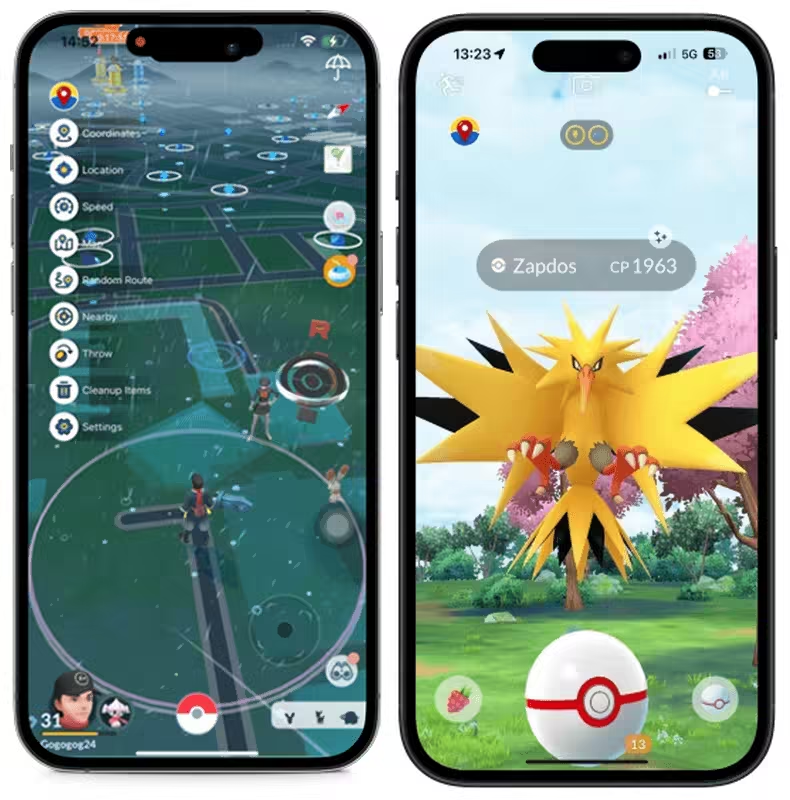
1 Key Features
- Location Spoofing: Teleport anywhere on the map to catch regional Pokémon or join raids around the globe.
- Feed Filter: Quickly search and filter spawns based on Pokémon names, IVs, and distance for faster hunting.
- Auto Inventory Management: The Auto Arrangement feature helps declutter your bag by removing unwanted items automatically.
- Customizable Speed: Walk, jog, or "fly" across the map at adjustable speeds to hatch Eggs without walking or raid hopping.
- Spawn Booster: Expand your visible radius and see Pokémon spawns that would normally be out of range.
- Shiny Blocker: Ignore non-shiny Pokémon during encounters to save time and Pokéballs.
2 Free vs VIP Plans Comparison
| Plan Type | Price | Key Features |
|---|---|---|
| Standard | Free, Forever | GPS Spoofing |
| Pokémon GO Joystick Control | ||
| Speed Settings | ||
| IV Checker | ||
| Enhanced Throw | ||
| VIP | $4.99/month | Everything in Standard |
| Fast Catch | ||
| Fast Map Load | ||
| Skip Animations | ||
| Freeze Pokémon | ||
| Shiny Scanner |
Does iSpoofer Still Work in 2026?
Not reliably. iSpoofer.app may still load and present the tool as active, but a live website is not the same thing as a working Pokémon GO setup.
In our last test, the app failed at the login stage with an "account authentication failed" error. That is the annoying part: you may still find download pages, but getting the app to work is another story.
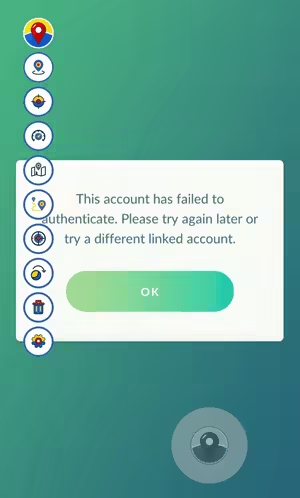
In that test, I used an alternate account and iSpoofer did not work. The official Pokémon GO app logged in normally on the same device, so the issue was not the account itself.
Is iSpoofer Safe to Use? Pros & Cons
No, iSpoofer is not a safe pick for a main Pokémon GO account. It is an unofficial spoofing app, and Pokémon GO can penalize spoofing, suspicious travel patterns, or unauthorized access methods.
Most users on Reddit treat it as outdated and risky, especially compared with newer tools like SpooferPro or AnyTo. That does not mean every account gets hit. It means the downside is real enough that you should not test it casually.
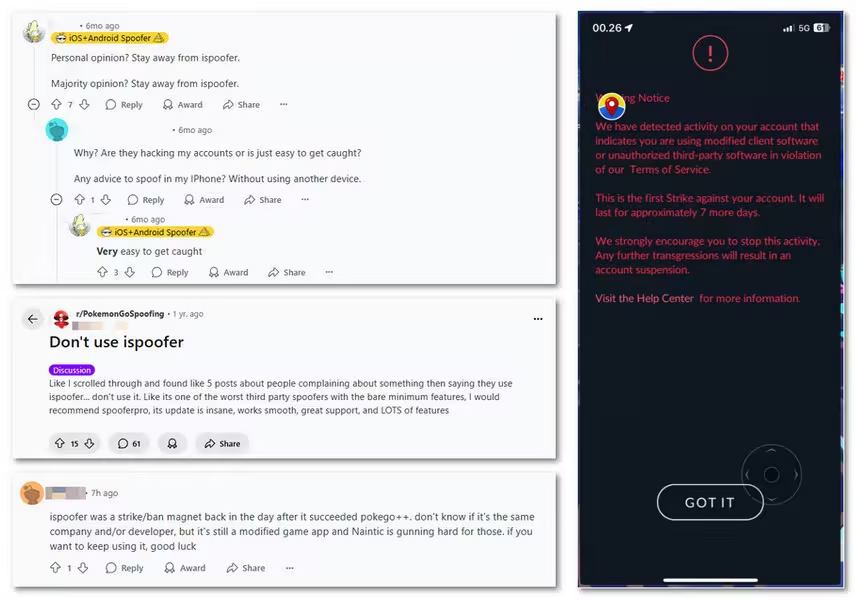
First, Pokémon GO does not treat location spoofing kindly. Account behavior, impossible travel, unusual device signals, and unofficial tooling can all become risk signals.
Second, iSpoofer itself offers no special account protection. Yes, it includes a cooldown timer, but cooldown rules do not make spoofing safe. They only help you avoid the most obvious movement mistakes.
Still, iSpoofer had its prime. It was once a solid tool. Here's a quick look at its pros and cons.
Pros

- It offers a free version with decent spoofing features.
- It's easy to use.
- Includes IV previews, joystick control, teleportation, spawn booster, and enhanced throw.
- A few longtime spoofers claim it's safe if you follow cooldown rules and avoid risky behavior.
Cons

- The subreddit is inactive in recent years.
- Many users have reported bans or strikes after using iSpoofer even when following the rules.
- Several posts warned that sideloading hacked IPAs (like iSpoofer) on iOS is unsafe.
- Without a rooted or jailbroken device, you're more likely to get flagged.
Hands-On Testing: My Experience Using iSpoofer
To refresh this section for 2026, I gave iSpoofer another try and joined their Discord server. Before the testing I went through the recent chat history from the server. It did not read like a clean comeback story. It read like a messy support room: some people were trying to install it, some were asking if it worked at all, and a few said theirs worked while others were stuck.
During my test, the first thing I ran into was crashing. Even after several reinstallations, it still didn't work. And that's the whole story on my side.
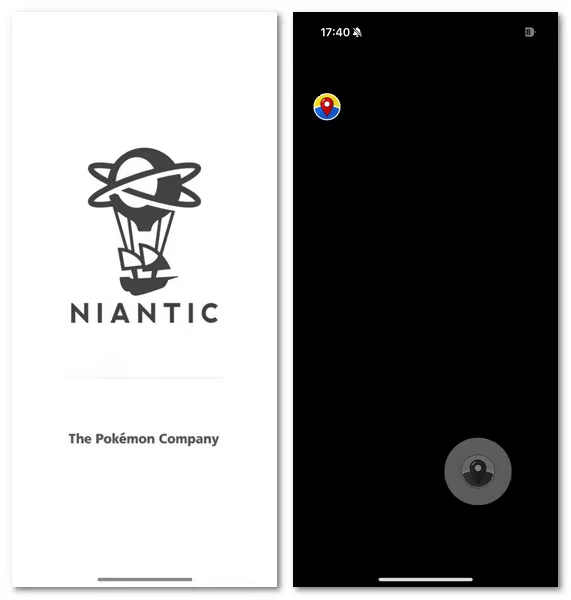
For other users, the crashing issue was not news. Even after being told to turn on Developer Mode, the reply was basically: it still crashes.
And here is the annoying part: the working status was mixed. Some said that the iSpoofer app was not working for them, not even on Android, while others claimed, loudly, that their iSpoofer worked perfectly. So I would not call the June Discord signal a clear “yes.” I would call it unstable.
The most useful detail matched an older issue I had seen before: GPS signal not found. One Discord user said they used to spoof by plugging the phone into a MacBook and teleporting from the laptop, but that method had been patched, and every time they tried it, they got the GPS signal error. That lines up with why iSpoofer feels unreliable now: even when installation is possible, the actual location workflow can still break.
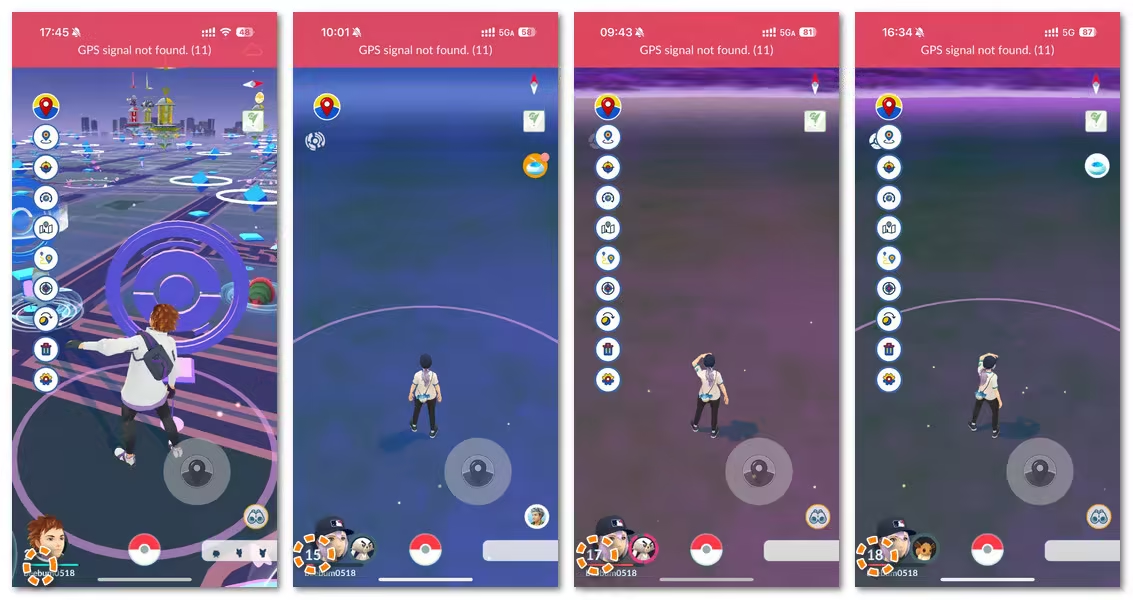
My takeaway from the Discord thread is simple: iSpoofer may work for a small number of people with the right setup, but the average experience looks shaky. If I were testing it today, I would expect crash troubleshooting, Developer Mode confusion, and “is it working for anyone?” messages before I expected a smooth Pokémon GO session.
iSpoofer Download for iOS & Android: 2026 Guide
1 How to Download iSpoofer iOS
Before you try anything here, a quick warning: these steps explain how iSpoofer installation usually works. They are not a recommendation to use it on your main Pokémon GO account.
There are two methods to install it on iOS devices: Direct Download and IPA Installation.
1. Direct download (No computer needed)
Step 1. Delete the official Pokémon GO app from your device.
Step 2. Go to iSpoofer's official site and tap Install > Direct Download.
Step 3. Follow any on-screen prompts (like watching an ad).
Step 4. After installation, go to Settings > General > VPN & Device Management, find the profile, and trust the app.
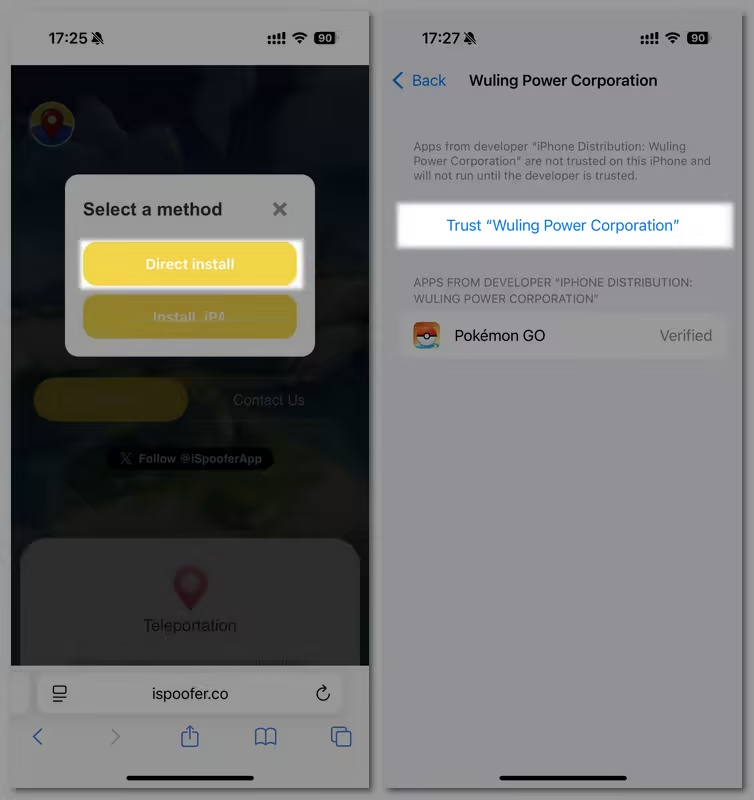
Step 5. Restart your device, install the profile when prompted, then launch the app. If it fails at login or asks for repeated profile trust steps, stop there instead of forcing it on your main account.
2. Install IPA
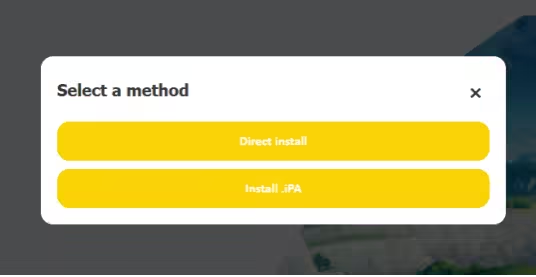
Step 1. Visit iSpoofer's official website, click Install > Install .IPA.
Step 2. Download Sideloadly, a free tool to install .iPA on your iOS device.
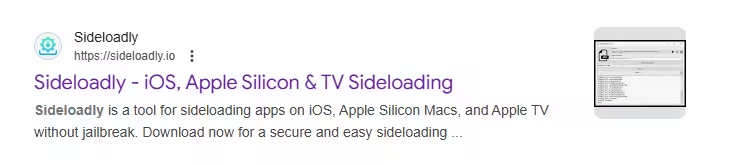
Step 3. Connect your phone to the computer and drag the iSpoofer IPA file to Sideloadly.
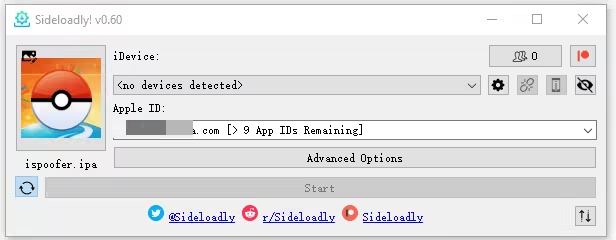
Step 4. When it's done, you'll find the iSpoofer Pokémon GO app on your phone's home screen. Trust the app in Settings > General > VPN & Device Management, and you're good to go.
2 How to Download iSpoofer Android
Unfortunately, iSpoofer doesn't support Android devices.
It's specifically designed for iOS users only. If you're on Android, consider using a reliable alternative like AnyTo, which supports both Android and iOS for safe and flexible location spoofing.
Best Apps Like iSpoofer for Pokémon GO
1 iPogo vs iSpoofer vs AnyTo: Which is the best
Here's a side-by-side comparison of iPogo, iSpoofer, and AnyTo to help you decide which tool fits your needs best:
| Feature | iSpoofer | AnyTo | iPogo |
|---|---|---|---|
| Risk Level | High | Lower | Medium-High |
| Easy Installation |  Complicated (PC + trust issues) Complicated (PC + trust issues) |
 Plug-and-play (via PC/Mac) Plug-and-play (via PC/Mac) |
⚠️ Moderate (Signulous/Sideloadly) |
| Needs Root/Jailbreak | No | No |
Best rooted/JB |
| Android & iOS Support | iOS only | Both platforms |
Both platforms |
| Auto Cooldown Calculator | No |
Yes |
Yes |
| Virtual GoPlus (Auto-Catch) | Yes |
Yes |
Yes (may glitch) |
| Long-Term Fit | Weak |
Strong |
Still risky |
 AnyTo
EXCLUSIVE 15% OFF
AnyTo
EXCLUSIVE 15% OFF
Ready for Your Next Pokémon GO Adventure? Save 15%
2 Best iSpoofer Alternative AnyTo
If you're looking for a smoother and more practical alternative to iSpoofer, AnyTo is worth a serious look.
Backed by a professional development team, AnyTo is constantly updated to stay compatible with the latest Pokémon GO versions. Its biggest advantage is simple: it changes your device location without asking you to replace the Pokémon GO app. That may reduce setup risk, but you still need to move realistically and avoid reckless teleporting.


AnyTo's Key Features
- Works on both iOS and Android (iOS 27 included). No need to jailbreak or root your phone.
- Lower-risk spoofing. Since it doesn't alter the Pokémon GO app directly, it helps avoid some setup risks tied to unofficial game apps.
- Realistic speed settings to adjust your movement speed to mimic real-life behavior.
- Auto cooldown calculator helps you follow spoofing cooldown rules and avoid soft bans.
- Joystick control & multi-point routes to simulate walking, cycling, or driving routes with full control.
- Instantly jump to any location on the map in just one click.
AnyTo's New Features
AnyTo's New Feature #1: PoKo Assistant lets you auto-raid, auto-join Rocket Battles, and modify every throw.

AnyTo's New Feature #2: AnyTo Plus is the newest upgrade in iMyFone’s AnyTo lineup for iPhone users. It works through Bluetooth pairing between an Android phone and your iPhone, letting you change your iPhone’s location directly without using a PC.

How to Change Location in Pokémon GO with AnyTo
Watch Video Guide

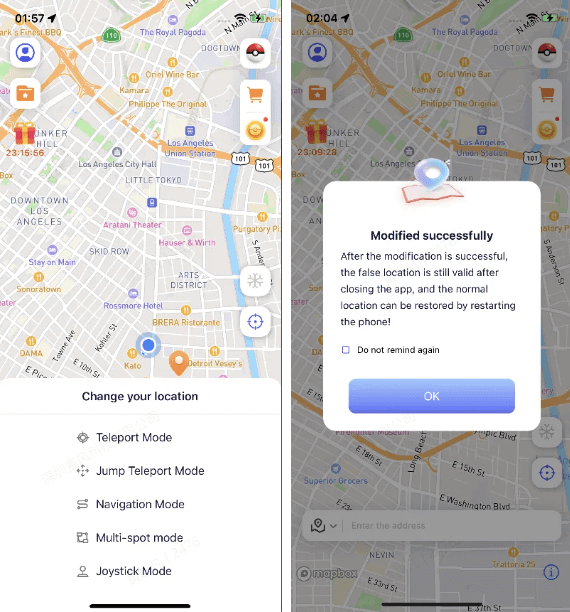
Step 1. Install AnyTo on your phone and follow the instructions to setup.
Step 2. Paste the coordinate or type in a location, choose a mode, and your location is changed immediately.
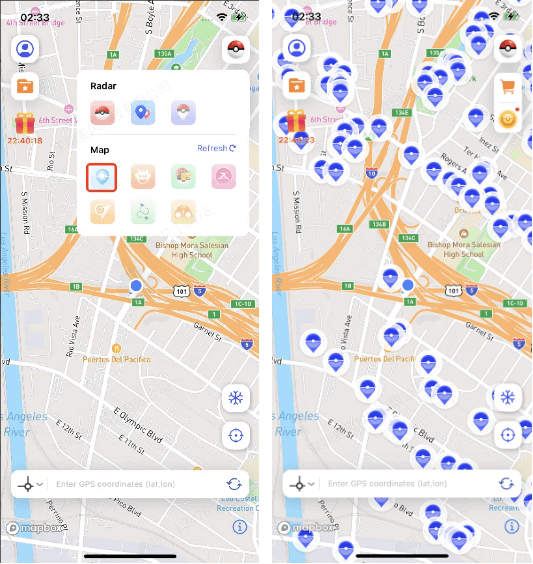
Step 3. Use the PoGo Search feature in the upper-right toolbar to find PokéStops or specific Pokémon nearby.
You can also control your in-game body from a PC via Bluetooth connection, a lower-risk setup than replacing the Pokémon GO app. For a more detailed handbook, see Users Guide of AnyTo PC Version. Here's a brief guide:
1-Click Change GPS Location with AnyTo!
Choose your platform and install (iOS, Android, PC).
Select a location mocking mode.
Spoof anywhere you like!


iSpoofer Pokémon GO FAQs
1. Does iSpoofer still work in 2026?
Not reliably. iSpoofer pages may still appear online, but our last test could not get past the login stage. If you see a working download, treat it carefully and do not test it with your main Pokémon GO account.
2. Is iSpoofer.app official?
iSpoofer.app is one of the sites people find when searching for iSpoofer, but a live site alone does not prove the app is safe, current, or reliable. Be careful with any profile, IPA, or download page that asks you to trust an unknown developer.
3. Is iSpoofer safe for Pokémon GO?
No, not for a main account. It is an unofficial spoofing app, and Pokémon GO can penalize spoofing behavior, unusual travel, or unsupported access methods. Cooldown timers reduce obvious mistakes, but they do not remove the risk.
4. Can I use iSpoofer on iOS?
iSpoofer is mainly known as an iOS spoofing app, usually installed through direct download, device profiles, or IPA sideloading. The tricky part is reliability: installation may succeed, but login or account safety can still be a problem.
5. Is there an iSpoofer Android app?
iSpoofer is best known for iOS, and the Android situation is messy enough that I would not recommend chasing random Android downloads. If you need Android support, use a clearer Android/iOS location changer instead.
6. Is AnyTo better than iSpoofer?
For most users, yes. AnyTo supports both iOS and Android, works without root or jailbreak, and avoids replacing the Pokémon GO app. It is still spoofing, so careful movement and account-risk awareness matter.
Conclusion
iSpoofer for Pokémon GO is not the clean answer it used to be. The name is still around, the sites still exist, and the feature list can still look tempting. But for Pokémon GO in 2026, the risk is the point.
If you only want to check what iSpoofer was or how iSpoofer iOS installation works, this guide gives you the context. If you actually want a lower-risk setup for spoofing, choose a tool that does not replace the Pokémon GO app. That is where AnyTo makes more sense.

 AnyTo Discord Server

Ryan Miles is a seasoned gamer and mobile strategy writer with over 5 years of hands-on experience in Pokémon GO spoofing and GPS-based games. Known for breaking down complex location tricks into beginner-friendly guides, Ryan’s mission is simple: help you explore more, catch faster, and play smarter without ever leaving home.
-
Hyper Training Guide: Best Pokémon for Silver Bottle Caps in Pokémon GO
How does Silver Bottle Cap work in Pokémon GO? Which Pokémon should you use the Silver Bottle Cap on? Check out this ultimate Hyper Training guide!
17 mins read -
Paldean Tauros Forms in Pokémon GO: Tips to Get Aqua, Blaze & Combat Breeds
Want to get all Paldean Tauros forms fast in Pokémon GO? Discover where to find Aqua, Blaze, and Combat forms and the best raid strategies for 2026.
16 mins read -
Best Remote Shadow Raid Tips for Pokémon GO (2026)
Want to master Remote Shadow Raids in Pokémon GO 2026? Discover pro tips, best Pokémon picks, and smart ways to save your raid passes!
20 mins read -
Pokémon GO Forever Friends & Remote Trades: What You Need to Know
Find out how Forever Friends and Remote Trades work in Pokemon GO, how to become Forever Friends, and how this new feature affects everyone.
28 mins read -
How to Spoof Pokémon GO Fest 2026: Tokyo, Chicago & Copenhagen
Is GO Fest 2026 worth it for spoofers? Learn how to spoof safely, explore top coordinates, and get spoofing tips for Tokyo, Chicago, and Copenhagen!
9 mins read -
Is AnyTo Safe for Pokémon GO & GO Fest? Full Guide
Is AnyTo safe for Pokémon GO? Can you use it for GO Fest? This guide has the answers and tips on how to get the most out of the event.
8 mins read
Was this page helpful?
Thanks for your rating
Rated successfully!
You have already rated this article, please do not repeat scoring!