
 Catch Pokémon
 Top-Views
 New-Updates


Why stop at just an auto catcher when AnyTo offers even more? With its built-in virtual GO Plus and auto walk feature, you can catch 'em all without even looking at your phone. iOS 27 supported!
Which Pokémon GO auto catcher is worth choosing in 2026? Start with the balls you want to use, the number of phones you play on, and how much setup you can live with. Hardware suits daily walks; an app paired with a Pokémon GO auto walker gives you more control over where you catch.
This guide compares eight physical devices and other auto-catcher apps. First, check the game's own Explorer Gadget: it may already cover the everyday catching you need.

Key Takeaways
- No Extra Device: Explorer Gadget offers built-in auto-catching from level 20, with daily limits and phased availability.
- Official Hardware: Pokémon GO Plus+ auto-catches with regular Poké Balls; Great and Ultra Balls need a button press.
- Two-Phone Play: DuoMon 3 and Brook LIGHT support two phones. DuoMon3 Pro adds a charging pad and protective pouch; Lite leaves them out.
- Apps and Auto-Walking: AnyTo combines virtual catching, Great/Ultra Ball support, and route control. iPogo, PGSharp, and SpooferPro offer alternatives; PGTools needs rooted Android.
Quick Navigation

What Is a Pokémon GO Auto Catcher?
A Pokémon GO auto catcher is a device or app that helps you automatically catch Pokémon and spin PokéStops without constantly staring at your phone.
The Early Days: Pokémon GO Plus & Poké Ball Plus
The original Pokémon GO Plus and Poké Ball Plus let you play with your phone in your pocket, but catching requires a button press. Poké Ball Plus can also auto-spin stops when a Pokémon from Let's Go is inside it.
The Game-Changer: Pokémon GO Plus+
Pokémon GO Plus+ adds automatic catching with regular Poké Balls and automatic PokéStop spinning. Great and Ultra Balls are available through button throws.

Can Pokémon GO Auto Catch Without a Device?
Yes, with Explorer Gadget. This built-in feature attempts to catch nearby Pokémon and spin PokéStops while you walk with the game in the background. You need Trainer level 20 or higher and access to the phased rollout. Find it in your Item Bag under Key Items, then tap Use.
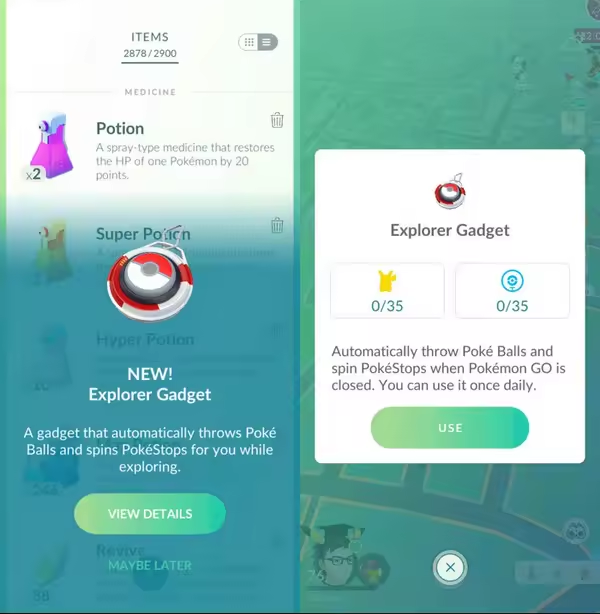
However, the limitations are clear:
- It uses regular Poké Balls only.
- It has daily catch and spin limits based on Trainer level.
- It skips Pokémon you haven't registered.
For casual walks, try this first; for dual-phone play or more control, compare the options below. See the Explorer Gadget details.
Best Pokémon GO Auto Catchers in 2026: 8 Devices Compared
Third-party auto catchers are more flexible.
A wristband, a dual-phone catcher, or an official accessory? The table below makes those trade-offs easier to compare. For more encounters along the way, choose from these Pokémon GO locations with plenty of stops and spawns.
| Device | Auto-Catch | Auto-Spin | Ball Support | Phones | Power | Price & Availability |
|---|---|---|---|---|---|---|
| Pokémon GO Plus+ |  |
|
Poké Balls; Great/Ultra by button | 1 | USB-C | $59.99 Best Buy; sold out |
| Go-tcha Evolve | |
|
Poké Balls | 1 | Built-in USB | £34.99 GBP Codejunkies |
| DuoMon 3 | |
|
Poké Balls | 2 | USB-C / wireless | Lite: $84 Pro: $94 MEGACOM |
| PhotoFast 247 Dual Catcher | |
|
Poké Balls | 2 | USB power | $77.14 PhotoFast; sold out |
| Pocket Auto Catch ND | |
|
Poké Balls | 1 | 2 AAA batteries | $44.99 sale Brook store |
| Poké Ball Plus | Button press | With a Pokémon inside | Poké Balls | 1 | USB-C | $39.99 used DKOldies; sold out |
| MEGACOM Flymon | |
|
Check current setup | iOS setup | USB rechargeable | $89 MEGACOM |
| Brook Auto Catch LIGHT | |
|
Poké Balls | 2 | USB-C | $79 Brook store |

Note
A connected accessory and Explorer Gadget cannot run at the same time.
1 Pokémon GO Plus+: The Official Auto Catcher
The Official Option with Major Upgrades
Pokémon GO Plus+ is the straightforward choice if you want an official accessory for automatic catching and spinning. Charge it by USB-C, pair it with Pokémon GO, and turn on the catching and spinning settings you want.
For hands-free catches, it uses regular Poké Balls. To use Great or Ultra Balls, choose the ball in the accessory settings and press the device's main button for each throw. When you spot one of the rarest Pokémon in Pokémon GO, switching to a manual encounter gives you control over berries and throws.
It also comes with exclusive perks, like encounters with Nightcap Snorlax and special research tasks available only to Pokémon GO Plus+ users.

Pros

- Officially supported by Niantic.
- Auto catch and auto spin supported.
- Great and Ultra Balls available for button throws.
- USB-C charging.
- Compact and easy to carry.
Cons

- Only one account supported at a time.
- Great and Ultra Balls need a physical button press.
- Requires a separate accessory purchase.
2 Go-tcha Evolve
Hands-free catching in a wristband.
The Datel Go-tcha Evolve suits players who would rather wear their auto catcher than keep another gadget in a pocket. Its color screen shows catching and spinning status at a glance.
Unlike earlier official options, it allows fully automatic catching and PokéStop spinning—no button pressing required. Plus, its full-color display adds both flair and function.

Pros
- True auto-catcher experience—completely hands-free.
- Stylish and discreet enough for everyday wear.
- No app alert sounds or vibrations if you want a silent session.
- Rechargeable and portable with integrated USB plug.
Cons
- Bluetooth sessions may need reconnecting.
- Interface can be tricky to navigate for first-timers.
- Keep its firmware updated through the Go-tcha Evolve app.
Go-tcha Series Compared
| Model | Display | Wearing Style | Charging Method | Extra Features |
|---|---|---|---|---|
| Go-tcha Classic (color-screen model) | Color touchscreen | Wristband | Magnetic USB cable | Battery indicator and vibration alerts |
| Go-tcha Clip | Color touchscreen | Clip-on case | Magnetic USB cable | Clips to clothing or a bag |
| Go-tcha Evolve | Color screen | Wristband | Built-in USB connector | Step counter; clock availability varies by region |
| Go-tcha Ranger | OLED touchscreen | Belt, bag, or keyring clip | Built-in USB charging cable | Phone power bank, compass, and LED torch |
The Evolve has a built-in USB connector under the buckle end of its strap. Remove that end carefully and check for the charging animation when you plug it in. The connector can enter a USB port either way, but charges only in the correct orientation.
3 DuoMon 3
Dual-phone catching with rechargeable power.
MEGACOM DuoMon 3 is a compact choice for two-phone play. It catches Pokémon and spins stops on two connected accounts, with adjustable voice, vibration, and light alerts.
One of its standout features is dual-device support, meaning you can connect and auto-catch on two accounts at once—perfect for tag-team trainers.

Pros
- Best for multitaskers using two phones/accounts.
- Reconnect through the in-game accessory icon.
- Fully silent experience available.
- Wireless and USB-C charging.
- Easy to pocket and forget about.
Cons
- Can only use red Poké Balls.
- Requires both devices to stay near each other—otherwise, it disconnects.
- Regular Poké Balls only; keep both phones stocked.
- Occasionally talks too much (voice alerts), but you can disable this.
DuoMon Series Compared
| Model | Ball Types | Phones | Power / Charging | What You Get |
|---|---|---|---|---|
| DuoMon | Regular Poké Balls | 1–2 | 2 AAA batteries | Compact body; voice, light, and vibration alerts |
| DuoMon Egg | Regular Poké Balls | 1–2 | 2 AAA batteries | Same catching functions as DuoMon in an egg-shaped body |
| DuoMon 3 | Regular Poké Balls | 1–2 | USB-C and wireless | Rechargeable battery; app-controlled alerts; can run while charging |
| DuoMon3 Lite | Regular Poké Balls | 1–2 | USB-C and wireless | DuoMon 3 catcher with USB-C cable; charging pad and pouch excluded |
| DuoMon3 Pro | Regular Poké Balls | 1–2 | USB-C and wireless | DuoMon 3 catcher plus magnetic charging pad and protective pouch |
Choose by charging setup. DuoMon3 Lite and Pro have the same core catching features, dual-phone support, and charging options. Lite is $84; Pro is $94 and adds the magnetic charging pad and protective pouch. Go with Lite if USB-C is enough, or spend the extra $10 for the Pro bundle. Moving from an AAA-powered DuoMon to DuoMon 3 brings rechargeable power and app-based alert controls.
4 PhotoFast 247 Dual Catcher
Dual-phone catching with battle-tap controls.
PhotoFast 247 Dual Catcher combines two-phone catching with an auto-tap setup for battles. It suits a desk setup better than a simple pocket-and-go session. The official store currently lists it as sold out, so check local availability before choosing it.
Like the DuoMon 3, this automatic Pokémon catcher allows two-device connection, making it ideal for players managing multiple accounts.
Its auto-tap battle support can help with repeated taps in Raids and Gym battles. The full setup needs cables and an awake phone screen, so factor in a power source for longer sessions.

Pros
- Perfect for heavy-duty players who farm all day or multitask.
- Automatic catching and PokéStop spinning.
- Unique auto-tap feature gives you help in raids and gyms.
- Dual-device support increases catching potential.
- USB-powered setup for longer sessions.
- 247 mode uses a screen-on setup for reconnection.
Cons
- No display or app customization.
- Requires physical cables for full functionality.
- Only uses red balls, so rarer catches may flee more often.
- Needs your phone screen always on in “247” mode—can drain battery fast.
5 Pocket Auto Catch ND
Single-phone catching with extra battle controls.
The Brook Pocket Auto Catch ND is a single-phone catcher with extra controls for reconnecting and battle taps. It runs on two AAA batteries, making spare batteries more useful than a charging cable.
SmartConnect handles reconnection, while HyperTap and TapSwitch help with repeated battle inputs. Keep the game in the foreground and the screen on for SmartConnect and QuickConnect. That extra setup makes ND a better fit for players who want battle controls as well as catching.

Pros
- Long battery life if you're okay with AAA batteries.
- Advanced auto-tap support makes it great for semi-auto raid battles.
- Supports auto spin and auto catch without constant intervention.
- SmartConnect assists with reconnecting while the game stays open.
- Good for experienced users who want full control.
Cons
- No Great or Ultra Ball support—catch rate suffers for rare spawns.
- Setup process is tedious, especially for casual users.
- Not rechargeable, which is inconvenient by modern standards.
- Clunky UI and multi-button inputs can feel unintuitive.
- Supports one phone, not two simultaneous connections.
6 Poké Ball Plus
Worth reusing if you already own one.
The Poké Ball Plus was released alongside Pokémon: Let's Go, Pikachu/Eevee! and remains one of the most stylish Pokémon GO accessories to date.
It uses button-based catching with regular Poké Balls. Put a Pokémon from Let's Go inside it to enable automatic PokéStop spinning. If you already own one, that makes it handy for collecting items on a walk.

Pros
- High-quality build and nostalgic design.
- Very comfortable to grip.
- Official Pokémon accessory.
- Works as a controller for Pokémon: Let's Go, Pikachu! and Let's Go, Eevee!
- Phone can stay locked while you use the accessory.
Cons
- Every catch needs a button press.
- Only one account support.
- Doesn't support Great or Ultra Balls.
- Older hardware with occasional Bluetooth connection issues.
- Lacks screen, vibration settings, and other modern customization options.
7 MEGACOM Flymon
A handy all-in-one pick for iPhone catching and joystick walking.
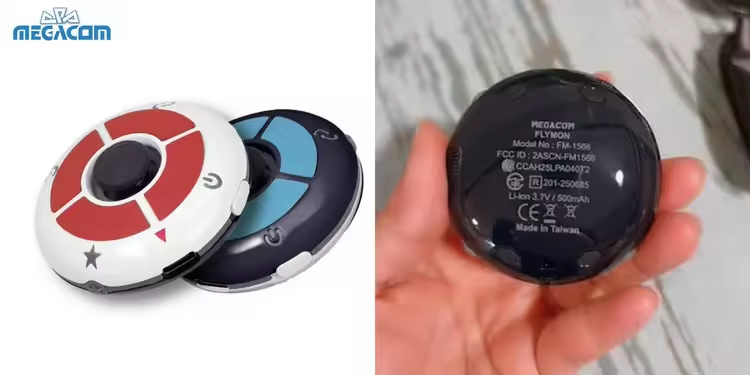
For iPhone players who also want movement control. Flymon combines automatic catching and spinning with joystick walking through its iOS app setup. The rechargeable Bluetooth device is listed at $89.
Pair Flymon in your iPhone's Bluetooth settings before opening the app. It adds hardware to carry, but puts catching and route control in the same setup.
Pros
- Automatic catching and PokéStop spinning keep routine item and Stardust collection hands-free.
- Joystick walking with adjustable speed gives you control over how you move around the map.
- Real Path Mode adds road-following routes, while the map-screen battery indicator helps you plan charging breaks.
- A compact, USB-rechargeable design saves you buying and carrying replacement batteries.
Cons
- GPS and joystick controls are iOS-only. No Android option.
- Setup involves Bluetooth pairing and companion apps; opening the app before pairing can prevent connection.
- Outdoor signal interference can disrupt location control; indoor use is the better fit.
- At $89, it is a pricey choice if you only need basic catching and spinning.
8 Brook Auto Catch LIGHT
A pocket-friendly pick for catching on two phones without spare batteries.
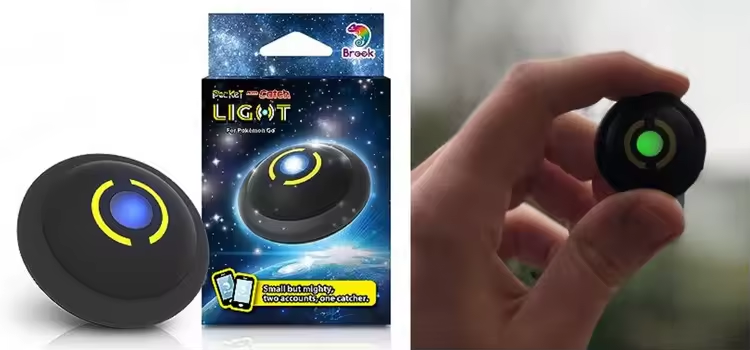
A rechargeable choice for two phones. Brook Auto Catch LIGHT handles automatic catching and item collection on two connected accounts. At 32 × 32 mm and 10 g, it takes up little pocket space, and USB-C charging keeps spare AAA batteries off your packing list.
Choose LIGHT for dual-phone catching; choose ND if you want Brook's battle-tap controls.
Pros
- Connects two phones at once.
- At just 10 g and 32 × 32 mm, it fits easily on a keychain or in a pocket.
- Pairing and checking each connection is straightforward.
- Pocket Center provides settings and firmware updates, plus disconnect alerts and automatic Bluetooth pairing on Android.
Cons
- Only uses regular Poké Balls.
- Automatic reconnection requires a Pocket Center subscription and is currently Android-only.
- Status is shown through light patterns rather than a screen; some colors cover more than one condition.
- The supplied USB-C cable is device-specific and cannot charge your phone or other accessories.
Top 5 Pokémon GO Auto Catcher Apps (No Device)
A virtual catcher saves you carrying another gadget. Compare AnyTo and the other apps below by platform, catching features, and setup.
| App | Platform | Auto-Catch Feature |
|---|---|---|
| AnyTo | iOS / Android | Virtual GO Plus, Great/Ultra Balls, and auto-walk |
| iPogo | iOS / Android | Virtual GoPlus: catch, spin, auto-reconnect |
| PGSharp | Android | Virtual Go Plus; regular Poké Balls |
| SpooferPro | iOS | Virtual GO Plus; paid catcher controls |
| PGTools PaC | Rooted Android | Automated catching and spinning |
1 AnyTo: Virtual Auto Catcher & Auto Walker
Not everyone wants to carry around a physical device or invest in multiple accessories just to boost their Pokémon GO performance. If you're looking for a digital, all-in-one solution that combines auto catching and auto walking, AnyTo is the app you'll want in your toolkit.

Unlike traditional physical catchers, AnyTo lets you automatically catch nearby Pokémon (Great Ball and Ultra Ball supported!) and collect items from PokéStops by linking with a virtual in-game accessory. That means you can explore, walk, and catch without lifting a finger.
Want to clear the "3 Excellent Throws in a row" challenge without the headache? AnyTo has a helpful assist. Turn on the enhanced throw feature and every toss lands exactly how you want it to, Nice, Great, or Excellent.


AnyTo's Key Features
- Works as a virtual auto catcher for Pokémon GO that supports Great Ball and Ultra Ball.
- Easily create realistic walking paths and auto walk to hatch eggs and earn buddy candy, perfect for those looking to move in Pokémon GO without walking.
- 1-Click teleport to any hotspot instantly to catch region-exclusive Pokemon and local Raids.
- On-Screen joystick for Pokémon GO for full manual control of your movement in-game, all from your keyboard or screen.
- Manage up to 10 accounts or phones from one place, perfect for players with a main and alt account.
- In-app PoGo atlas for nearby Pokemon, PokeStop, Raids, and Gyms.
AnyTo Pokémon GO Virtual Go Plus Video Guide

2 iPogo
iPogo combines location controls with a VIP Virtual GoPlus that catches, spins, and reconnects automatically. Pair it with a route and Release on Catch to keep unwanted catches from filling your storage.

A practical choice for existing VIP users. If the virtual catcher does not appear under connected devices, enable Bluetooth, restart iPogo, and pair it again. Once connected, it can catch and spin along your route.
3 PGSharp
PGSharp is an Android spoofer with a Virtual Go Plus for catching and spinning along your route. Keep regular Poké Balls and free storage available; the documented catcher uses red balls.
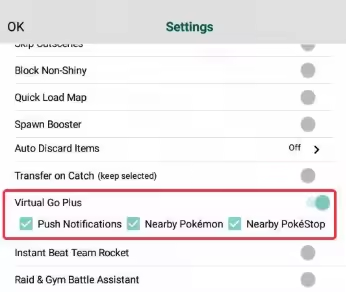
PGSharp's Virtual Go Plus sometimes stops catching or spinning. Keep it at a walking pace and check both the in-game accessory settings and PGSharp's VGP switches. It is convenient if you already use PGSharp, but longer sessions need occasional checks.
4 SpooferPro
SpooferPro is an iOS tool with location controls, routes, and Virtual GO Plus in its free plan. Its paid catcher tools add more control over what you catch, while background features sit in higher tiers.
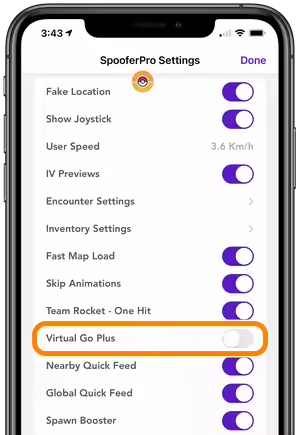
Start with the free Virtual GO Plus. It covers basic catching and spinning, while paid catcher controls suit more selective sessions. Try the free setup before paying for extras. Installation uses sideloading or a jailbreak tweak.
5 PGTools PaC
PGTools PaC is an automation option for rooted Android phones. It handles repeated catching and spinning and can be paired with a route for longer sessions.
Better suited to an existing rooted setup. The free PaC catcher works at a slower pace, so expect fewer encounters over the same session than with its faster paid modes. It makes more sense on a phone you have already rooted than as a quick install-and-play option.
Tips for Using an Automatic Pokémon Catcher More Effectively
A little preparation saves you coming back to an idle catcher. Check these before a longer session:
- Stock the right balls. Most hardware and virtual GO Plus catchers use regular Poké Balls. Great and Ultra Balls in your bag do not replace them automatically.
- Clear both storage limits. Free Pokémon Storage for catches and Item Bag space for spins, then check the catch and spin toggles.
- Keep your device charged. Some Pokémon auto catchers require your phone screen to be on the whole time to stay connected. Make sure your device or gadget is fully charged or carry spare batteries to avoid disconnection.
- Use auto catchers in high-density areas. Maximize your catch rate by using your auto catcher in places with lots of PokéStops and spawn points, like parks or popular city spots. This ensures you get the most spins and encounters without wasting battery life.
- Combine with an auto walker or spoofing app. Pair your auto catcher with apps like AnyTo to simulate walking routes or teleport between coordinates. This can help you reach rare Pokémon or participate in events remotely while your auto catcher does the work.
Pokémon GO Auto Catcher FAQs
Does an auto catcher work with Pokémon GO spoofer apps?
Some setups support both. A Bluetooth catcher handles catches and spins, while a GPS-changing app controls location. Check compatibility with your particular app: a built-in virtual catcher and a physical accessory may not connect in the same way.
Are auto catchers allowed in Pokémon GO?
Official accessories and Explorer Gadget are supported ways to catch and spin. Go-tcha, DuoMon, and other third-party hardware are unofficial accessories. Software that spoofs location or automates play also falls under Pokémon GO's rules against cheating.
Can you get banned for using a Pokémon GO catcher?
Using an official accessory as intended is a supported feature. Spoofing and unauthorized automation can lead to account penalties, whether or not a catcher is connected. Following a cooldown timer does not make those activities approved.
Do auto catchers spin PokéStops?
Yes. Pokémon GO Plus+, Go-tcha Evolve, DuoMon 3, and AnyTo's virtual catcher support automatic PokéStop spinning. Enable spinning and keep room in your Item Bag. Poké Ball Plus needs a Pokémon inside it for automatic spinning.
Does Pokémon GO Plus auto catch, or do I need Plus+?
The original Pokémon GO Plus needs a button press for each catch. Pokémon GO Plus+ can automatically throw regular Poké Balls. Great and Ultra Balls still require a button press on Plus+.
Why isn't my auto catcher catching nearby Pokémon?
Check the connection, catching toggle, regular Poké Ball supply, and Pokémon Storage first. For spinning, check Item Bag space too. Reconnect if the session has ended, and slow down if you are moving quickly. When using Explorer Gadget, also check its daily limit and disconnect any active accessory.
Conclusion
The best Pokémon GO auto catcher depends on how you play. Try Explorer Gadget for everyday walks if it is available on your account. Choose GO Plus+ for an official accessory, DuoMon 3 or Brook LIGHT for two phones, and Go-tcha Evolve for a wristband. For virtual catching paired with route planning and movement control, AnyTo keeps those tools together. Use the video guide above to see the setup before getting started.

 AnyTo Discord Server


Ryan Miles is a seasoned gamer and mobile strategy writer with over 5 years of hands-on experience in Pokémon GO spoofing and GPS-based games. Known for breaking down complex location tricks into beginner-friendly guides, Ryan’s mission is simple: help you explore more, catch faster, and play smarter without ever leaving home.
-
Hyper Training Guide: Best Pokémon for Silver Bottle Caps in Pokémon GO
How does Silver Bottle Cap work in Pokémon GO? Which Pokémon should you use the Silver Bottle Cap on? Check out this ultimate Hyper Training guide!
17 mins read -
Paldean Tauros Forms in Pokémon GO: Tips to Get Aqua, Blaze & Combat Breeds
Want to get all Paldean Tauros forms fast in Pokémon GO? Discover where to find Aqua, Blaze, and Combat forms and the best raid strategies for 2026.
16 mins read -
Best Remote Shadow Raid Tips for Pokémon GO (2026)
Want to master Remote Shadow Raids in Pokémon GO 2026? Discover pro tips, best Pokémon picks, and smart ways to save your raid passes!
20 mins read -
Pokémon GO Forever Friends & Remote Trades: What You Need to Know
Find out how Forever Friends and Remote Trades work in Pokemon GO, how to become Forever Friends, and how this new feature affects everyone.
28 mins read -
How to Spoof Pokémon GO Fest 2026: Tokyo, Chicago & Copenhagen
Is GO Fest 2026 worth it for spoofers? Learn how to spoof safely, explore top coordinates, and get spoofing tips for Tokyo, Chicago, and Copenhagen!
9 mins read -
Is AnyTo Safe for Pokémon GO & GO Fest? Full Guide
Is AnyTo safe for Pokémon GO? Can you use it for GO Fest? This guide has the answers and tips on how to get the most out of the event.
8 mins read
Was this page helpful?
Thanks for your rating
Rated successfully!
You have already rated this article, please do not repeat scoring!