
 Top-Views
 New-Updates


 Safer iPoGo Alternative AnyTo
Looking for less risky Pokémon GO mods like iPoGo? AnyTo offers safer location spoofing with Bluetooth connection and anti-detection mechanism.
iPoGo is a controversial mod that's been around for nearly a decade.
So, what's the real deal in 2026? In this guide, I'll break down everything you need to know about iPoGo and Pokémon GO: its latest features for the game, how to download it on Android and iOS, how to use it safely, and whether it's worth the hype or the risk.

Quick answer
iPoGo is still available for Android and iOS, but it is not an official Pokémon GO app. Android users usually install an iPoGo APK, while iOS users rely on Signulous, Sideloadly, or jailbreak methods. It can work, but it is not risk-free because spoofing and modified clients can still trigger Pokémon GO account penalties.
Quick Navigation
- What Is iPoGo?
- Does iPoGo Still Work?
- Key Features of iPoGo (VIP & Free Comparison)
- How to Download iPoGo App on Android & iOS
- Is iPoGo Safe in 2026? User Reviews, Pros & Cons
- How to Reduce Ban Risk If You Use iPoGo
- iPoGo vs AnyTo vs PGSharp – Comparison
- Safer iPoGo Alternative in 2026: Try AnyTo

- FAQs About iPoGo Pokémon GO
- Conclusion
What Is iPoGo?
iPoGo is a well-known Pokémon GO spoofing app, offering a suite of advanced features like teleportation, auto walking, shiny scanning, auto catch, and more.
It's available for both iOS and Android, with versions for jailbroken, non-jailbroken, rooted, and unrooted devices. However, iPoGo is not an official Pokémon GO app, and it is not installed through the normal App Store or Google Play flow.
Does iPoGo Still Work?
Yes, but it depends.
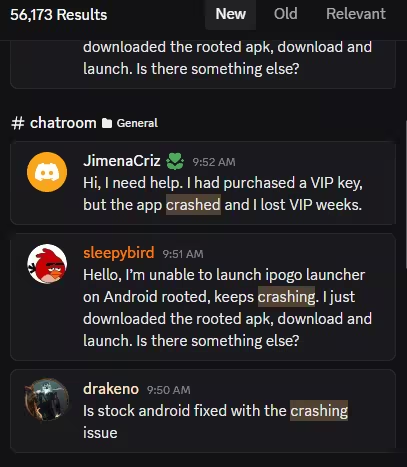
Following recent Pokémon GO updates, many users—especially on unrooted Android—have reported bugs, crashes, or complete service outages.
It took the dev team weeks to catch up, yet some users still experienced crashes immediately after launching the game.
Key Features of iPoGo (VIP&Free Comparison)
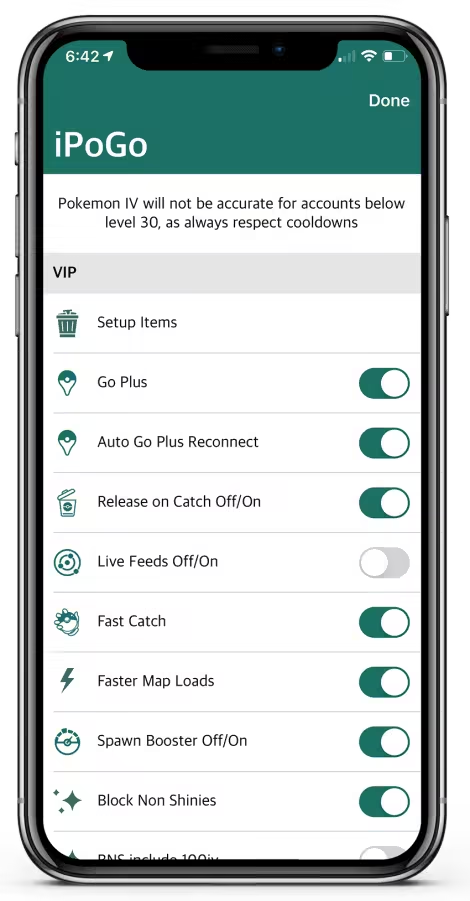
iPoGo offers both free and VIP versions. While the VIP tier unlocks advanced perks, the free version still packs plenty of powerful features.
Here's a comparison between the free and VIP versions to help you decide which fits your needs best.
| Free Features | VIP Features |
|---|---|
| $0.00 | $4.99 |
| Teleport, joystick, & auto walk | All free features included |
| Nest/Pokemon/Pokestop/Raid feeds | Auto Catch / Spin (Virtual GoPlus) |
| Enhanced throw (always Excellent) | Release on Catch |
| Autowalk random or specific routes | One Click Bag Cleaner |
| Freeze Pokemon | Block Non Shiny |
| Preview the IV of a pokemon before catching | Block non 100iv encounters |
| Keep track of your cooldown | Auto transfer pokemon ability |
| Win all TeamGO Rocket battles and Training battles | |
| Spawn Booster + Radius Booster |
Here's a quick look at some of its highlights:
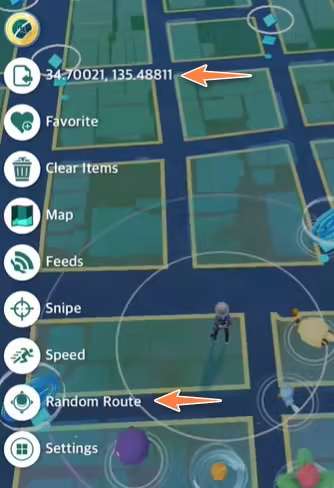
1 Teleport, Joystick, & Auto Walk in Pokémon GO
These are the core features that make iPoGo popular among spoofers:
- Teleport: Jump to any location worldwide instantly. Perfect for raid-hopping or rare spawns.
- Joystick: Allows smooth, manual movement without physically walking.
- Auto Walk: Set routes and let your avatar walk on autopilot to hatch eggs or collect PokéStops over time.
iPoGo Best Speed
The ideal speed for hatching eggs in iPoGo is under 9.3 km/h. Staying below this limit helps you avoid triggering suspicious movement flags.
2 iPoGo Shiny Scanner
One of the most hyped features available on the free plan, the Shiny Scanner automatically alerts you if a shiny Pokémon is nearby while walking, teleporting, or farming.

3 Freeze Pokemon
This feature freezes the Pokémon during the encounter screen, so you can land your throws without the usual dodging or jumping.

4 Virtual Go Plus Auto Catcher
This feature allows you to automatically catch Pokémon and spin PokéStops without tapping anything, just like a real Go Plus device, but built into the app.
However, users have reported that the Virtual GoPlus (VGP) feature has been broken for months, especially on Android devices running Android 14 and above.

5 Block Non-Shiny
The Shiny Scanner will automatically skip all encounters that aren't shiny.
This is a VIP-exclusive feature and a favorite among hardcore collectors who only want those rare sparkles.
How to Download iPoGo App on Android & iOS
1 iPoGo Android Download
There are two versions of iPoGo available for Android users, depending on whether your device is rooted or not.
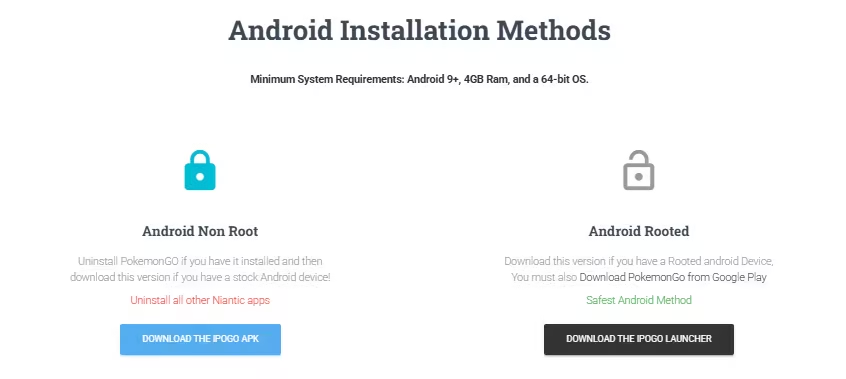
1. Android Non Root
Uninstall Pokémon GO if you have it installed, then download the stock iPoGo APK from the official iPoGo website. This method is simple, but it replaces the normal Pokémon GO app with a modified client, so account risk is still part of the deal.
2. Android Rooted
Download this version if you have a rooted Android device. You must also download Pokémon GO from Google Play. Compared with the stock APK method, rooted setups are often treated as the lower-risk iPoGo Android route, but they still do not guarantee safety. Here's how:
Step 1. Download the latest rooted iPoGo APK and its custom launcher from https://ipogo.app/install.php
Step 2. Enable installation from unknown sources: Go to Settings → Apps → Special app access → Install unknown apps
Step 3. Install the iPoGo launcher APK
Step 4. Configure Magisk DenyList to hide root from Pokémon GO and Google Play Services: Open Magisk app → Settings → Enable Zygisk and Enforce DenyList (if not already enabled) → Tap Configure DenyList → Add Pokémon GO, Google Play Services, and Google Play Store.
Step 5. Reboot your device to apply changes.
Step 6. Launch the rooted iPoGo and open Pokémon GO. You're now set to spoof with added stability and reduced setup risk.
2 iPoGo iOS Download
There are three main ways to install iPoGo iOS, depending on your setup and whether your device is jailbroken or not:
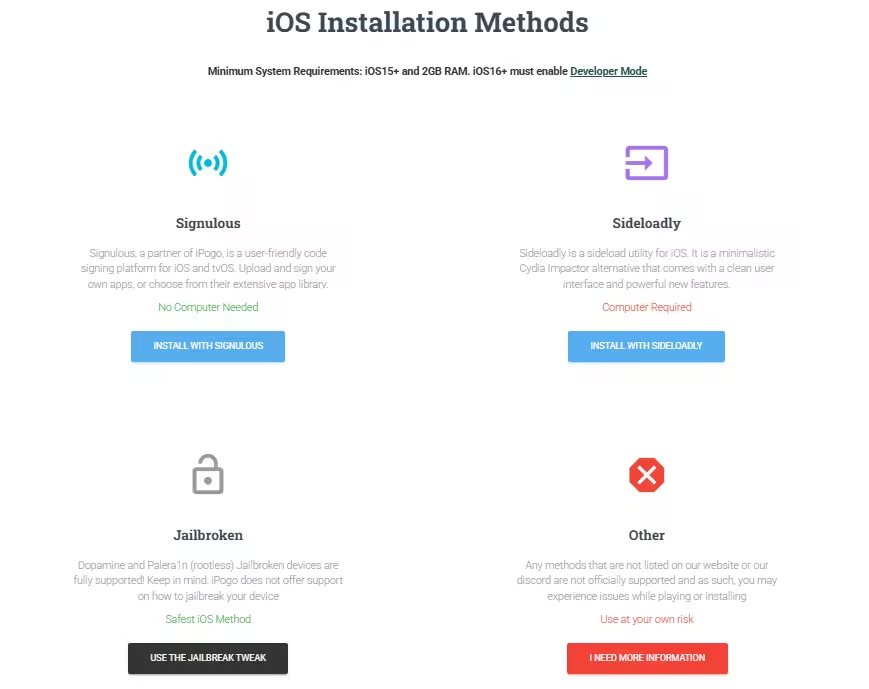
1. Signulous (No Computer, Paid)
Go to the Signulous website → Upload your UDID and subscribe → Choose iPoGo from their app list → Install it directly to your iPhone. This is convenient, but it is still a third-party signing method.
2. Sideloadly (With Computer, Free)
Install Sideloadly on your PC/Mac → Download the iPoGo IPA from the official website → Connect your iPhone → Use your Apple ID to sideload the app. With this route, you may need to reinstall the app regularly.
3. Jailbroken
Add iPoGo's repo and install the tweak → Install Ellekit (for Dopamine jailbreak only) → Launch the game — iPoGo will be active. Jailbreak methods are more technical, so only use official iPoGo install channels and support notes.
Is iPoGo Safe in 2026? User Reviews, Pros&Cons
No, iPoGo is not completely safe for Pokémon GO. It may work, but it still belongs to the risky side of spoofing because it uses modified app or injection-based methods instead of the standard Pokémon GO app experience.
Whether you're using iPoGo, PokeGo++, or iSpoofer, there's always some risk. Pokémon GO can penalize GPS spoofing, unauthorized clients, and third-party tools. Still, many players continue to use it, carefully balancing fun with caution. Here's what real users are saying:

How to Reduce Ban Risk If You Use iPoGo
No matter how careful you are, using iPoGo to spoof in Pokémon GO always carries risk.
Still, based on the experiences shared by seasoned users on Reddit, there are smart ways to lower that risk—especially if you're determined to spoof.
Here are the most useful tips from the community:
- Avoid Modded Apps on Stock Devices
- Don't Use Your Main Account
- Respect Cooldown Time (But Don't Rely on It Alone)
- Limit Multi-Location Hopping
- Skip Sideloading If You Can
- Check Official Status Before Updating
- Understand That Luck Plays a Role
The overwhelming consensus: logging in with a modded app (like iPoGo or PGSharp) on non-jailbroken iOS or non-rooted Android is the riskiest option.
If you want to test iPoGo, use an account you can afford to lose. A main account with rare Pokémon, paid tickets, or long-term progress is not worth the extra risk.
Cooldown timers are useful for mimicking real-world movement, but they don't protect you if you're using a detectable app.
Jumping between continents in the same day (e.g. Tokyo → NYC → Paris) is a common cause of detection.
iOS users relying on Sideloadly or Signulous (non-jailbroken) are more likely to get hit. The app itself is easier to track.
Forced Pokémon GO updates can break iPoGo for a while. Before you reinstall or update, check iPoGo's official support channels first.
Even if you follow every tip above, some users get banned within weeks—others spoof for years without issues.
iPoGo vs AnyTo vs PGSharp – Comparison
If you're deciding between iPoGo, PGSharp, and AnyTo to enhance your Pokémon GO experience in 2026, here's what really matters: safety, reliability, and ease of use. Let's break it down:
| Feature | iPoGo | AnyTo | PGSharp |
|---|---|---|---|
| App type | Modded app / tweak | Location changer | Modded app |
| Platform | Android & iOS | Android & iOS | Android only |
| Root / jailbreak | Optional |  |
|
| Setup | Medium | Easy | Easy |
| Risk note | Higher | Lower-risk | Higher |
| Best for | Advanced users | 👍 Safer spoofing | Android only |
Safer iPoGo Alternative in 2026: Try AnyTo
While all three tools offer teleportation and joystick features, AnyTo stands out as a lower-risk choice for spoofing Pokémon GO in 2026.
Unlike modded clients like iPoGo and PGSharp that often get flagged during ban waves, AnyTo doesn't modify the Pokémon GO app.
Instead, it changes device location through its own workflow and supports Bluetooth control. This may significantly reduce detection risk as long as you follow the setup guide step by step.


What AnyTo Offers
- No root / no jailbreak Required. Works on both iOS 27 and Android 17 without any system modification.
- Smart cooldown timer (built-in) automatically calculates your cooldown based on teleport distance.
- Auto-walker with natural speed simulation and create realistic movement paths with pauses and speed variation.
- Auto raid, auto Rocket Battle & auto catch without constantly tapping on the screen.
- Interactive maps for spawns, PokéStops, Gyms, raids, routes, and quests.
- Built-in IV checker to calculate exact IVs and Pokémon scanner to find Hundo.
- Control up to 10 devices simultaneously with multi-device support.
AnyTo's New Features


How to Change Location with AnyTo
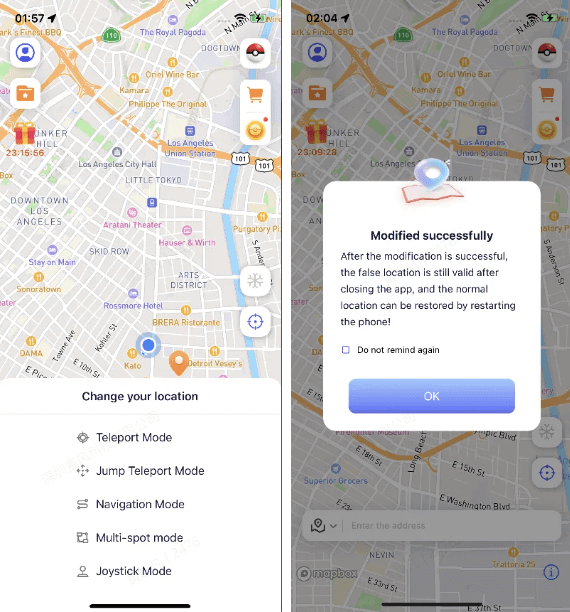
Step 1. Install AnyTo on your phone and follow the instructions to setup.
Step 2. Paste the coordinate, type in a location, or pick a spot on the map, and then choose a mode. Your location will be changed immediately.
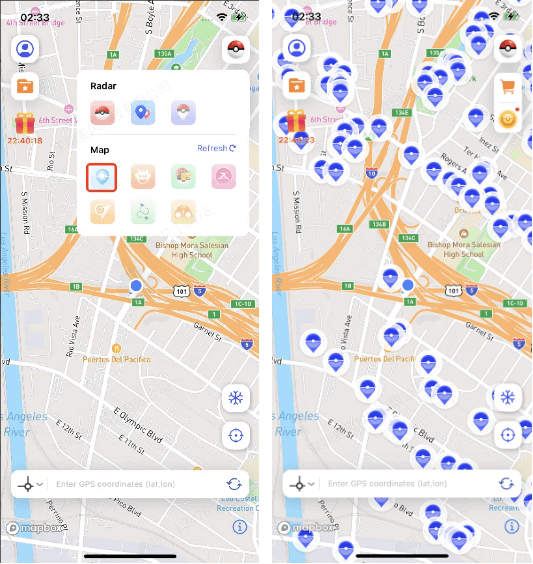
Step 3. Use the PoGo Search feature in the upper-right toolbar to find PokéStops or specific Pokémon nearby.
You can also control your in-game body from a PC via Bluetooth connection. For a more detailed handbook, see Users Guide of AnyTo PC Version. Here's a brief guide:
1-Click Change GPS Location with AnyTo!
Choose your platform and install (iOS, Android, PC).
Select a location mocking mode.
Spoof anywhere you like!


FAQs About iPoGo Pokémon GO
1. Is iPoGo safe for Pokémon GO?
No, iPoGo is not completely safe. It can work, but it still uses unofficial spoofing methods, so your account may face warnings, suspension, or bans.
2. Is iPoGo a virus?
No, iPoGo itself is not usually described as a virus, but it is a modified app that is not officially verified by Apple, Google, or Niantic. Always avoid random mirrors and only check official iPoGo channels if you decide to download it.
3. Is iPoGo down?
Not necessarily. iPoGo may still be available, but it often needs time to catch up when Pokémon GO pushes forced updates. For the latest status, check iPoGo's Discord server or official support channels.
4. What is the iPoGo APK?
The iPoGo APK is the Android install file for iPoGo. Stock Android users usually need to uninstall Pokémon GO before installing it, while rooted Android users follow a different launcher-based setup.
5. Can I use iPoGo on iOS?
Yes, iPoGo iOS can be installed through methods like Signulous, Sideloadly, or jailbreak tweaks. These methods are more involved than normal App Store installation and may carry account or device risks.
6. Can you have iPoGo and Pokémon GO on your phone?
Usually no on stock devices. You typically need to uninstall the official Pokémon GO app before installing iPoGo. Rooted or jailbroken setups may allow different behavior, but they also require more technical setup.
Conclusion
iPogo remains one of the most popular Pokémon GO spoofing tools in 2026, but it is far from risk-free.
While it offers impressive features like teleportation, shiny scanning, and auto-catching, using iPoGo can still put your Pokémon GO account at risk, especially on non-rooted or non-jailbroken devices.
If you still want to use it, understand the account and device risks first. If your priority is avoiding modified Pokémon GO clients, AnyTo is the better alternative to consider.

 AnyTo Discord Server

Ryan Miles is a seasoned gamer and mobile strategy writer with over 5 years of hands-on experience in Pokémon GO spoofing and GPS-based games. Known for breaking down complex location tricks into beginner-friendly guides, Ryan’s mission is simple: help you explore more, catch faster, and play smarter without ever leaving home.
-
Hyper Training Guide: Best Pokémon for Silver Bottle Caps in Pokémon GO
How does Silver Bottle Cap work in Pokémon GO? Which Pokémon should you use the Silver Bottle Cap on? Check out this ultimate Hyper Training guide!
17 mins read -
Paldean Tauros Forms in Pokémon GO: Tips to Get Aqua, Blaze & Combat Breeds
Want to get all Paldean Tauros forms fast in Pokémon GO? Discover where to find Aqua, Blaze, and Combat forms and the best raid strategies for 2026.
16 mins read -
Best Remote Shadow Raid Tips for Pokémon GO (2026)
Want to master Remote Shadow Raids in Pokémon GO 2026? Discover pro tips, best Pokémon picks, and smart ways to save your raid passes!
20 mins read -
Pokémon GO Forever Friends & Remote Trades: What You Need to Know
Find out how Forever Friends and Remote Trades work in Pokemon GO, how to become Forever Friends, and how this new feature affects everyone.
28 mins read -
How to Spoof Pokémon GO Fest 2026: Tokyo, Chicago & Copenhagen
Is GO Fest 2026 worth it for spoofers? Learn how to spoof safely, explore top coordinates, and get spoofing tips for Tokyo, Chicago, and Copenhagen!
9 mins read -
Is AnyTo Safe for Pokémon GO & GO Fest? Full Guide
Is AnyTo safe for Pokémon GO? Can you use it for GO Fest? This guide has the answers and tips on how to get the most out of the event.
8 mins read
Was this page helpful?
Thanks for your rating
Rated successfully!
You have already rated this article, please do not repeat scoring!