
 Catch Pokémon
 Top-Views
 New-Updates


AnyTo makes flying in Pokémon GO easy and safe. Instantly teleport, auto-walk, or use the joystick to move anywhere!
For those tired of walking under the scorching sun or trekking miles just to reach a Raid spot, flying in Pokémon GO feels like a dream come true.
In this guide, I'll explain what flying really means, how to fly in Pokémon GO, the best tools to use on iOS and Android, and how to solve common problems while staying safe.

Quick Navigation

Key Takeaways
- How do you fly in Pokémon GO? Use a GPS location changer to choose a destination, move with a joystick, or follow a simulated walking route.
- What setup do you need? The iPhone method below starts on a computer, with mobile control after installation. Android setup depends on the tool and its game mode.
- What does “can fly” mean? In trading posts, it means the player can change their location to meet you in the game.
- Which tool should you choose? AnyTo combines teleportation, joystick control, and custom routes for iPhone and Android, so you can choose how you want to move.
What Does 'Flying' Mean in Pokémon GO?
In the Pokémon GO community, the word 'flying' is another way of saying 'spoofing.' In simple terms, it means using fake GPS apps to teleport, auto-walk, or simulate routes.
Instead of walking around in real life, you can move your in-game avatar anywhere with a single tap, and flying in Pokémon GO comes with plenty of bonuses:
- Reach region-locked and rare Pokémon spawns
- Take part in global events
- Join Raids in the hottest locations in Pokémon GO
- Trade with people from all over the world
- Join events quicker in a different time zone
- Hatch eggs without walking.
What Does "Can Fly" Mean in Pokémon GO Trades?
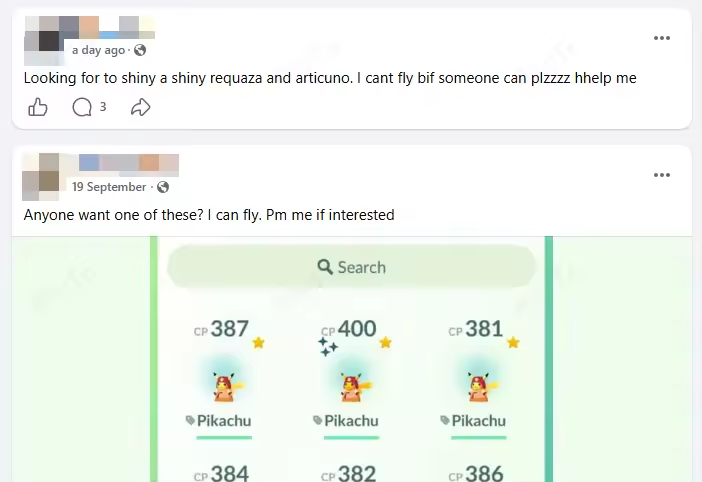
In Pokémon GO trading posts, "can fly" means the player can spoof their location to meet another Trainer. "Can't fly" means they usually don't spoof, so they need the other person to come to their location.
For example, “Looking for a trade, can't fly” tells you who needs to handle the travel. Before arranging the trade, agree on the meeting location and which person will move. The label describes their ability to change location, not whether they are waiting for a teleport cooldown.
How to Fly in Pokémon GO: Best Tools for iOS/Android
If you're curious about flying in Pokémon GO but don't know where to start, the first step is choosing the right tool. The best apps let you move safely, enjoy stable GPS, and avoid unnecessary risks. Below are two of the most popular and reliable options—one for iOS and one for Android.
Before choosing a tool, decide how you want to move. In AnyTo, these modes cover three different jobs:
| Your Goal | Movement Mode | What to Set |
|---|---|---|
| Reach a specific location | Teleport | Enter a destination or coordinates and check the map pin. |
| Move around a nearby area | Joystick | Choose your direction and movement speed. |
| Follow a planned route | Multi-spot / Auto-walk | Set the route and speed before starting. |
1 How to Fly in Pokémon GO on iPhone & Android with AnyTo
One of the most trusted tools for iOS players is AnyTo, a location spoofer for Pokémon GO designed with fairness and accessibility in mind. Its goal is simple: to make the game fun for everyone, whether you can physically explore or not. It works on both iOS and Android devices without root or jailbreak.


AnyTo's Key Features
- Multiple movement modes: Instantly teleport, create multi-spot routes, Pokémon GO joystick, or set auto-walk to simulate realistic gameplay.
- Safety first: Uses a Bluetooth connection for location spoofing, which is safer than most other ways.
- Regular updates: Always stays compatible with the latest iOS and Pokémon GO updates.
- Prompt support: A dedicated Discord channel where you can ask questions and solve problems quickly.
- Extra tools: Raid maps, PokéStop maps, Gym maps, and Pokémon GO search features make hunting easier than ever.
- Cross-platform: Works smoothly on both iOS and Android.

 AnyTo Discord Server
How to Use AnyTo on iOS
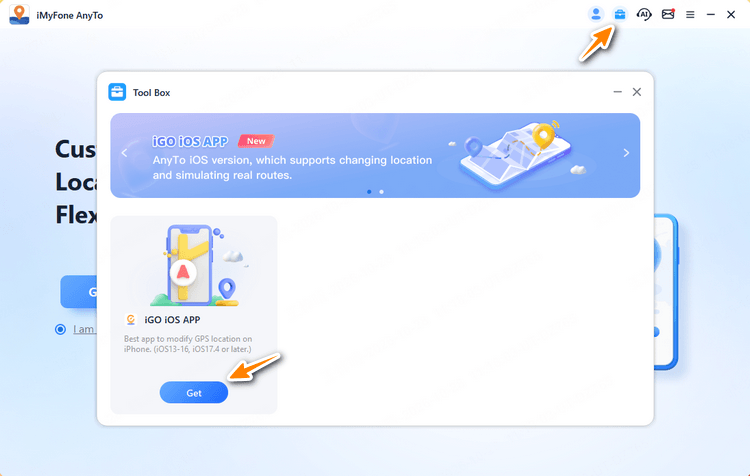
Step 1. Download the iOS app version via AnyTo PC version. After the initial computer-based installation, you can use the AnyTo iOS app to fly across the map in Pokémon GO without a computer for everyday control.
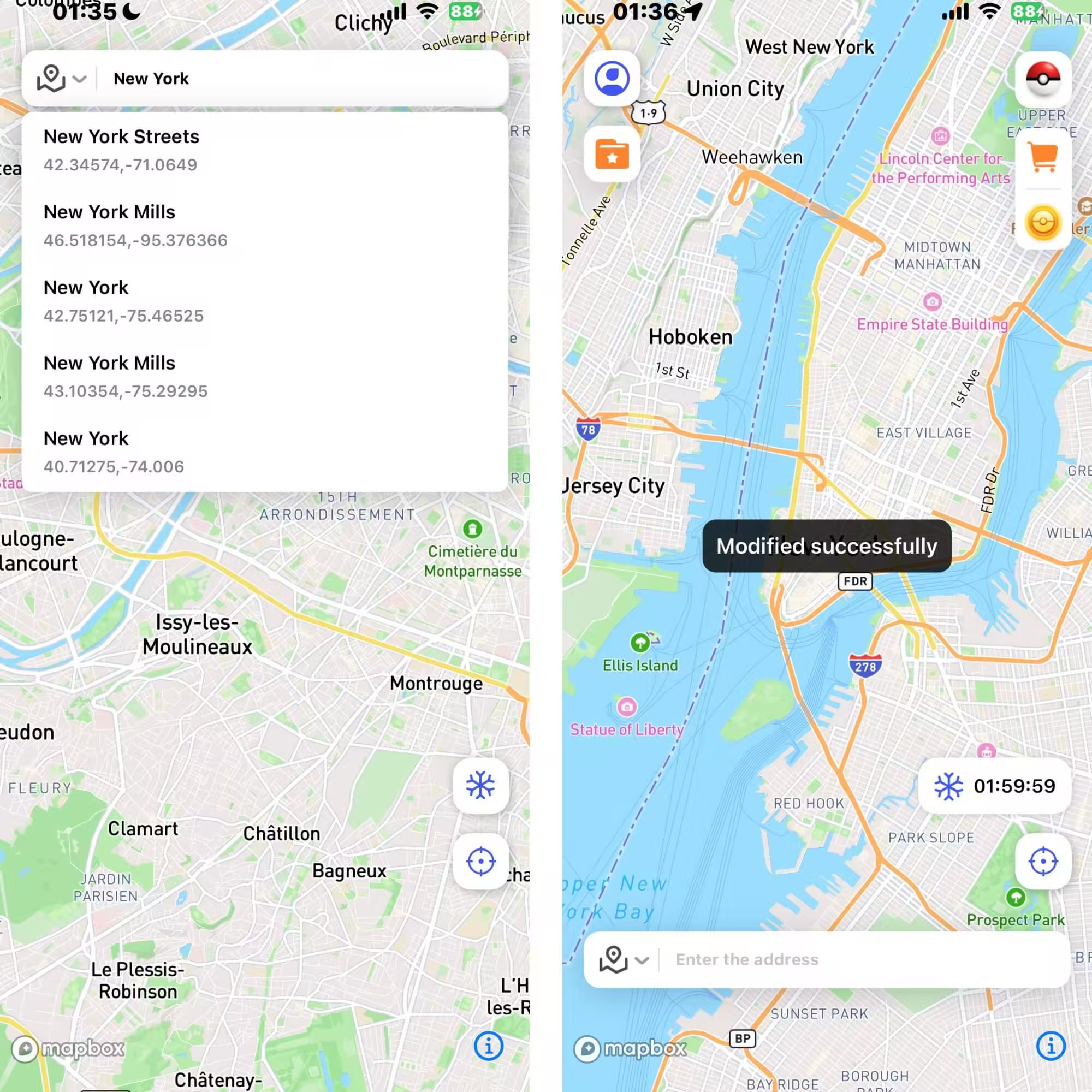
Step 2. Open the app on your phone, long-press to set a destination or enter the coordinates, choose a movement mode, and tap Move.
How to Return to Your Real Location
Finished playing? Stop the simulated movement and close the app. Open your phone's map app to check that it shows your actual location before heading out to play normally.
2 How to Use Fly GPS in Pokémon GO on Android
As the name suggests, Fly GPS lets you teleport to any chosen location. It's a free app on Google Play made for Android users, but not specifically for Pokémon GO players. It lacks a Pokémon GO cooldown timer to help track waiting time between location-based actions associated with soft bans. What's more, recent reviews mention 'no support' and 'too many ads.'
Fly GPS's Key Features
- Overlay Controls: The joystick and movement panel can stay on top of Pokémon GO, so you don't have to constantly switch apps.
- Speed Control: Adjust movement speed to mimic natural walking, jogging, or driving.
- Location Favorites: Save frequently used teleport spots (like Raids, gyms, or farming nests) for quick access.
- Lightweight & Free: No paid subscription needed and it doesn't take up much space.
How to use it
Pokémon GO may reject mock locations even when Fly GPS changes your position in other apps. If you see Error 12, use the location troubleshooting steps below.
Step 1. Install the app from Google Play, enable developer mode, and select Fly GPS as your mock location app.

Step 2. Choose a location on the map, search for one, or enter the coordinates. Tap the icon on the left, then choose GPS Service Run.

Step 3. The Fixed Location Mode lets you teleport right to the location, and the Move Location Mode works as a joystick overlay.

Common Problems When Flying in Pokémon GO & How to Fix Them
Even with the best tools, flying in Pokémon GO isn't always smooth sailing. Players often run into a few common problems that can ruin the experience if not fixed quickly. Here's a breakdown of the most frequent issues and how you can solve them.
| What You See | Check First | Next Step |
|---|---|---|
| Catches or PokéStop spins fail after moving | Your last location, interaction time, and which actions fail | Check cooldown timing. One fleeing Pokémon alone doesn't establish a penalty. |
| Failed to detect location (12) | Mock-location settings and the selected game mode | Test with your real location to isolate the problem. |
| GPS signal not found (11) | Location permissions, signal, and network | Check GPS and location accuracy. |
| The game freezes or closes | Game version, cache, and conflicting apps | Try the crash fixes. |
| An account warning or suspension notice | The message shown in the game | Follow the account notice. A cooldown timer does not clear a suspension. |
1 Can't catch Pokémon after flying
Reason
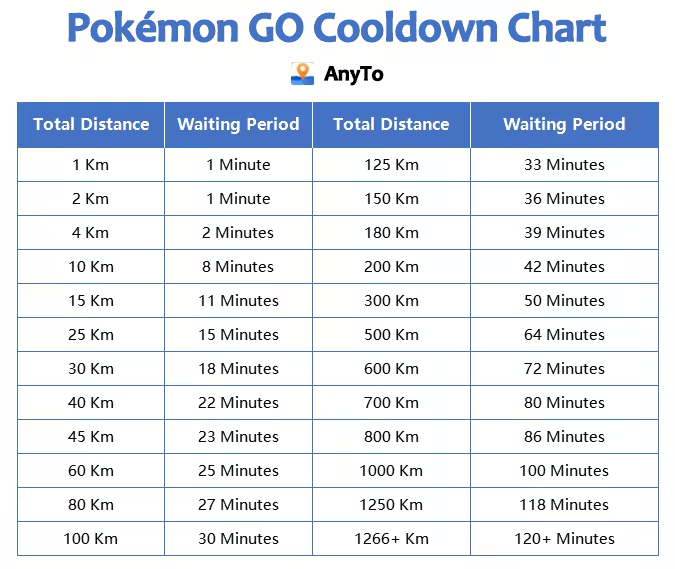
This usually means you've hit the cooldown period, the time Pokémon GO enforces to prevent instant globe-hopping.
How to fix it
There isn't much you can do except following the cooldown chart based on the distance traveled and waiting it out.
2 Failed to detect location
Reason
Failed to detect location (12) can appear when Pokémon GO cannot use your device's location settings. On Android, a selected mock-location app can prevent the game from working.
How to fix it on iOS
- Teleport to a new place or change the location mode
- Disable Find My temporarily if you're using iOS
- Reset Location & Privacy in Settings
How to fix it on Android
- Take Pokémon GO Off the Deny List in Magisk
- Clear Cache
- To test with your real location, stop the location-changing app and clear Select mock location app in Developer Options. Reopen Pokémon GO to check whether normal GPS works.
For more detailed information, please check out our guide How to Fix "Failed to Detect Location 12" While Spoofing in Pokémon GO.
3 GPS signal not found
Reason
GPS signal not found (11) isn't always about spoofing. It is commonly triggered by weak or unstable GPS signal, incorrect location settings on your phone.
How to fix it on iOS
- Allow Pokémon GO to retrieve the exact location
- Switch between Wi-Fi and mobile data to check whether the connection improves.
- Adjust DNS/IP configuration with apps like IPLocate
How to fix it on Android
- Turn on WiFi and Bluetooth Scanning
- Ensure Google Location Accuracy is on and enable Improve Location Accuracy in its settings.
- Try switching between Wi-Fi and mobile data.
- Set MAC Address Type to "Phone MAC" in WiFi Settings
- Turn off "Pause app activity if unused"
- Empty game cache
- Advanced (rooted phones): Re-patch boot.img with Magisk
For more detailed information, please check out our guide Pokémon GO GPS Signal Not Found: Full Guide for Android/iOS.
4 Game freezing or crashing
Reason
Flying can be resource-heavy. Running Pokémon GO plus a GPS spoofing app, while other apps run in the background, often overloads your phone.
How to fix it
- Update Pokémon GO to the latest version
- Clear cache and app data
- Disable "Analyze on-screen text" to free up storage
- Disable screen overlays and conflicting apps
- Restart before every Raid
- Don't switch to camera app while playing
- Test Pokémon GO on a different network
For more detailed information, please check out our guide [2026 Guide] Pokémon GO Keeps Crashing? Top 7 Fixes to Try.
What You Can't Do When Flying in Pokémon GO
Flying in Pokémon GO, like any form of spoofing, comes with strict limitations if you want to stay safe. Here's what you should avoid doing:
- Don't teleport while logged in – Always teleport before launching the app. Logging in at a faraway location can trigger instant suspicion.
- Avoid jumping continents too quickly – Moving across countries in minutes is unrealistic and raises red flags.
- Don't exceed natural movement speeds – Simulating driving or running faster than a human could reasonably travel can lead to soft or hard bans.
- Avoid interacting with high-level content immediately after teleporting – Raids, gyms, or EX events immediately after flying can trigger cooldown violations.
- Don't use untrusted spoofing apps – Only rely on reputable tools like AnyTo to minimize detection risk.
- Never share your spoofing setup publicly – Screenshots, tutorials, or account links can put your account at risk.
FAQs About Flying in Pokémon GO
Is flying the same as teleporting in Pokémon GO?
Not exactly. Flying is a slang term for GPS spoofing in general, which can include teleporting, auto-walking, or route simulation. Teleporting specifically means instantly moving your in-game location to a new spot, whereas flying may involve broader spoofing activities.
Is flying allowed in Pokémon GO?
Technically, no. Flying is considered a form of cheating and violates Niantic's Terms of Service. It's only 'safe' if you follow all cooldown rules and use trusted tools, but there's always a risk of a soft or hard ban.
Can you get banned for using Fly GPS in Pokémon GO?
Yes. Niantic can detect unnatural movements. Soft bans may prevent catching Pokémon or spinning PokéStops, while hard bans can permanently block your account. Following cooldown rules, using trusted apps, and avoiding suspicious patterns reduces the risk.
Does Fly GPS work with Pokémon GO Adventure Sync?
No. Adventure Sync relies on real physical movement tracked by Apple Health or Google Fit. Fly GPS can simulate location for catching Pokémon or visiting PokéStops, but it won't register steps or hatch eggs through Adventure Sync.
Conclusion
Flying in Pokémon GO may sound like the ultimate shortcut, and in many ways, it is. By using spoofing tools, you can explore hotspots worldwide, join Raids anywhere, and catch region-exclusive Pokémon without moving an inch. But remember, flying in Pokémon GO always comes with risks.
The key is to play smart: respect cooldown rules, use trusted apps like AnyTo or Fly GPS, and avoid reckless teleports that might trigger Niantic's security systems.


Ryan Miles is a seasoned gamer and mobile strategy writer with over 5 years of hands-on experience in Pokémon GO spoofing and GPS-based games. Known for breaking down complex location tricks into beginner-friendly guides, Ryan’s mission is simple: help you explore more, catch faster, and play smarter without ever leaving home.
-
Pokémon GO Wild Area Coordinates 2026: 14 Rally Stops
Find Pokémon GO Wild Area coordinates for all 14 Sendai and Mexico City rally stops, plus five global locations, event times, and ticket requirements.
24 mins read -
Hyper Training Guide: Best Pokémon for Silver Bottle Caps in Pokémon GO
How does Silver Bottle Cap work in Pokémon GO? Which Pokémon should you use the Silver Bottle Cap on? Check out this ultimate Hyper Training guide!
17 mins read -
Paldean Tauros Forms in Pokémon GO: Tips to Get Aqua, Blaze & Combat Breeds
Want to get all Paldean Tauros forms fast in Pokémon GO? Discover where to find Aqua, Blaze, and Combat forms and the best raid strategies for 2026.
16 mins read -
Best Remote Shadow Raid Tips for Pokémon GO (2026)
Want to master Remote Shadow Raids in Pokémon GO 2026? Discover pro tips, best Pokémon picks, and smart ways to save your raid passes!
20 mins read -
Pokémon GO Forever Friends & Remote Trades: What You Need to Know
Find out how Forever Friends and Remote Trades work in Pokemon GO, how to become Forever Friends, and how this new feature affects everyone.
28 mins read -
How to Spoof Pokémon GO Fest 2026: Tokyo, Chicago & Copenhagen
Is GO Fest 2026 worth it for spoofers? Learn how to spoof safely, explore top coordinates, and get spoofing tips for Tokyo, Chicago, and Copenhagen!
9 mins read
Was this page helpful?
Thanks for your rating
Rated successfully!
You have already rated this article, please do not repeat scoring!