
 Top-Views
 New-Updates


Want a safer, hassle-free way to boost Adventure Sync rewards? AnyTo lets you simulate movement and teleport in Pokémon GO without complex setups. Easy, reliable, and low-risk. Try AnyTo free today!
DeFit is an app that fakes your walking distance by syncing artificial steps into Google Fit, which Pokémon GO then reads through its Adventure Sync feature. It's a clever way for players to hatch eggs, earn Buddy Candy, and get distance-based rewards, all without actually walking.
But as 2026 rolls in, many trainers are wondering: does DeFit still work with Pokémon GO after the new Google Fit–Health Connect transition? This guide breaks down everything you need to know about DeFit and Pokémon GO.

Quick Navigation

Does DeFit Work for Pokémon GO in 2026?
Not really. At least, not the way it used to.
Since 2025, DeFit has worked inconsistently with Pokémon GO due to major changes in how Adventure Sync handles fitness data.
While the app can still fake your distance and steps inside Google Fit, that data often doesn't sync properly to Pokémon GO anymore.
Why is DeFit not working for Pokémon GO?
DeFit has never directly communicated with Adventure Sync. Instead, it fakes steps in Google Fit, and Pokémon GO reads that data through the Fit API. But now that Google is phasing out the old Google Fit API and replacing it with Health Connect, the link between Fit and Pokémon GO has broken down.
Google officially ended support for the old API on June 30, 2025, and Scopely hasn't fully migrated Pokémon GO to Health Connect yet. That means Android users are stuck in an awkward middle stage. Steps may register sometimes, but not consistently.

The situation isn't better for iOS users, either. Adventure Sync itself has been buggy. Many players have reported that distance tracking randomly stops, even when all permissions and settings are correct.
So, while DeFit isn't completely "dead", it's unstable and inconsistent in 2026, mostly because of the ongoing shift from Google Fit to Health Connect and lingering Adventure Sync bugs across both Android and iOS.
 AnyTo Auto Walker
Tired of DeFit's syncing bugs and step glitches? AnyTo offers a stable, low-risk way to simulate walking in Pokémon GO, plus a virtual Pokémon auto-catcher. Smooth movement, easy setup. Try AnyTo free today!
How to Use DeFit on Pokémon GO: Step-by Step Guide
Using DeFit with Pokémon GO is pretty simple. Here's a quick step-by-step guide to set it up and start earning distance without walking for real, if you're lucky:
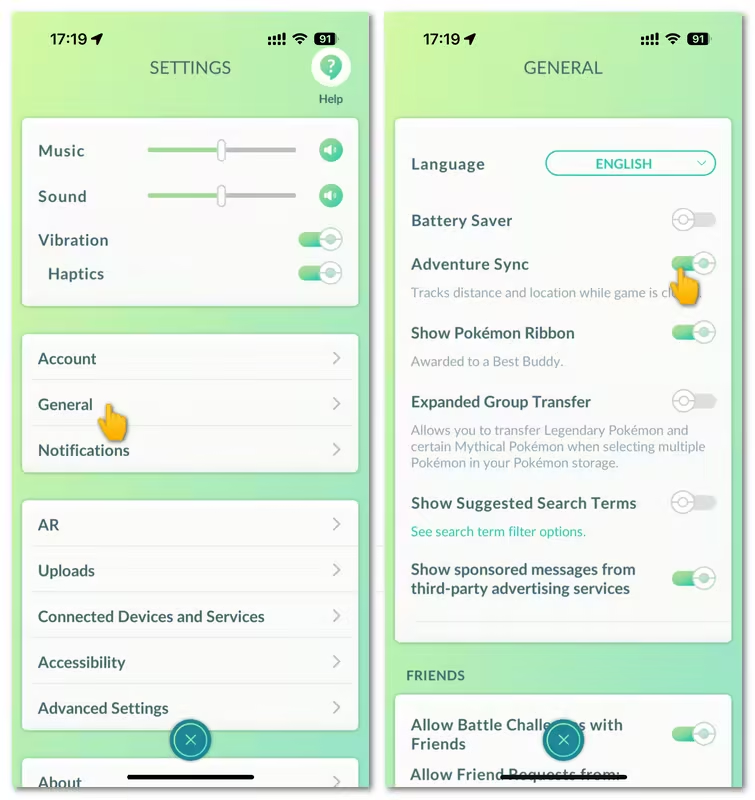
Step 1. Enable Adventure Sync in Pokémon GO
Open Pokémon GO, head to Settings, and scroll down until you find Adventure Sync. Toggle it on so the game can read your walking data from Google Fit.
Step 2. Close the Pokémon GO app completely
Once Adventure Sync is turned on, fully close Pokémon GO (don't just minimize it). This ensures your new step data from Google Fit will sync properly when you reopen the game later.
Step 3. Open DeFit and log in with your Google account
Launch the DeFit app and sign in using the same Google account linked to Pokémon GO. This step is crucial because DeFit needs to sync its fake step data to Google Fit.

Step 4. Tap the play button in DeFit to start simulating steps
Choose the distance In the Covert Mode section and hit the play button. DeFit will begin generating step counts and distance automatically.

Possible Fixes for DeFit Not Working on Pokémon GO
Since Pokémon GO's Adventure Sync isn't as reliable as it used to be, DeFit might act up or stop syncing properly. If that happens unfortunately, try the following fixes. Just note that because Adventure Sync itself can be buggy, results may vary.
1 Use Convert Mode Properly
Many players report that DeFit only works smoothly when Convert Mode is used correctly. Here's the trick:
Step 1. Before starting, clear data for both Pokémon GO and DeFit to ensure a clean setup.

Step 2. Open Pokémon GO and make sure Adventure Sync is ON.
Step 3. Go to DeFit, choose your desired distance, and activate Convert Mode. Once it starts walking, don't touch or move anything until it's completely done.

This method tends to sync steps accurately, and it works in most cases when done carefully.
2 Reconnect and Sync with Google Fit
If DeFit isn't syncing steps, your connection to Google Fit might be the culprit. Follow this process to reestablish the link and force data syncing:
Step 1. Open Google Fit and check Manage Connected Apps in Settings to ensure DeFit is listed there.

Step 2. In DeFit, watch ads to add enough active time. Then, in the Convert Mode section, pick your desired distance.

Step 3. Once DeFit is running, open Google Fit and leave it open for a minute. Usually, it will update automatically.
Step 4. If not, tap any progress metric (like calories, miles, or move minutes) to manually refresh the data.
Step 5. Keep Adventure Sync on in Pokémon GO. Then restart the game, wait about 15–30 seconds, and your new step data should appear.
If Google Fit still refuses to count steps, force close all three apps (Pokémon GO, Google Fit, and DeFit) and clear their cache.

Pro tip
The weak link is usually Google Fit, not DeFit or Pokémon GO, so always double-check that it's properly syncing in the background.
Best DeFit Alternative to Fake Distance in Pokémon GO—AnyTo
AnyTo's New Features
AnyTo's New Feature #1: PoKo Assistant lets you auto-attack in raids and Rocket Battles and modify every throw.

AnyTo's New Feature #2: AnyTo Plus is the newest upgrade in iMyFone’s AnyTo lineup for iPhone users. It works through Bluetooth pairing between an Android phone and your iPhone, letting you change your iPhone’s location directly without using a PC.

If DeFit keeps glitching or stops syncing steps, there's a much smarter way to fake distance in Pokémon GO—AnyTo. It's a smart step faker and all-in-one Pokémon GO spoofer that works on both Andorid and iOS.
Unlike DeFit, AnyTo bypasses Google Fit entirely, sending distance data directly to Pokémon GO with zero sync issues or API limits.
It also goes beyond distance tracking by simulating real movement. With GPS spoofing in Pokemon GO, you can spin PokéStops and join raids in other locations without leaving home.


AnyTo's Key Features
- Auto-Walk Mode: Simulates realistic movement with adjustable walking speed and natural pauses to avoid detection.
- Custom Route Planning: Create or import your own walking paths anywhere in the world and let AnyTo auto-walk them for you.
- Smart Route Generator: Automatically generates walking routes based on PokéStops, gyms, or Pokémon spawn points nearby.
- Bluetooth Connection: Connects directly to your phone via Bluetooth, fully compatible with the official Pokémon GO app, no modding required.
- Virtual Go Plus Integration: Simulates Go Plus features supporting Great and Ultra ball, letting you spin PokéStops and catch Pokémon automatically.
- Built-In Pokémon GO Joystick: Move freely in any direction and control your trainer in real time while staying home.
- Pokémon Scanner: Finds nearby Pokémon by IV, CP, or type, helping you teleport instantly for sniping rare catches.

 AnyTo Discord Server
How to fake distance with AnyTo Andorid
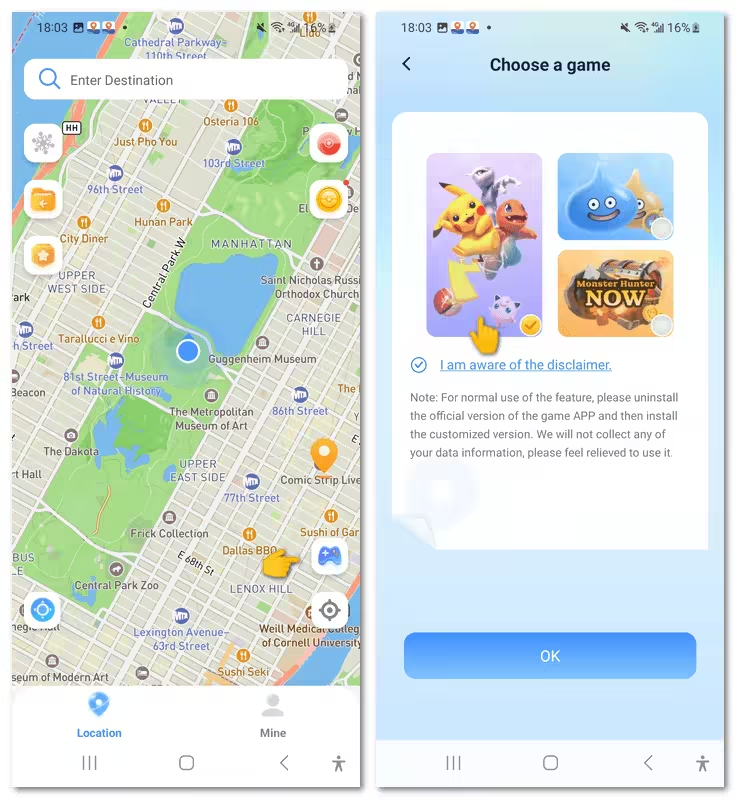
Step 1. Open AnyTo and choose the Game Mode to unlock Pokémon GO-specific features. You don’t need to enable Developer Mode, which helps reduce the risk of detection.
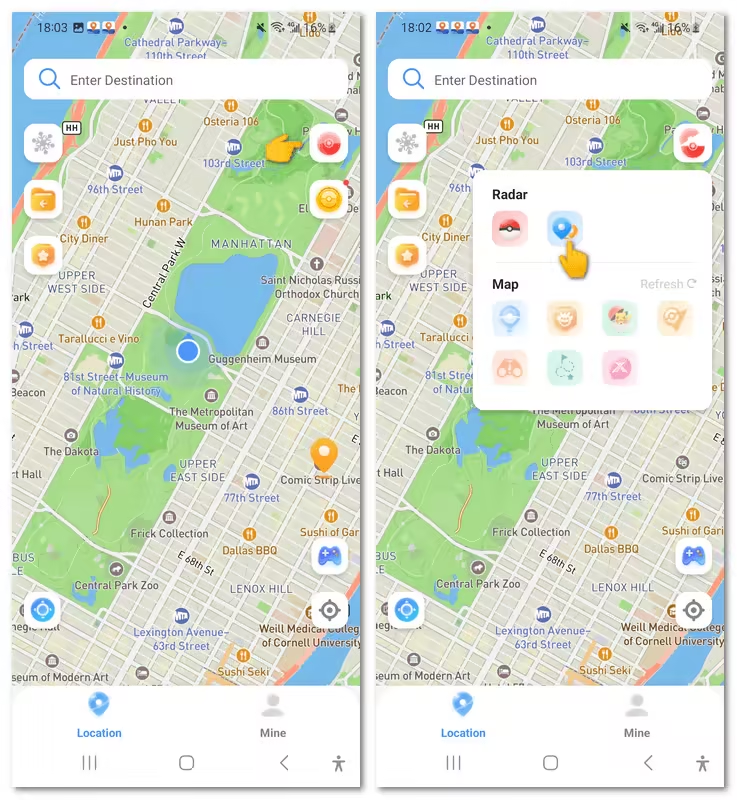
Step 2. Tap the Poké Ball icon on the upper right corner, and choose the second option in the radar section to generate a route.
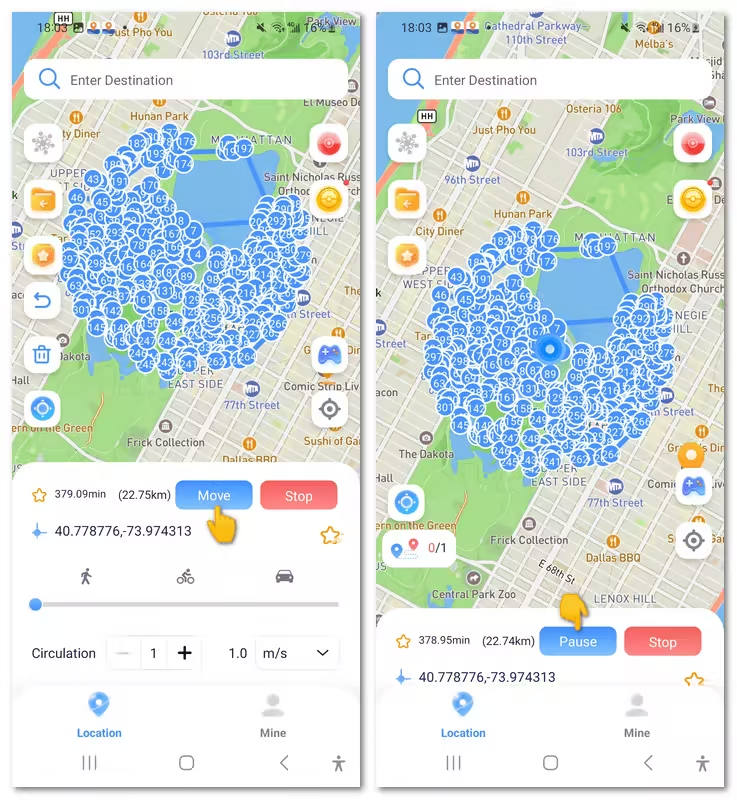
Step 3. Tap Move to start walking. You can pause anytime.
You can also spoof in Pokémon GO via PC. Here's a video guide to show you how AnyTo works. For a more detailed handbook, see Users Guide of AnyTo PC Version.

FAQs about Pokémon GO and DeFit
Does DeFit work on iOS?
No. DeFit is an Android-only app because it relies on syncing with Google Fit, which isn't available on iOS. If you want to fake steps or location on iOS, try AnyTo, a more advanced DeFit alternative for iOS users.
Why is DeFit not working with Pokémon GO?
DeFit often fails to sync with Pokémon GO because of recent Adventure Sync issues and the retirement of the Google Fit API.
Can DeFit be detected in Pokémon GO?
Not directly. DeFit itself doesn't modify or inject data into Pokémon GO, so it's unlikely to trigger a ban. However, using it excessively or pairing it with other spoofing tools could raise red flags. The risk is low, but it's always better to keep your use moderate and avoid suspicious behavior in-game.
Final Thought
Pokémon GO DeFit was once a convenient way to simulate walking, but in 2026 it's largely unreliable due to changes in Adventure Sync and the Google Fit to Health Connect transition.
If you still want to hatch eggs, earn buddy candy, or track distance without relying on physical movement, a safer and more effective alternative is AnyTo. With features like auto-walk, route planning, realistic movement, and Bluetooth connection, it bypasses the broken sync issues and works seamlessly with the official Pokémon GO app.

AnyTo
Change GPS Location on iOS/Android
168,282 people have downloaded
- Fake iOS/Android GPS location to anywhere in the world instantly.
- 100% Work with location-based apps such as AR games, social platforms, etc.
- Joystick to simulate GPS movement freely when playing games.
- Import / Export GPX file to save your favorite routes.
- Compatible with All iOS & Android versions.


Ryan Miles is a seasoned gamer and mobile strategy writer with over 5 years of hands-on experience in Pokémon GO spoofing and GPS-based games. Known for breaking down complex location tricks into beginner-friendly guides, Ryan’s mission is simple: help you explore more, catch faster, and play smarter without ever leaving home.
-
Hyper Training Guide: Best Pokémon for Silver Bottle Caps in Pokémon GO
How does Silver Bottle Cap work in Pokémon GO? Which Pokémon should you use the Silver Bottle Cap on? Check out this ultimate Hyper Training guide!
17 mins read -
Paldean Tauros Forms in Pokémon GO: Tips to Get Aqua, Blaze & Combat Breeds
Want to get all Paldean Tauros forms fast in Pokémon GO? Discover where to find Aqua, Blaze, and Combat forms and the best raid strategies for 2026.
16 mins read -
Best Remote Shadow Raid Tips for Pokémon GO (2026)
Want to master Remote Shadow Raids in Pokémon GO 2026? Discover pro tips, best Pokémon picks, and smart ways to save your raid passes!
20 mins read -
Pokémon GO Forever Friends & Remote Trades: What You Need to Know
Find out how Forever Friends and Remote Trades work in Pokemon GO, how to become Forever Friends, and how this new feature affects everyone.
28 mins read -
How to Spoof Pokémon GO Fest 2026: Tokyo, Chicago & Copenhagen
Is GO Fest 2026 worth it for spoofers? Learn how to spoof safely, explore top coordinates, and get spoofing tips for Tokyo, Chicago, and Copenhagen!
9 mins read -
Is AnyTo Safe for Pokémon GO & GO Fest? Full Guide
Is AnyTo safe for Pokémon GO? Can you use it for GO Fest? This guide has the answers and tips on how to get the most out of the event.
8 mins read
Was this page helpful?
Thanks for your rating
Rated successfully!
You have already rated this article, please do not repeat scoring!