
 Top-Views
 New-Updates


Try AnyTo for safer, smoother spoofing. Use Bluetooth spoofing without jailbreak and unlock richer, game-focused features with a modern, reliable tool built for Pokémon GO play!
If you were part of the Pokémon GO spoofing scene a few years ago, you probably have heard of UnicTool TailorGo. But time moves fast in the spoofing world.
With Pokémon GO’s anti-cheat system getting tougher and more complex, many players wonder whether TailorGo is still reliable today or if it’s been left behind. In this review, I break down everything you need to know before using it.

Quick Navigation

What is UnicTool TailorGo?
Let’s start with the basics.
UnicTool TailorGo is a GPS spoofing tool. It lets you fake your GPS in Pokémon GO without physically moving. This can be a game-changer for rural players, people with mobility challenges, or anyone who wants to catch region-exclusive Pokémon and join global raids.

Key Features of TailorGo
- Change GPS Location: Instantly teleport anywhere on the map. You can use two-spot and multi-spot modes to simulate walking or driving along a route. There’s also a joystick mode for manual movement.
- Pokémon GO Specific Features: TailorGo isn’t just a generic location changer. It’s designed with Pokémon GO in mind. You get:
- Nearby Pokémon: See what’s spawning around your spoofed location.
- Raids: Find and join raids in any city.
- Routes: Plan your path to maximize PokéStops and gyms.
- Quests: Find field research tasks and rewards.
- Real-time Search: Find Pokémon spawns and raids on the fly.
- Cooldown Timer: This feature helps you avoid soft bans by calculating how long you should wait before taking another action (like catching or spinning) after teleporting.
Sounds pretty good, right? But before you get too excited, let’s see how it actually works with Pokémon GO.
How does TailorGo work with Pokémon GO?
TailorGo isn’t a standalone mobile app. You need a computer to run it, which leads to USB tethering. Once connected, the software overrides your phone’s GPS data so Pokémon GO reads the spoofed location as if it were real. No root or jailbreak for Pokémon GO.
What You Need
- A computer (Windows or Mac)
- Your smartphone (iOS or Android)
- A USB cable
Step-by-Step: Using TailorGo With Pokémon GO
Step 1. Install TailorGo on your computer and launch it.
Step 2. Connect your phone via USB.
- iOS users can switch to Wi-Fi mode after the first USB connection.
- Android users, sorry—USB only.
Step 3. Select Game Mode and open Pokémon GO on your phone.
Step 4. Wait for the map to load in TailorGo. Now, you can teleport, set routes, or use the joystick to move around.

Note
I’ve tested TailorGo on both iPhone and Android. The setup is straightforward, and the interface is clean. The joystick feels responsive, and the teleport function works as promised. The Pokémon GO-specific features (like raid and quest search) are helpful, especially if you’re hunting for something specific. But, there are a few things you should keep in mind, which I’ll cover in the next sections.
TailorGo vs. AnyTo: Which spoofer is better for Pokémon GO?
It's time to get to the big question: Is TailorGo the best option out there? Here’s where things get interesting.
Compared with the sea of Pokémon GO spoofers out there, TailorGo doesn’t really rise above the tide.
First of all, it uses the outdated USB tethering method, which is detectable in Pokémon GO's anti-cheat system.
Second, it offers far fewer game-focused features than heavyweights like iPoGo and iSpoofer. And when you put it side-by-side with AnyTo, which delivers nearly the same core spoofing functions but with a richer toolkit, TailorGo’s limitations become even clearer.

AnyTo Pokémon GO Spoofer vs TailorGo
- Features
- Baisic Spoofing
- Maps
- Auto Catch
- BT Connection
- IV Scanner
- Auto Raid
- Auto Grunts
- Enhanced Throw
- PoGo on PC
- iMoveGo
- AnyTo
Verdict
If you want a spoofer that goes beyond just moving your GPS pin, AnyTo is the more complete Pokémon GO toolkit.
Best alternative to TailorGo: AnyTo
If TailorGo feels a bit limited for today’s Pokémon GO landscape, AnyTo is the stronger, more future-proof alternative. It works with the official Pokémon GO app, supports both iOS and Android, and comes packed with advanced tools TailorGo simply doesn’t offer, like an IV checker, Auto-Raid, Auto-Grunt Battle, Enhanced Throw, and even Screen and Play on PC for desktop players.

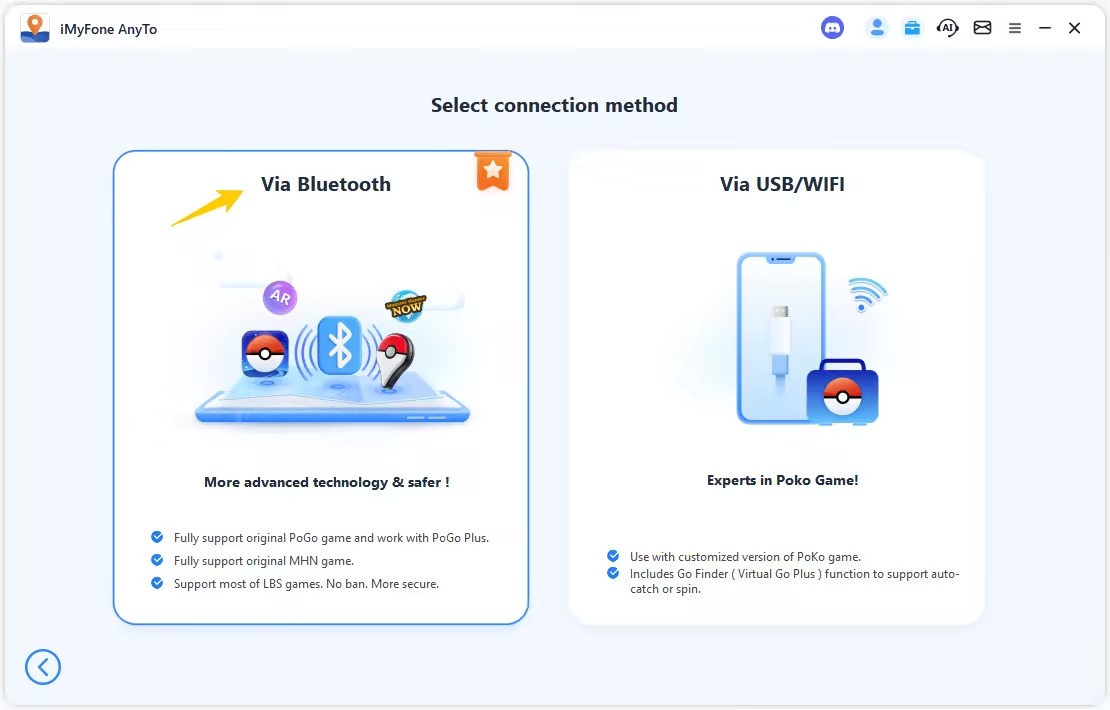
One of its biggest advantages is the safer Bluetooth spoofing system. Your computer pretends to be a legitimate external GPS device while sending simulated coordinates to your phone, helping you stay aligned with Pokémon GO’s integrity checks.
AnyTo also has a large and active Discord community, so users can chat directly with support, troubleshoot issues faster, and share tips with thousands of other spoofers. For stability, features, and overall security, AnyTo is the better pick.

 AnyTo Discord Server
How to Fake Location with AnyTo
Step 1. Download and install AnyTo on your computer.
Step 2. Connect your phone via Bluetooth (recommended), WiFi, or USB, and then choose Game Mode to unlock more features for Pokémon GO.
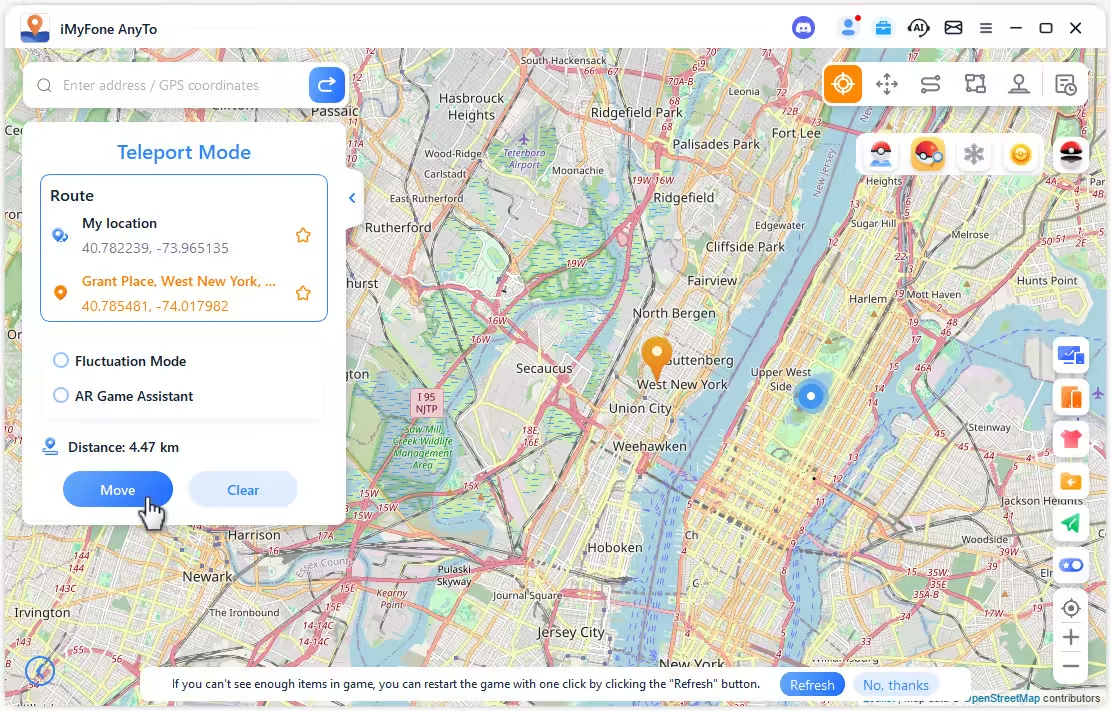
Step 3. Set your destination, and select Teleport Mode to change your location.
Note
You can also change location in Pokémon GO without using a computer. Follow the detailed setup guide to install the AnyTo's app version (iGo for iOS).

Final Thought
UnicTool TailorGo still works, but it hasn’t kept pace with how fast Pokémon GO’s anti-cheat and player needs have evolved. It’s fine for basic location changes, yet it lacks the advanced tools, stability, and community support that modern spoofers rely on.
If you want stronger protection, more automation, and a feature set built specifically for Pokémon GO, AnyTo is simply the more reliable long-term choice.


Ryan Miles is a seasoned gamer and mobile strategy writer with over 5 years of hands-on experience in Pokémon GO spoofing and GPS-based games. Known for breaking down complex location tricks into beginner-friendly guides, Ryan’s mission is simple: help you explore more, catch faster, and play smarter without ever leaving home.
-
Is TweakBox Pokémon GO Still Working? Best Alternatives!
What is TweakBox? Does TweakBox still work? Does TweakBox have Pokémon GO? What are the best alternatives for TweakBox Pokémon GO? Find the answers here!
6 mins read -
How to Play Pokémon GO on a Mac: 3 Proven Ways for 2026
Are you wondering if it's possible to play Pokémon GO on Mac? Our article provides the most workable solutions to enjoy playing Pokémon GO on your Mac.
6 mins read -
Top 8 Pokémon GO Raid Finders to Find Remote Raids in 2026
Find and join global Pokemon GO raids fast with the best Pokemon GO raid finder apps in 2026. Discover Mega, Shadow, and 5-Star raids—no walking required!
47 mins read -
Pokémon GO TutuApp 2026: Status, Download & Best Alternative
Does Tutuapp Pokémon GO still work in 2026? Can you download Tutuapp Pokémon GO on iOS and Android? Is Tutuapp Pokémon GO safe? Find out all the answers here!
37 mins read -
SpooferX Pokémon GO: Latest Review and Download Guide
Is SpooferX safe to use for Pokémon GO? Learn what SpooferX is, read honest reviews, and find the best safe alternative to try.
5 mins read -
Pokémon GO Nest Map 2026: Find Pokémon GO Nests Near Me
Discover the best Pokémon GO Nest Maps in 2026 to find and catch rare Pokémon fast. Learn how to locate nests and explore them remotely with AnyTo!
4 mins read
Was this page helpful?
Thanks for your rating
Rated successfully!
You have already rated this article, please do not repeat scoring!