
 Catch Pokémon
 Top-Views
 New-Updates


Unlock perfect IV Pokémon faster! Pair Poke Genie with AnyTo to fly worldwide, hatch more Eggs, and catch top-tier Pokémon anytime.
If you play Pokémon GO seriously, you’ve probably heard of Poke Genie. It’s one of the most popular IV calculators and battle planners, helping millions of Trainers pick the strongest Pokémon for Raids, Gyms, and PvP. But is it safe? How do you actually use it? And how accurate is it really? Here’s everything you need to know in 2026.

In this article:

What is Poke Genie?
Poke Genie is a third-party companion app for Pokémon GO. It lets you scan your Pokémon’s stats, calculate hidden IVs, find Raid teams, and check PvP rankings — all by reading your in-game screenshots or using an overlay. It’s basically a smart tool to squeeze the best out of every catch, so you know exactly which Pokémon to power up or evolve.

Is Poke Genie Safe?
Poke Genie is widely seen as safe because it doesn’t change any game files or fake your location. It simply reads your screenshots or screen overlay to analyze your Pokémon’s stats. Many top Trainers use it daily to build better teams.
Is Poke Genie Cheating?
No, using Poke Genie is not considered cheating. It’s just a scanning tool, not a mod or a spoofer. However, you should always avoid any app that edits Pokémon GO’s code or violates Niantic’s Terms of Service directly.
How Accurate is Poke Genie IV Calculation?
Poke Genie’s IV results are highly reliable when your screenshots are clear and your appraisal stars are accurate. Small rounding errors can happen because Pokémon GO’s stats use hidden decimals. If you want to be sure, cross-check with in-game appraisal or other IV tools.
 1-Click Change GPS Location with AnyTo!
Choose your platform and install (iOS, Android, PC).
Select a location mocking mode.
Change location anywhere you like.


Key Features of Poke Genie
Here’s what Poke Genie can do for Trainers in 2026:
IV Calculator
Instantly check your Pokémon’s IVs by scanning a screenshot. See the hidden Attack, Defense, and Stamina values to decide if it’s worth powering up.

Set IV for Each Pokémon
You can manually adjust the scanned data for each Pokémon if needed. This helps you fine-tune CP, appraisal stars, and level when comparing multiple Pokémon of the same species. This helps you to find the best Pokemon to evolve.
Raid Counters & Change Target
Plan the best team for any Raid Boss. You can easily change your target Pokémon, see top counters, and simulate battle scenarios for better Raid success.

PvP Team Builder
Check PvP rankings for Great League, Ultra League, and Master League. Build teams based on IV spreads that maximize your CP cap and stat product.
Overlay & Screenshot Scan
Poke Genie uses an Android overlay or an iOS screenshot scanner to read stats without manual entry.
Pokedex
Access a comprehensive Pokedex with detailed information about each Pokémon, including base stats and max CP.
Battle simulator
Analyze different battle strategies and find the best counters for raid bosses.
How to Use Poke Genie (iOS & Android)
1: Download & Install: Install Poke Genie from the App Store or Google Play.

2: Grant Permissions: Allow screen capture or screenshot access.
3: Scan Pokémon: Take a clear screenshot of your Pokémon’s status page. Poke Genie will automatically detect CP, HP, and appraisal stars.
4: Adjust if Needed: Manually fine-tune the level or IVs for better accuracy.
5: Plan Teams: Use the Raid or PvP tools to find the best counters and simulate battles.
How to Set IV for Each Pokémon in Poke Genie
After Poké Genie scans your Pokémon appraisal, if it shows a range of possible IVs instead of just one, you can manually select the correct IVs:
1. Open Poké Genie and view the Pokémon's analysis.
2. Scroll to "IV DETAILS" and tap "SHOW ALL."
3. Tap the three dots (menu) in the top right.
4. Select "SET IV."
5. Choose the correct IV combination from the list based on your in-game appraisal messages.

How to Change Target in Poke Genie?
1. Open Poke Genie and analyze your Pokémon.
2. On the analysis screen, find the "IV Details" section.
3. Tap on the PVP section (Great League, Ultra League, etc.) to open league settings.
4. Here, you can adjust settings like max Pokémon level (e.g., prioritize candidates with level ≤ 40), or whether to account for the Best Buddy bonus when evaluating PvP rankings.
These adjustments help you fine-tune the ranking based on the league or scenario you're aiming for.

Poke Genie vs Calcy IV vs AnyTo
| Feature | Poke Genie | Calcy IV | AnyTo |
|---|---|---|---|
| Platform | iOS & Android | Android only | iOS & Android & Windows & macOS |
| Main Use | IV checking, Raid counters, PvP ranking | IV checking, live overlay | Virtual location changer, raid planner, PvP ranking |
| Overlay Mode | Android overlay & iOS screenshots | Android real-time overlay | Desktop dashboard or in-app interface |
| Raid Team Planner | Yes | Yes (simpler) | No |
| PvP Ranking | Yes | Yes | Yes — check opponents in live battles |
| Does it modify game data? | No | No | No |
| Risk of Ban | Very low | Very low | Very low |
| Extra Benefit | Works great for iPhone users | Best for power Android users | Helps you spoof routes, hatch eggs, walk Buddy and plan battles |
| Best For | Beginners & cross-platform players | Android IV enthusiasts | Trainers who want full control—hatching, walking, PvP, raids—virtually everywhere |
Best Poke Genie Alternative - AnyTo
While Poke Genie helps you find the best Pokémon, AnyTo helps you catch more of them, no endless walking needed. Plan virtual routes, hatch Eggs faster, collect Candy, and join Remote Raids anywhere. Combine both tools for a powerful Pokémon GO setup!

AnyTo's Key Features
- Catch Perfect IV Pokémon Faster: Stop waiting around for the right spawn. Combine Poke Genie’s IV checks with AnyTo’s virtual GPS to find and catch high-IV Pokémon worldwide — no walking required.
- Hatch Eggs and Walk Buddies Anytime: Hatch more 12km Eggs, earn extra Buddy Candy, and complete “Adventure Together” evolutions faster by simulating realistic walking routes.
- Join Remote Raids Worldwide: Can’t find enough local Trainers? Use AnyTo to jump to active Raid hotspots, catch rare bosses, and power up your best Pokémon with ease.
- Safe, Flexible, and Easy to Use: AnyTo is designed for Pokémon GO Trainers who want full control. Change your GPS safely, simulate movement at any speed, and stay under the radar.
- The Perfect Match for Poke Genie: Poke Genie tells you which Pokémon are worth it — AnyTo helps you get them. Scan smarter, move smarter, and build your dream team faster than ever.
Steps to use AnyTo:
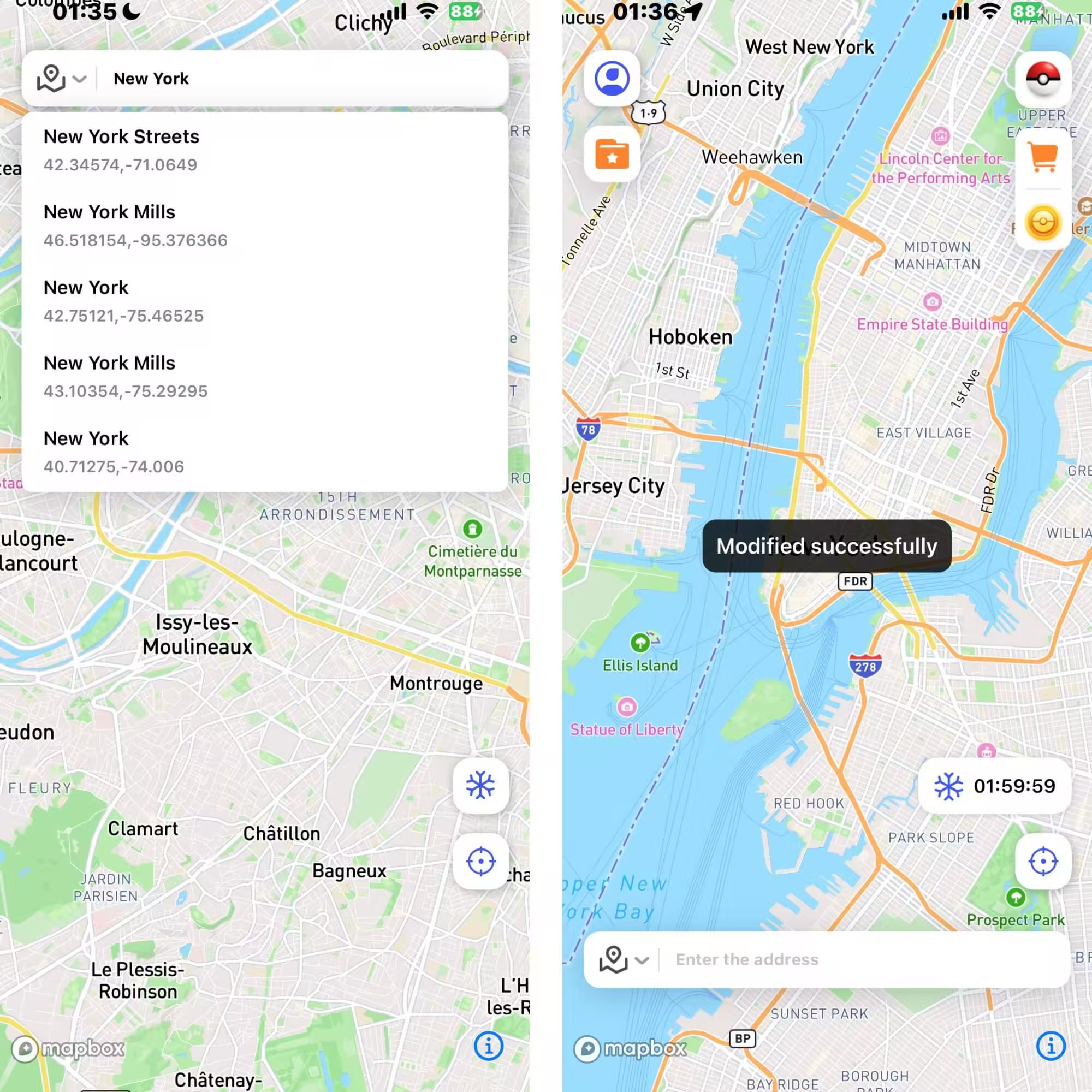
Step 1: Download and install AnyTo. You can either download the PC version to change the location on your iOS/Android device via computer, or get the mobile app version to modify your location directly.
Step 2: Once installed, enter coordinates or a place name in the search bar and change your location with one click.
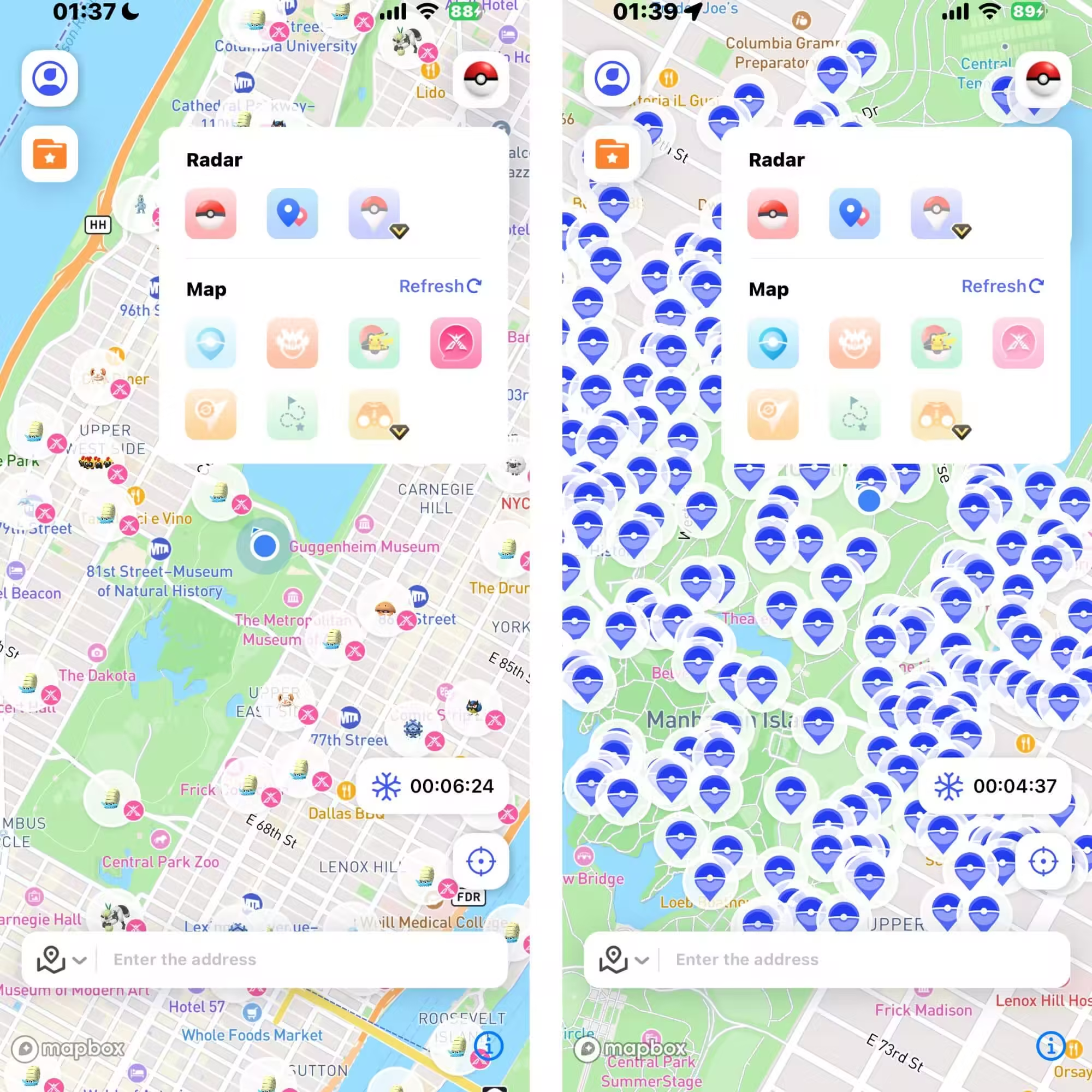
Step 3: You can also use the special game features to find nearby raids, Pokémon, PokéStops, and more.
FAQs
1.How do I set IV for each Pokémon in Poke Genie?
After scanning, tap the results to edit level, CP, or appraisal manually.
2.How do I change my Raid target in Poke Genie?
Go to the Raid Counters tab, pick a different Raid Boss, and plan your counter team.
3.What’s the best alternative to Poke Genie?
For IVs, Calcy IV is a top choice for Android. For catching more high IV Pokémon, AnyTo is perfect for safely changing your location and walking routes.
4.Is Poke Genie bannable?
No. Poke Genie is generally safe because it only scans screenshots or overlays your screen. It does not change game files or spoof your location. As long as you use it as intended, there’s no risk of a ban.
5.What is Dust in Poke Genie?
In Poke Genie, “Dust” shows how much Stardust you’ll need to power up that Pokémon to its max level. This helps you plan if it’s worth investing Candy and Stardust for PvP or Raids.
6.Can you use Poke Genie for local Raids?
Yes. Poke Genie works great for local Raids. Use the Raid Counters feature to pick the best counters for your local Boss, plan your team, and share your lineup with nearby Trainers.
Conclusion
Poke Genie is one of the safest, easiest ways to find your strongest Pokémon in 2026. It won’t get you banned if you use it right, and when you pair it with AnyTo, you can hunt down perfect IVs, hatch Eggs faster, and build the ultimate Pokémon GO team. Try them together and level up your Trainer game!


Ryan Miles is a seasoned gamer and mobile strategy writer with over 5 years of hands-on experience in Pokémon GO spoofing and GPS-based games. Known for breaking down complex location tricks into beginner-friendly guides, Ryan’s mission is simple: help you explore more, catch faster, and play smarter without ever leaving home.
-
Pokémon GO Wild Area Coordinates 2026: 14 Rally Stops
Find Pokémon GO Wild Area coordinates for all 14 Sendai and Mexico City rally stops, plus five global locations, event times, and ticket requirements.
24 mins read -
Hyper Training Guide: Best Pokémon for Silver Bottle Caps in Pokémon GO
How does Silver Bottle Cap work in Pokémon GO? Which Pokémon should you use the Silver Bottle Cap on? Check out this ultimate Hyper Training guide!
17 mins read -
Paldean Tauros Pokémon GO: All 3 Breeds & Where to Find Them
Find Aqua, Blaze, and Combat Breed Paldean Tauros in Pokémon GO. Check each form's region, typing, raid weaknesses, and how to collect all three.
16 mins read -
Best Remote Shadow Raid Tips for Pokémon GO (2026)
Want to master Remote Shadow Raids in Pokémon GO 2026? Discover pro tips, best Pokémon picks, and smart ways to save your raid passes!
20 mins read -
Pokémon GO Forever Friends & Remote Trades: What You Need to Know
Find out how Forever Friends and Remote Trades work in Pokemon GO, how to become Forever Friends, and how this new feature affects everyone.
28 mins read -
How to Spoof Pokémon GO Fest 2026: Tokyo, Chicago & Copenhagen
Is GO Fest 2026 worth it for spoofers? Learn how to spoof safely, explore top coordinates, and get spoofing tips for Tokyo, Chicago, and Copenhagen!
9 mins read
Was this page helpful?
Thanks for your rating
Rated successfully!
You have already rated this article, please do not repeat scoring!