
 Top-Views
 New-Updates


Bridge the urban and rural gap with AnyTo, a reliable iOS and Android Pokémon GO Spoofer that teleports, hatches eggs, joins raids, and catches hundos. Easy setup, responsible use. Try AnyTo free today!
A reliable Pokémon GO spoofer can revolutionize the way you play. In 2026, these spoofing methods have become more advanced and have greatly helped players bridge the gap between urban and rural gameplay in Pokémon GO. You can check IV, teleport to catch rare Pokémon, join raids without Remote Raid Passes, hatch eggs without walking, and reach level 80 faster.
This article lists the 11 best Pokémon GO spoofers for iOS and Android in 2026. For each tool, we highlight features, how to download, pros, and cons to help you pick the right one.

In this article:
- What is Spoofing in Pokémon GO?
- How to Spoof on Pokémon GO?
- [iPhone] 5 Best Pokémon GO Spoofing Apps iOS in 2026

- [Android] 6 Best Pokémon GO Spoofers Android in 2026
- #1 iMyfone AnyTo Android

- #2 Fake GPS Joystick by App Ninjas
- #3 Fly GPS
- #4 PGSharp
- #5 PG Tools
- #6 Shungo
- FAQs about Pokémon GO GPS Location Spoofing
- Understanding and Reducing Risks of Spoofing in Pokémon GO
- Conclusion
What is Spoofing in Pokémon GO?
Spoofing in Pokémon GO means using third-party spoofing apps or devices to fake your GPS location, so you don't have to actually walk around to play the game.
A feature-rich spoofer lets you claim the 50km reward and trade with friends without leaving home. You can also snipe wild Hundos and land Excellent Curveball throws every time.
How to Spoof on Pokémon GO?
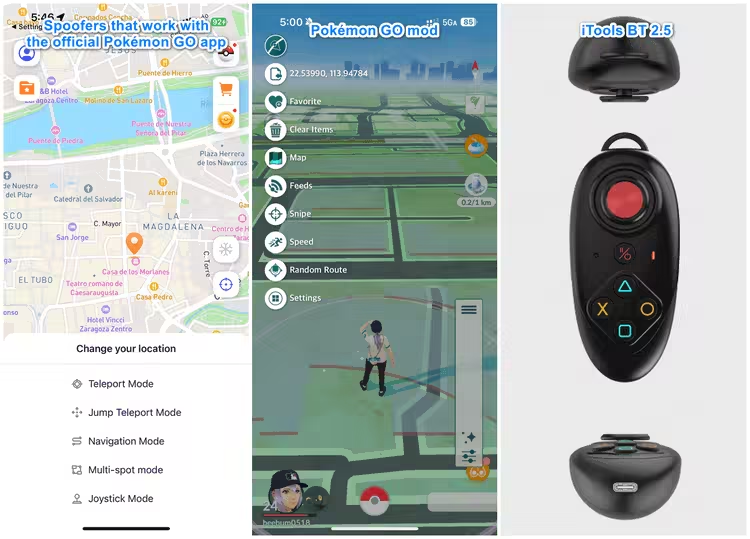
Currently, the 3 best Pokémon GO spoofing methods are:
- Option 1: Use spoofers that work with the official Pokémon GO app. Tools like iMyFone AnyTo are generally safer because they don't tamper with the game’s core files, modify the game’s core files, and their connection method makes them harder to detect.
- Option 2: Use modified versions of Pokémon GO. Mods like iPoGo and PGSharp add powerful tools that make the grind easier. They usually require a rooted or jailbroken device and carry a higher ban risk.
- Option 3: Using hardware devices like iTools BT 2.5. These connect via Bluetooth and let you "walk" in Pokémon GO with a physical joystick. It’s a one-time purchase and, when used properly, is generally as safe as Option 1.
5 Best Pokémon GO Spoofing Apps iOS in 2026
| Pokémon GO iOS Spoofer | Jailbreak | Safety | Methods | Game Mode | Recommendation |
|---|---|---|---|---|---|
| iMyfone AnyTo iOS | No | 99% | Bluetooth (app) |  |
|
| iTools BT 2.5 | NO | 90% | Bluetooth (device) |  |
|
| iPoGo | Required | 85% | Mod | |
|
| Spoofer GO | Required | 75% | Mod | |
|
| iSpoofer | No | 65% | Mod | |
|
#1 iMyfone AnyTo iOS
Safety & Stability: 
AnyTo's New Features
AnyTo's New Feature #1: PoKo Assistant lets you auto-raid, auto-join Rocket Battles, and modify every throw.

AnyTo's New Feature #2: AnyTo Plus is the newest upgrade in iMyFone’s AnyTo lineup for iPhone users. It works through Bluetooth pairing between an Android phone and your iPhone, letting you change your iPhone’s location directly without using a PC.

iMyFone AnyTo is the best spoofer for Pokémon GO amid the changing spoofing landscape. Driven by the goal of making Pokémon GO accessible to everyone, the team keeps honing its spoofing technology and constantly updates the tool to stay compatible and safe with the latest Pokémon GO versions, fully supporting iOS 26 and Android 16.
AnyTo iOS offers both a PC version and a mobile app that help you change location in Pokémon GO easily. You can use Bluetooth spoofing with your computer acting as an external GPS. With this method, Scopely can’t see anything suspicious, which makes it a a much safer approach than using mods.
Watch Video Introduction


AnyTo's Key Features
- No cracked game required. Pokémon GO Error 12 completely solved.
- Safe and easy to download and use, with advanced anti-detection mechanism and a cooldown timer to help you avoid Pokémon GO soft ban.
- Offers a Game Mode that comes with advanced gaming features, including Enhanced Throw, Pokémon scanner, IV checker, Raid Finder and so on.
- Teleport in Pokémon GO with 1-click. 360-degree GPS joystick to move your avatar freely on the map.
- Compatible with Windows, macOS, and the latest iOS 26 and Android 16.
- Free trial spoofing available!
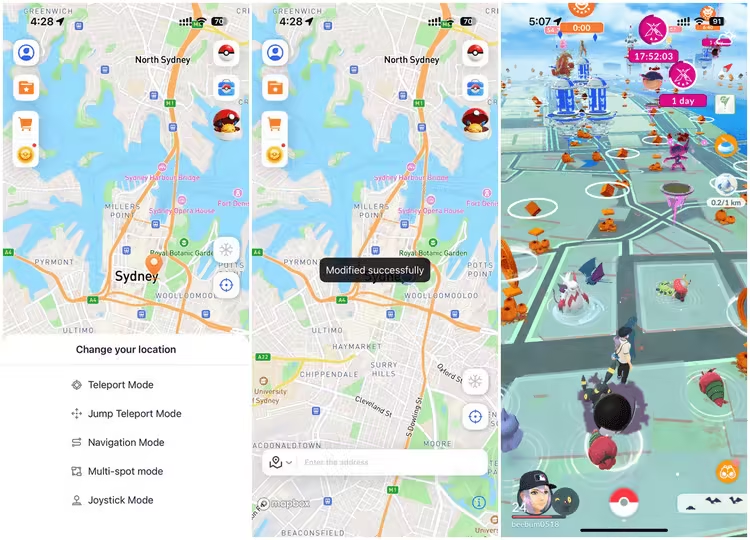
For iOS players, you can download the AnyTo iOS app on your iPhone, and simply choose any of the moving modes to spoof Pokémon GO with 1 click.
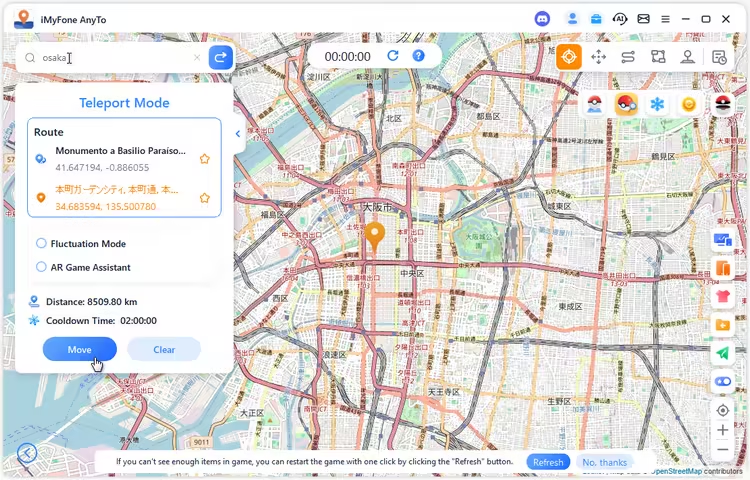
Also, if you prefer spoofing Pokémon GO on a computer, you can choose AnyTo PC version and connect to your iOS device. The choice is yours!
Pros

- iMyfone AnyTo is widely recognized as the safest and most stable Pokémon GO spoofer for both iOS and Android users.
- In addition to location spoofing, it offers many more features like cooldown timer, Pokémon sniper to help you enjoy the game more.
- AnyTo is the first tool that allows you to spoof directly in the original game without needing to download cracked versions.
- It has a user-friendly interface and is simple to use.
Cons

- Some advanced features are locked behind a pay wall.
- It requires careful setup to run smoothly.
- Lacks the built in features.

 AnyTo Discord Server
Pro Tip
If you’re curious about the best locations to use these spoofing apps, check out our detailed guide on Best Places to Spoof Pokémon GO to discover the top hotspots around the world.
#2 iTools BT 2.5
Safety & Stability:
iTools BT 2.5 is different from any other tool mentioned above or below. It's an external Bluetooth device only available on iOS for Pokémon GO spoofing, featuring the joystick function. When paired with the iTools Mobile App, you can unlock more features, like teleportation, pokesniper, nest finder, ect.
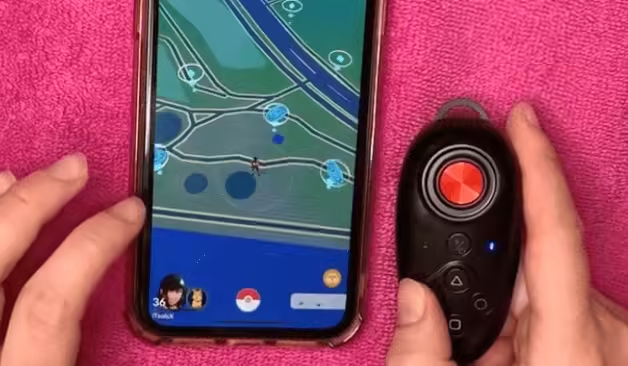
Safer though it is, the device has a hard distance limit: GPS can’t deviate more than ~15 km. To work around that ceiling, you need to use a DNS/proxy tool like NextDNS or Shadowrocket.
How install iTools BT 2.5
Step 1. Buy the device from the official website and wait for it to be shipped.

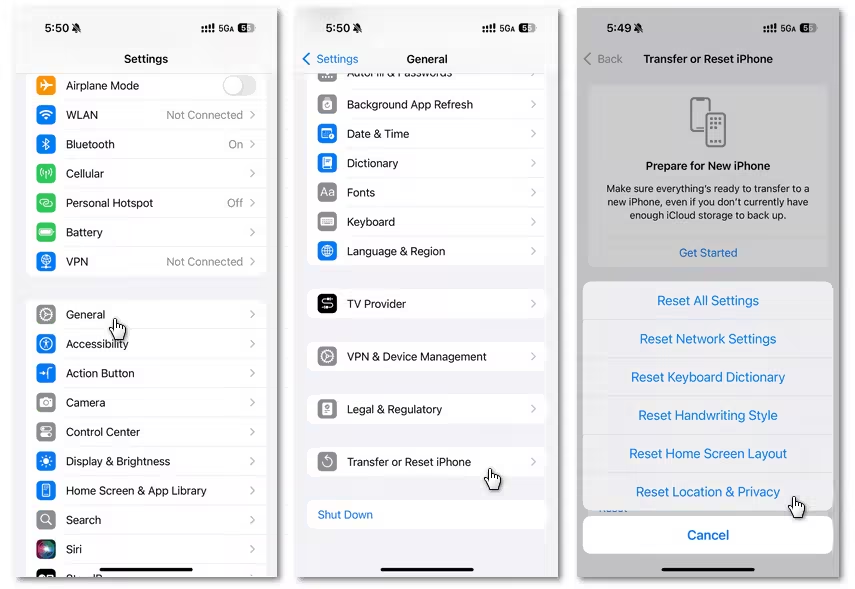
Step 2. After you get it, go to Settings → General → Transfer or Reset iPhone → Reset → Reset Location & Privacy
Step 3. Turn On Airplane Mode & turn off Location Services
Step 4. Use the invitation link to install iToolsBT app via TestFlight
Step 5. Power On the Bluetooth joystick and pair it with your phone.
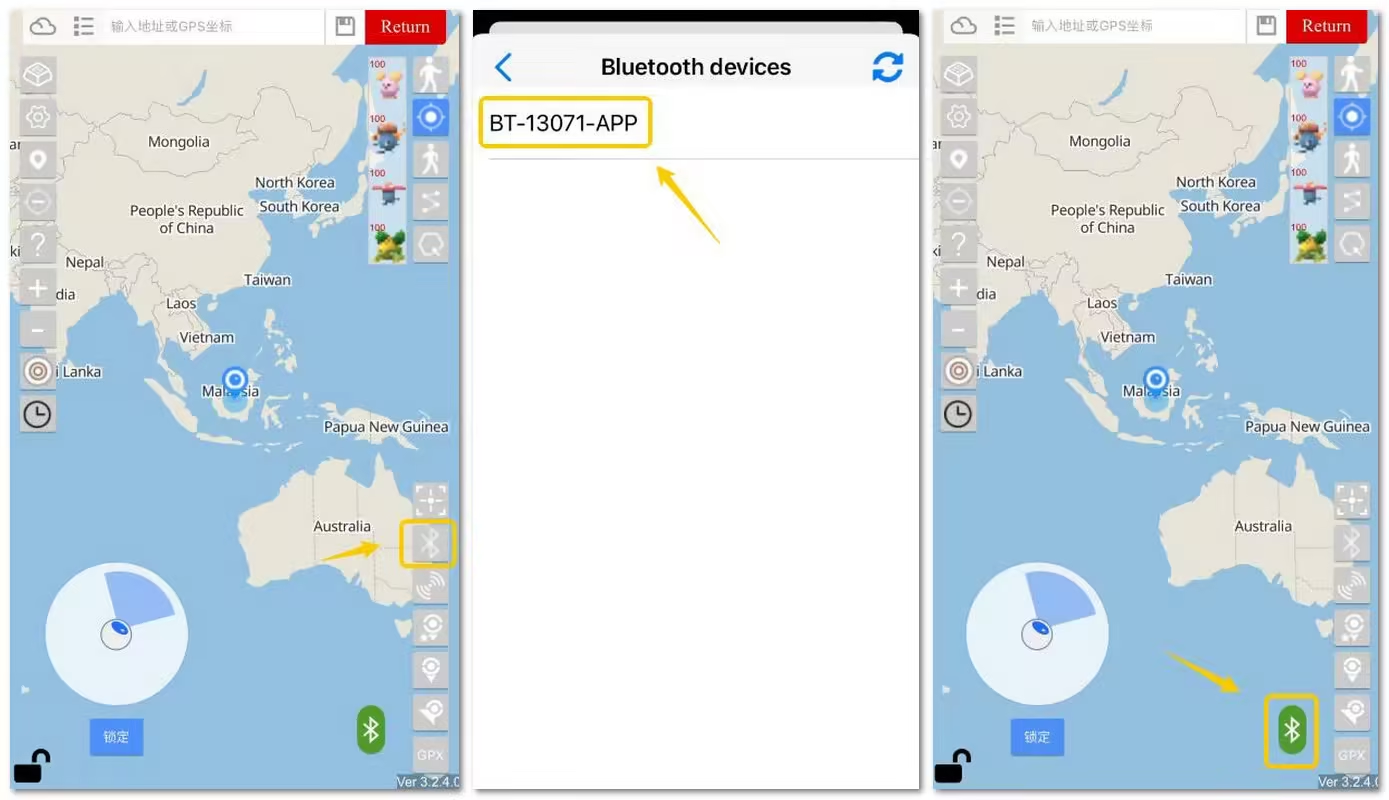
Step 6. Open the iToolsBT app, tap the Bluetooth icon to activate pairing.
Pros
- Low detection risk. It's a reputable Pokémon GO spoofer for iOS in 2026.
- The physical joystick makes control more enjoyable.
- One-time purchase. No further subscription fee.
Cons
- Setting up DNS or Shadowrocket to bypass the distance limit can be complicated.
- Costs $72.99. No free trial. UK buyers may pay extra taxes because of Brexit.
- Shipped from China. It will take quite a while.
- Compatibility with iOS 26 is still under testing.
iMyFone AnyTo
Avoid hardware limits and messy DNS setup! AnyTo changes your GPS beyond emulator/device ceilings, on PC or mobile. Simple setup, reliable, low-risk when used responsibly. Try AnyTo free right now.
#3 iPoGo
Safety & Stability:
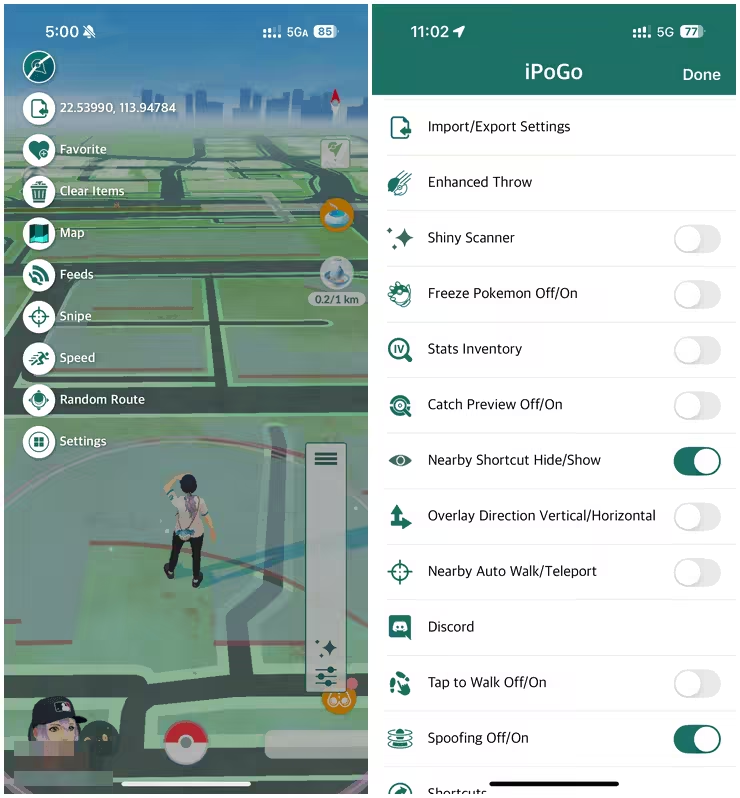
iPoGo, a free Pokémon GO spoofing app, is one of the most popular mods among the iOS players. It offers a bunch of impressive features built into the modded game, like tap-to-walk, enhanced throw, shiny scanner, and Pokémon and raids scanner.
This may sound too good to be true, and, in fact, there's a caveat. You have to use it on a jailbroken iPhone if you want to keep your account safe. I tested it via sideloading and received a 7‑day account ban immediately after the login. So, the following how‑to will only cover the jailbreak method.
Steps to download iPoGo
Step 1. Jailbreak Your Device. Choose jailbreak tools based on your iOS version and device, preferably Dopamine (iOS 15 – 16.6.1b) or Palera1n (A11 and below, iOS up to 16.7.7 / iPad up to 17.4.1).
Step 2. Add iPoGo Repo and Install the Tweak
- Install Pokémon GO from the App Store.
- Add the iPoGo Repo to Sileo or Zebra: http://ipogo.app/repo/
- Install iPoGo Tweak from the repo.
- (For Dopamine users) Install ElleKit via Sileo or Zebra.
- Open the modded app and enjoy.

Note
iPoGo offers three installation methods. The jailbreak option is the safest and is also the one officially recommended. If you want to explore other download methods, check out this iPoGo Pokémon GO guide.
Pros
- iPoGo is easy to use, best for beginners.
- It includes GPS spoofing, teleportation, joystick navigation, route planning, and cooldown timers.
- It lets you hide the iPoGo UI so your spoofing stays out of sight when taking sreenshots.
Cons
- Jailbreaking is required if you don't want to get caught, which is complex to set up.
- Like all Pokémon GO mods, it can easily lead to account bans if not used carefully.
- It’s unstable. You may run into different iPoGo not working issues.
iMyFone AnyTo
Skip jailbreak fuss! AnyTo lets you spoof Pokémon GO without mods and jailbreak. Easy setup for iOS/Android, stable and reliable, reduces ban risk when used responsibly. Start your free trial today!
#4 Spoofer GO
Safety & Stability:
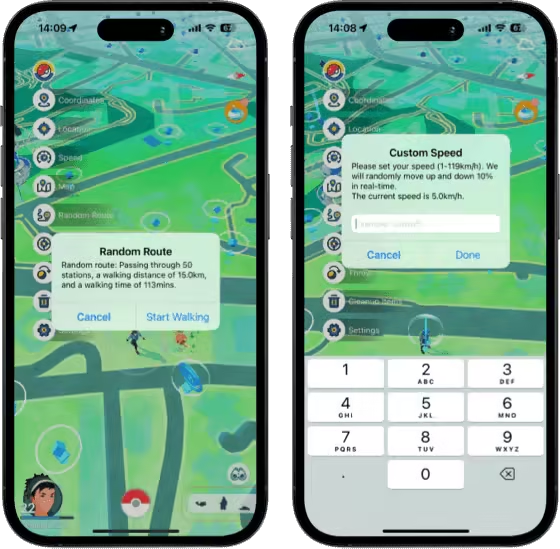
Spoofer GO is another amazing Pokémon GO spoofer for iOS players. It's a mod like iPoGo, and like all modded versions, it has features like GPS joystick, teleportation, IV preview, and modified catch. What makes it special is the Pokémon GO hacks it provides, including defeating GO Rocket in one hit, Virtual Go Plus, and spawn booster.
However, it has limits. Expect occasional crashes and a higher risk of detection than AnyTo.
How to install Spoofer GO
There are three official ways to download Spoofer GO: install via Panda Helper, use AltStore, or sideload the IPA. Panda Helper is the officially recommended method. Here's how to do it:
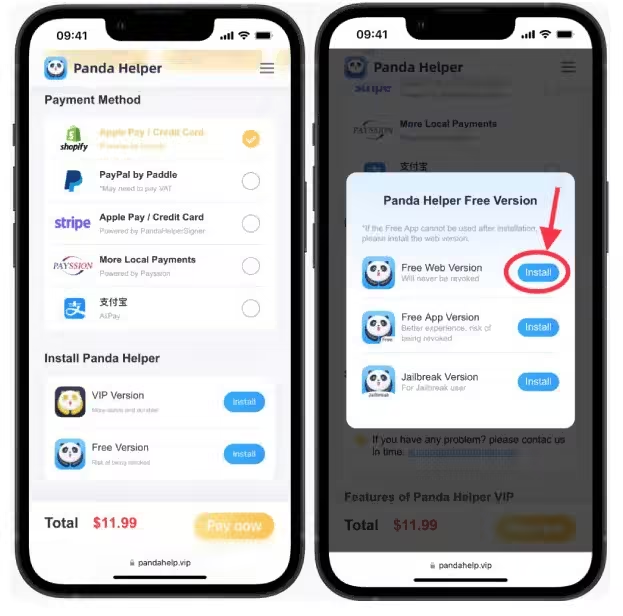
Step 1. First, download Panda Helper on your iOS device. Panda Helper is a third-party app store that provides users with access to a variety of apps, games, and tweaks that aren't available on Apple App Store or Google Play Store.
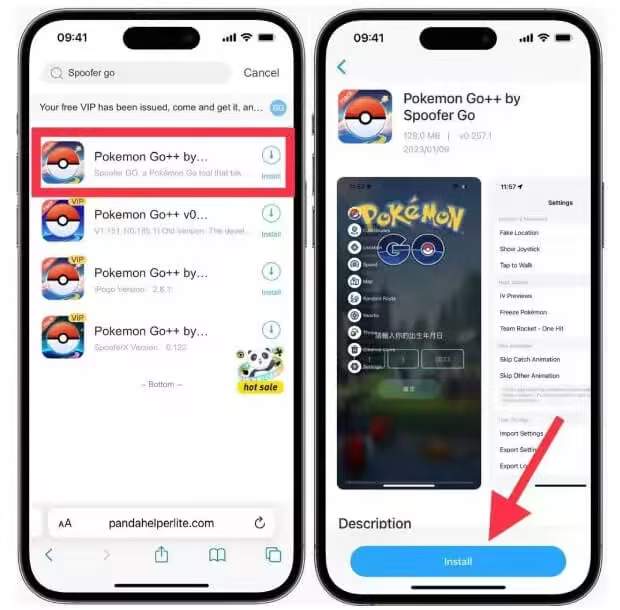
Step 2. After installation, search for Spoofer GO on Panda Helper's search bar.
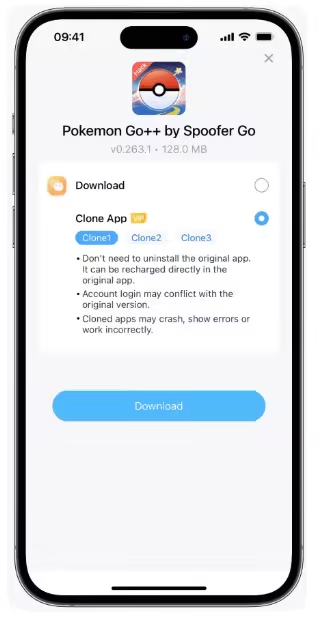
Step 3. Now download and install Pokémon GO++ by Spoofer GO.
Pros
- Spoofer GO offers basic spoofing features at a lower cost compared to its premium alternatives.
- It is ideal for users seeking a straightforward spoofing experience with extra features.
Cons
- Higher risk of bans due to lack of robust anti-detection mechanisms.
- Not very easy to setup and use.
- You have to delete the official Pokémon GO app from your phone.
#5 iSpoofer
Safety & Stability:
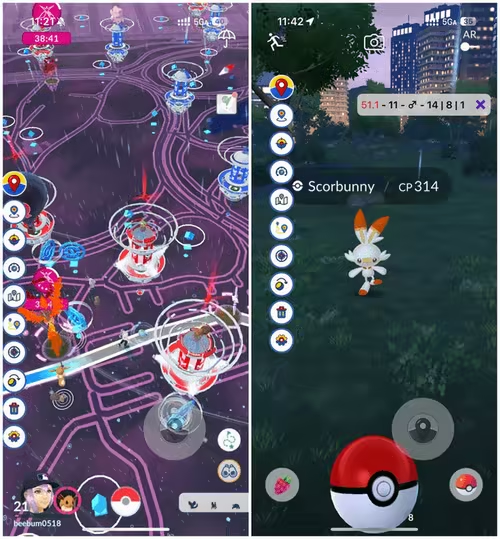
iSpoofer is a well-known name in the spoofing community. Many people thought it was down for good earlier in 2025, but it was offline for a major update and returned in July. The tool now works better than before, though minor issues like GPS signal not found errors may still occur occasionally.
iSpoofer adds several extras beyond basic spoofing: an IV preview, a feed filter to narrow spawns, automatic inventory management, a spawn booster (handy if you don’t have Spatial Rend), and a non‑shiny blocker.
How to install iSpoofer
You can download iSpoofer from the official website directly (no computer needed) or sideload the iPA (computer needed). Here's the Direct Download method:
Step 1. Delete the official Pokémon GO before you install.
Step 2. Go to iSpoofer's official site and tap Install → Direct Download.
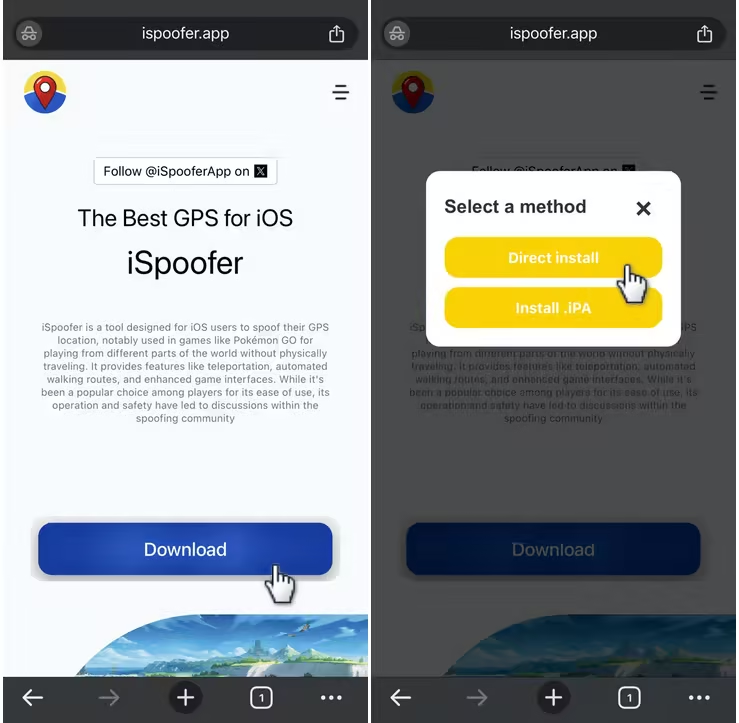
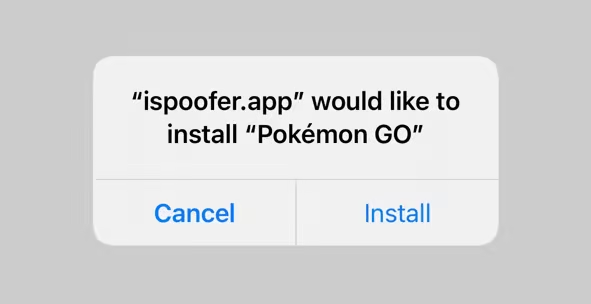
Step 3. Follow the prompts to continue. You might need to watch a few ads.
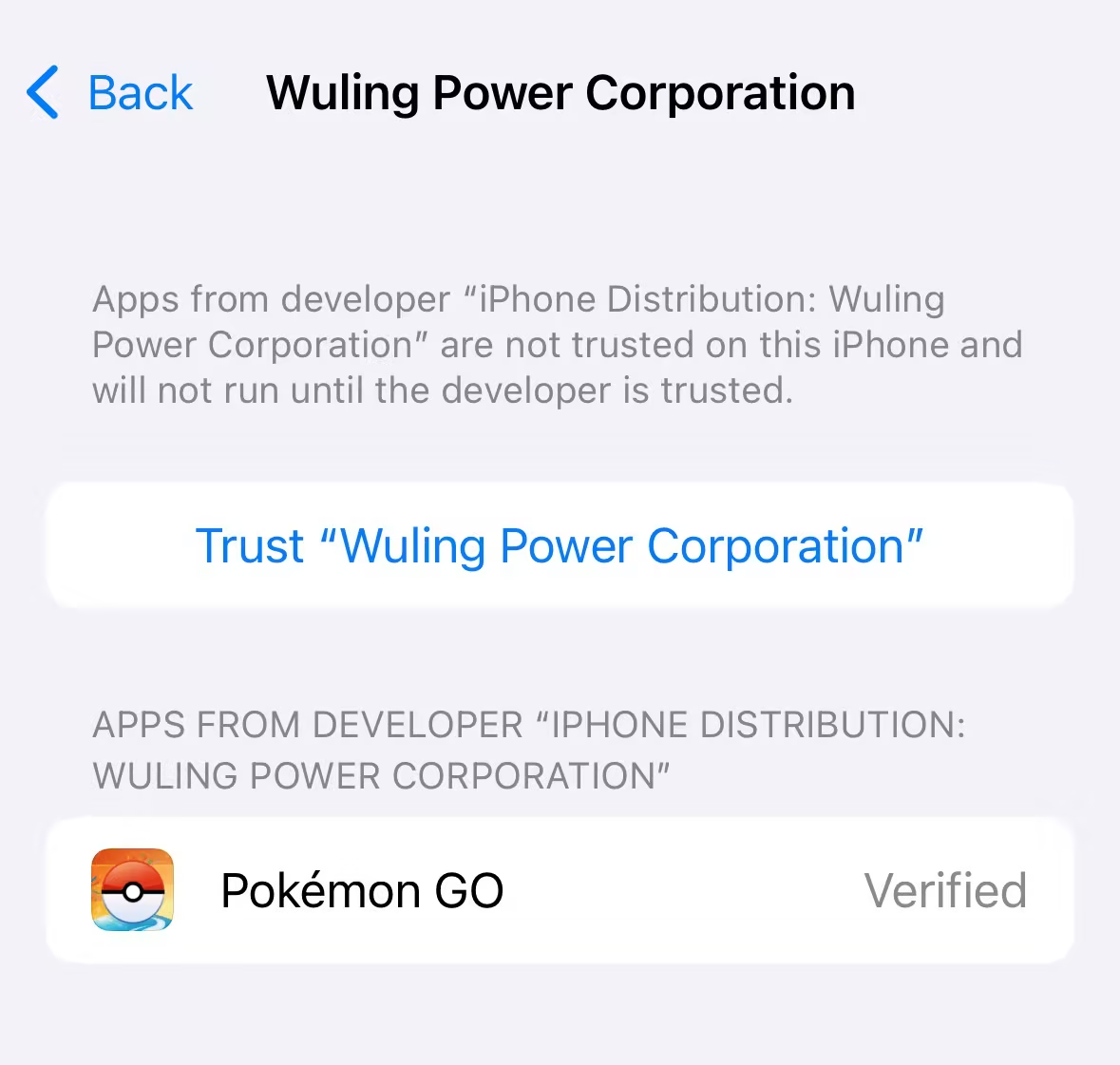
Step 4. When installed, go to Settings → General → VPN & Device Management, find the profile, and trust the app.
Pros
- Free Pokémon GO spoofing app for iOS with generous features.
- Direct download available. Minimal setup hassle.
Cons
- It's easy to get bans and strikes even if you follow the cooldown rules.
- Limited support from the developer team.
- You need to jailbreak your iPhone to get a safer experience.
6 Best Pokémon GO Spoofers Android in 2026
| Pokémon GO Spoofer Android | Root | Safety | Method | Game Mode | Rating |
|---|---|---|---|---|---|
| iMyfone AnyTo Android | No | 100% | Bluetooth (app) | |
|
| Fake GPS Joystick by App Ninjas | Optional | 75% | App | |
|
| Fly GPS | No | 65% | App | |
|
| PGSharp | Optional | 80% | Mod | |
|
| PG Tools | Yes | 70% | Bot | |
|
| Shungo | No | 70% | Bot | |
|
#1 iMyfone AnyTo Android
Safety & Stability:
As mentioned earlier, iMyFone AnyTo is also available on Andorid. Though their UIs differ, both versions deliver a stable, smooth spoofing experience wiht Bluetooth connection.
Supposed you have multiple Andorid devices and Pokémon GO accounts, you can control all of them from one AnyTo account using a single license, perfect for trading Pokémon between your main and alt accounts.
Steps to use AnyTo Android without computer
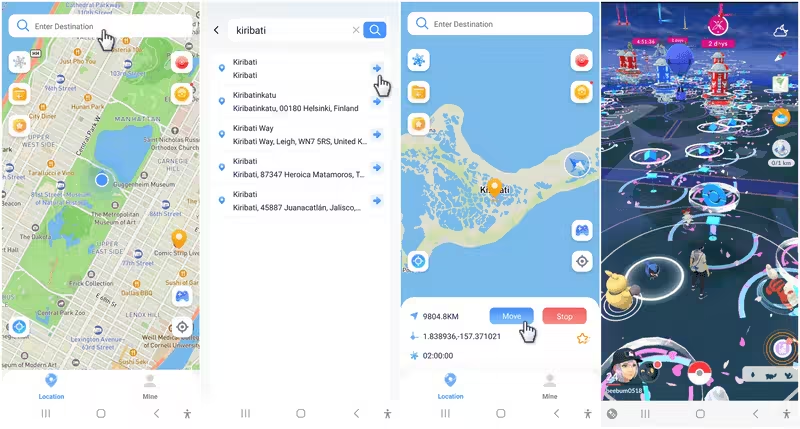
Step 1. Download and install iMyfone AnyTo Andorid on your phone.
Step 2. Open the app, choose the Game Mode to unlock more gamer-friendly features and minimize the detection risk, and enjoy spoofing.
Steps to use AnyTo Android with computer
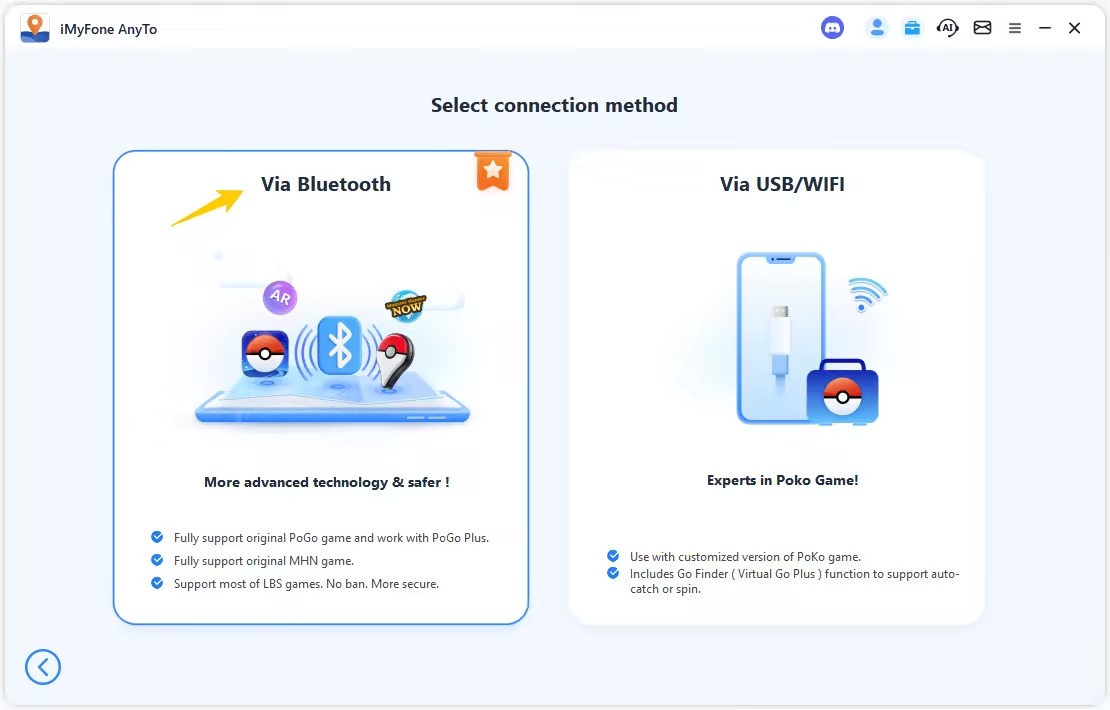
Step 1. Download and open AnyTo on your computer. Connect your device using Bluetooth (recommended), WiFi, or a cable.
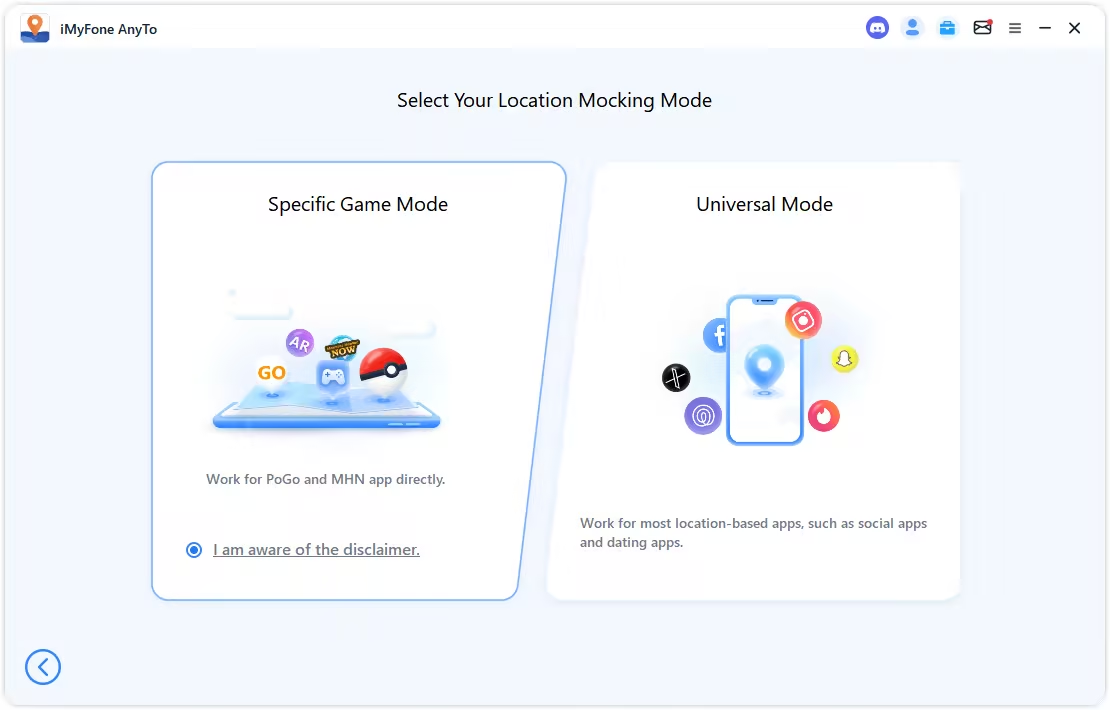
Step 2. Choose the Specific Game mode and enjoy spoofing.
#2 Fake GPS Joystick by App Ninjas
Safety & Stability:
Fake GPS by App Ninjas is an advanced spoofing tool that lets you hide mock location from Scopely if set up properly, making it a relatively low-risk tool for spoofing in Pokémon GO. However, the setup isn't easy. It involves rooting your phone or downgrading your Google Play Services.
The app’s core function is faking GPS in Pokémon GO, so when it comes to features that can make your Pokémon GO life easier, it doesn't shine like other tools mentioned here.
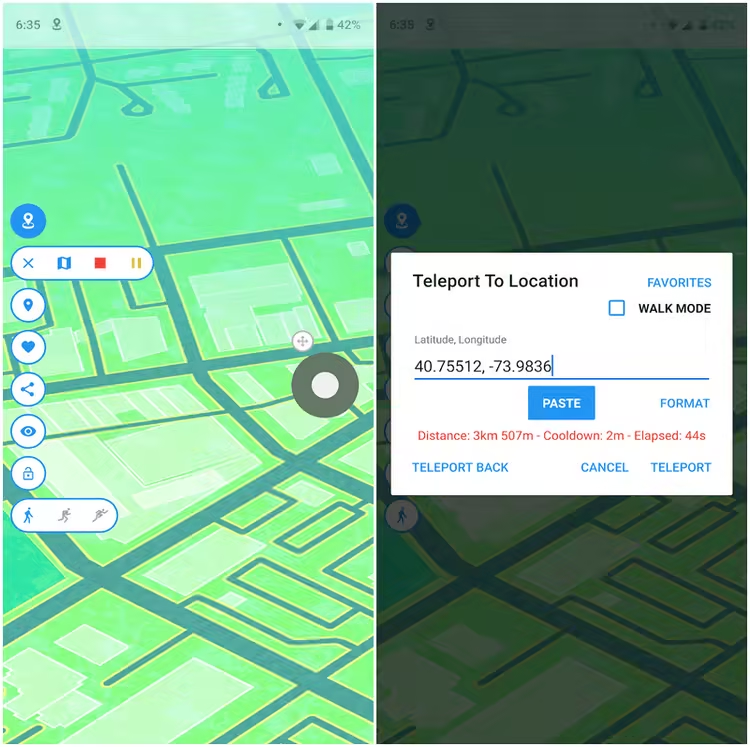
Steps to use Fake GPS Joystick
The Fake GPS app alone doesn't keep you safe from Pokémon GO account bans. It offers three options:
- Use Smali Patcher to hide mock locations system-wide. This makes in-game rubberbanding less likely.
- Root your phone with Magisk and install GPS JoyStick as a system-level app.
- Bypass mock location checks by downgrading Google Play Services or the Android Security Patch.
Each method requires complicated setup, so check out the official guide if you're interested.
Pros
- Offers advanced ways to avoid bans. High level of account safety.
- It is free to download and use, and it works with all LBS apps, not just PoGO.
Cons
- Limited botting features compared to tools like PGSharp or iPogo (e.g., no enhanced throw and tap to walk in the game).
- The setup is more difficult and complex than other Pokémon GO spoofers.
iMyFone AnyTo Pokémon GO Spoofer
Tired of rooting, Smali patches, and Play Services hacks? AnyTo offers straightforward location changing for Android and iOS without root, quick setup, stable spoofing when used responsibly. Try AnyTo free!
#3 Fly GPS
Safety & Stability:
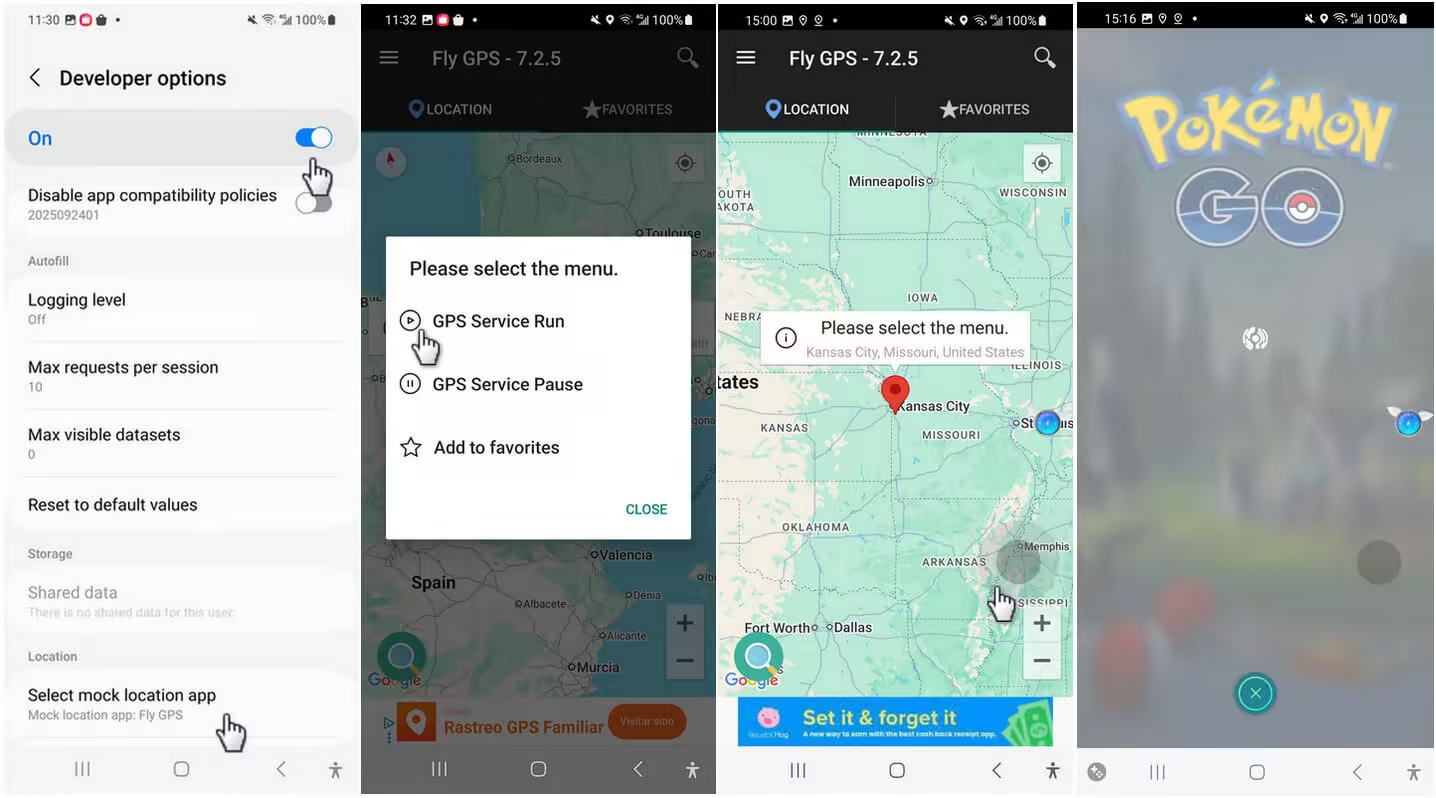
Fly GPS is a location spoofer for Android, providing a joystick overlay and teleportation for Pokémon GO. This free tool is popular with casual players for its accessibility. Just remember, this application wasn't originally built for GPS-based games, but you can still use its features to play.
Steps to download Fly GPS
Step 1. Download and install this joystick app from Play Store.
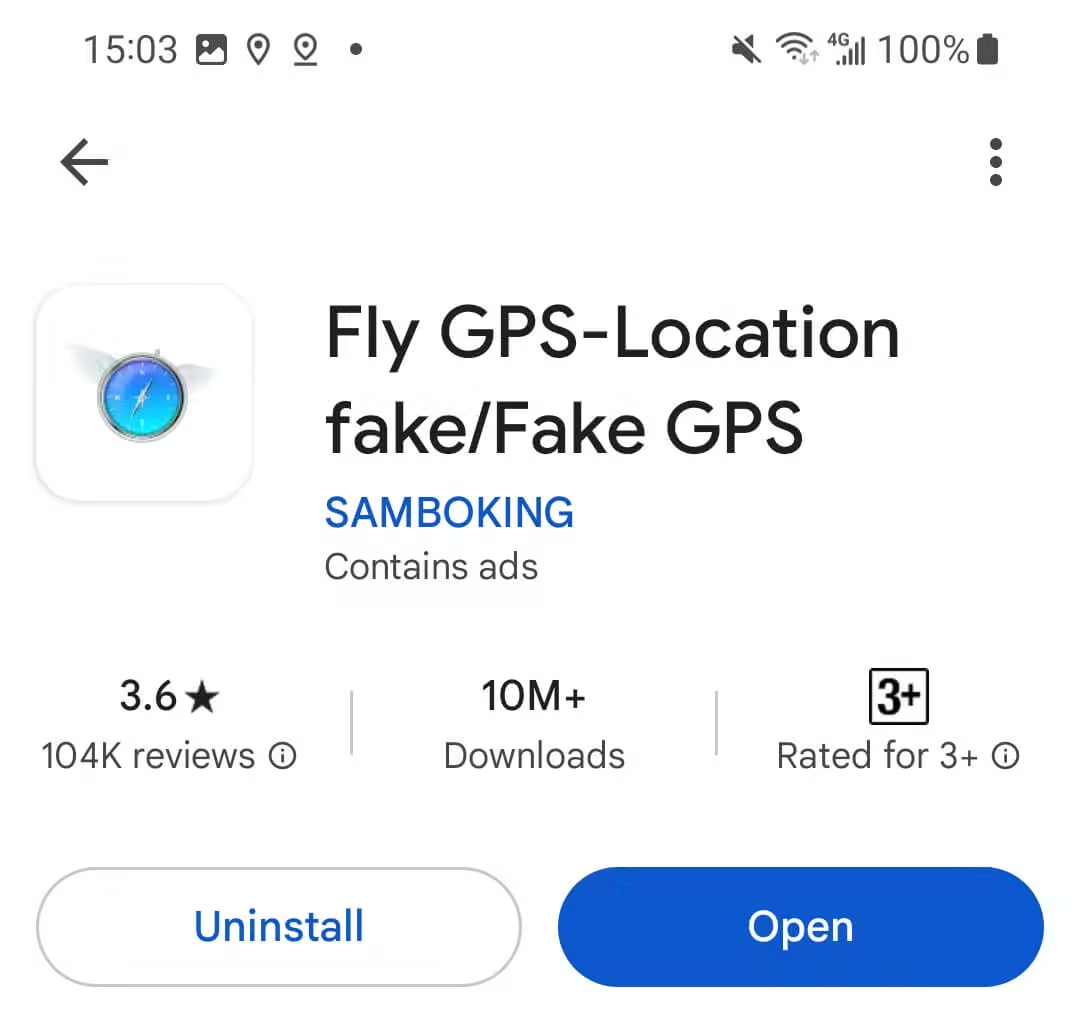
Step 2. Enable Developer Mode, select Fly GPS as your mock loation app,
Step 3. You can teleport or use the joystick now.
Pros
- Compact and easy to use. Simple joystick interface for location spoofing.
- Customizable settings for movement and speed.
Cons
- Too much ads.
- It requires Developer Mode and mock location, and both can be easily detected and flagged.
- Limited features compared to joystick apps built specifically for Pokémon GO.
- Limited support from the developer.
#4 PGSharp
Safety & Stability:
PGSharp is a Pokémon GO mod specifically designed for Android users. That said, there's a workaround to use PGSharp on iOS.

This Android spoofer has received many updates since its 2020 launch. It offers downloads for both rooted and non‑rooted devices. That combo, added with features like teleport, joystick, enhanced throw, and caught preview, has made it a household name in the Pokémon GO spoofing community.
However, it's not a top choice for non-rooted users. Many PGSharp users reported on Reddit that they got permanently banned for using it, so proceed with caution.
Steps to download PGSharp
Step 1. Prepare a rooted Andorid phone with proper setup.
Step 2. Download the PGSharp rooted version following the guide on their Discord.
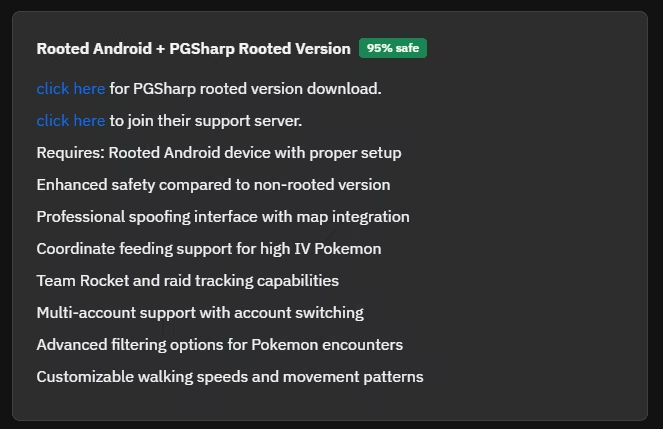
Step 3. Open the downloaded file, and enjoy spoofing.
Pros
- It's a modified Pokémon GO with many built-in botting and spoofing tools.
- Offers both free and premium versions.
- No PC required for installation
Cons
- Available only on Android.
- The free version has limited features compared to the premium plan.
- PGSharp has a highly risk of account suspension if not used properly
- Easy to get banned if non-rooted.
- Slow updates to support the newer Pokémon GO and OS versions.
#5 PG Tools
Safety & Stability:
PG Tools is a botting app for Pokémon GO that offers you tons of impressive tools and features to make your gameplay a lot easier.
Unlike traditional spoofing apps, PG Tools focuses on automation, like auto-spinning PokéStops and Gyms, auto-transfer unwanted Pokémon, auto-feed and auto-pet buddy.
You can literally level up to 80 in a few days without even touching your phone.
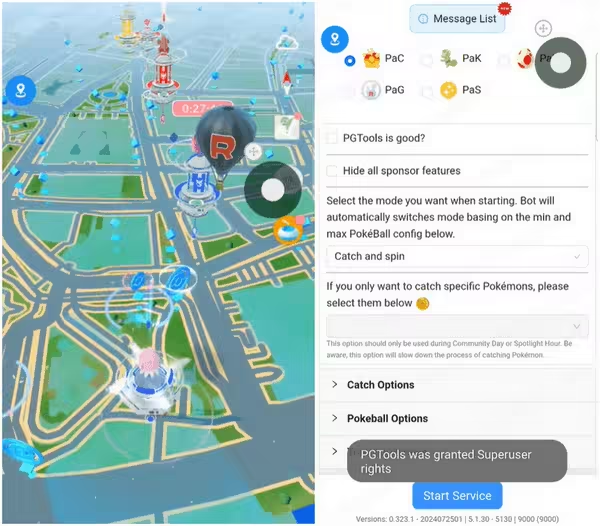
Steps to use PG Tools
Step 1. Go to PG Tools official website and download the files. You can choose among Final PGTools, Beta PGTools and GPS Wrapper.
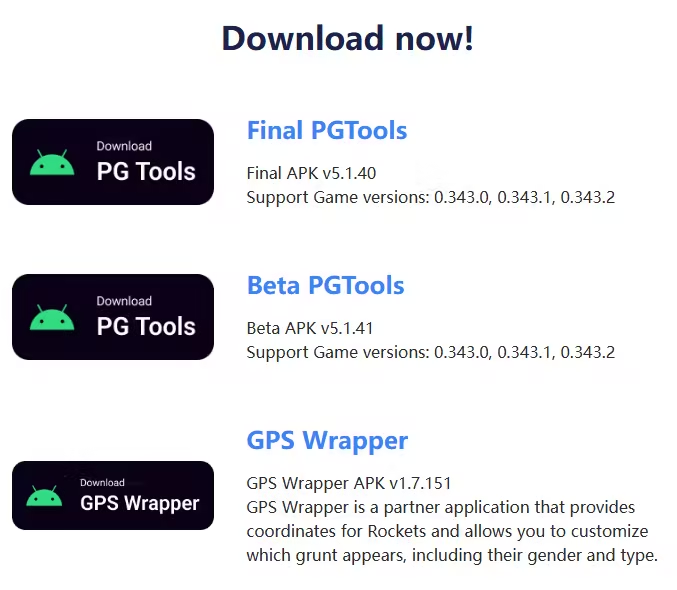
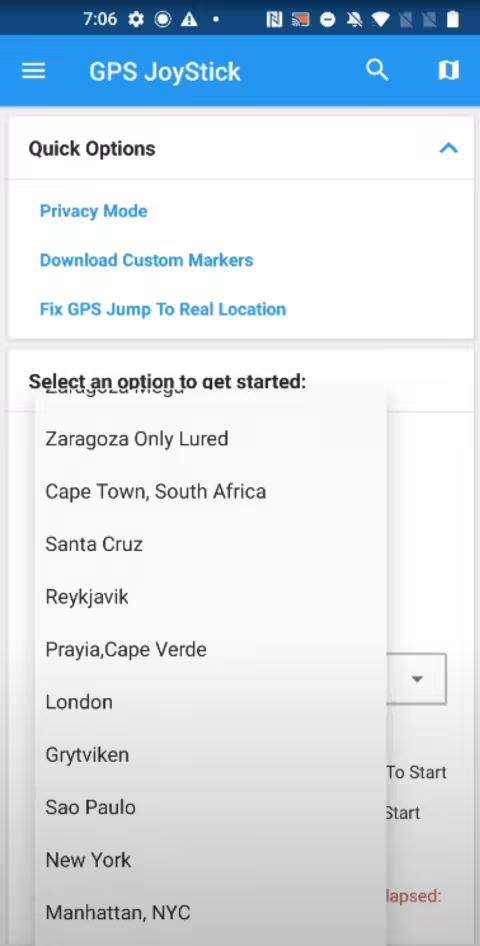
Step 2. After downloading and installing, you will see the PG Tools interface. Now select an area to get started.
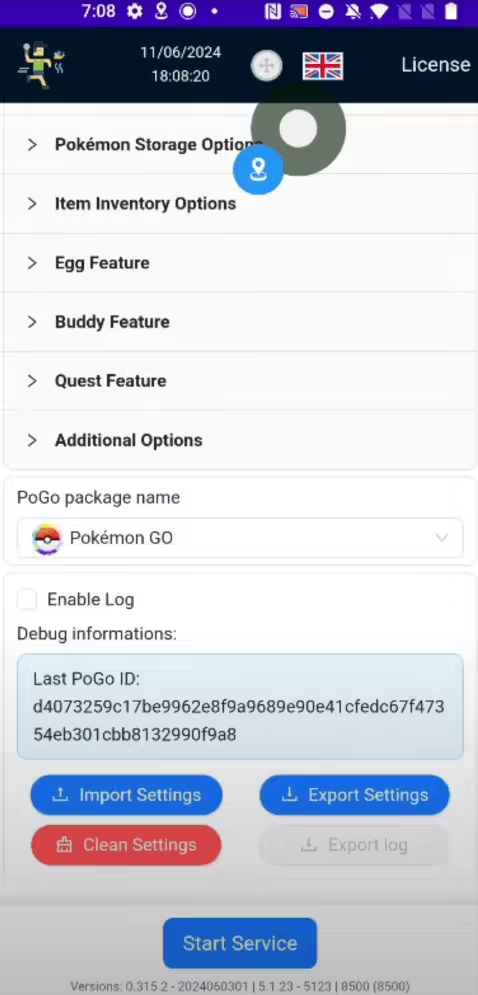
Step 3. In addition, you can unlock some advanced features, such as egg hatching, buddy feature, quest finding and so on.
Pros
- Comprehensive set of tools to assist with all aspects of Pokémon GO gameplay.
- User-friendly interface, designed for both casual and advanced players.
- A lightweight app that doesn't take up much storage space.
Cons
- Location spoofing is tightly integrated into the bot’s automation. Little room for manual control.
- Limited features for the free version.
- Relies on third-party services, which could occasionally cause delays or inaccuracies.
- A lot of ban reports in recent years. Not as good as it used to be.
AnyTo Pokémon GO Spoofer
Want safe, flexible spoofing without full-on bots? AnyTo lets you manually control your Pokémon GO location on iOS or Android, stable and low-risk when used responsibly. Start free with AnyTo today!
#6 Shungo
Safety & Stability:
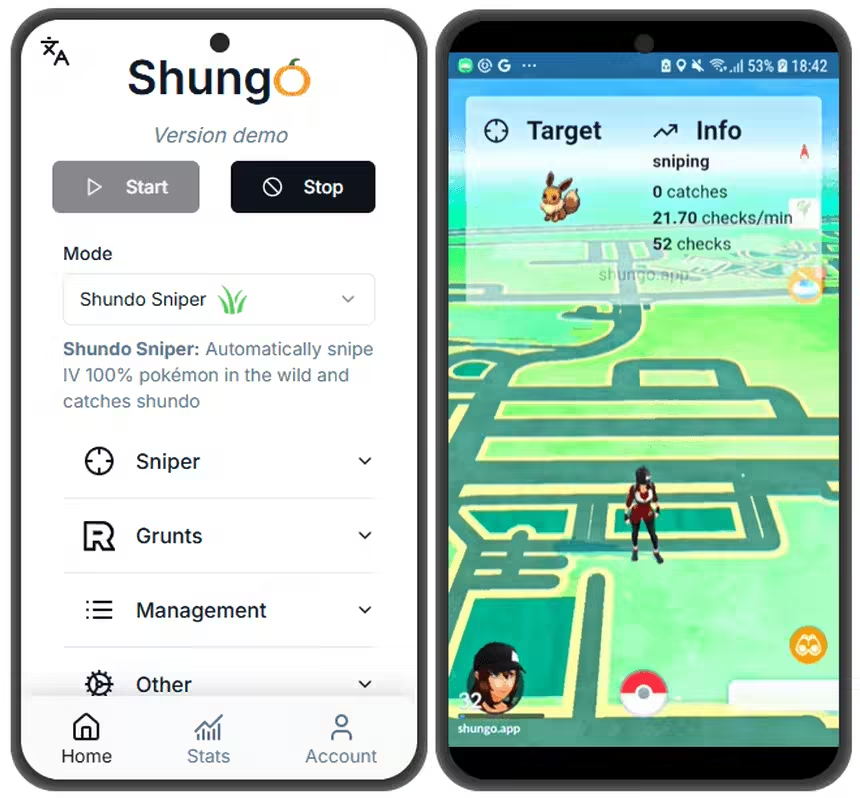
Shungo is a more of a Pokémon GO bot than a spoofer for Android users. It manipulates GPS locations and is known for its Shundo sniper. It even offers an automatic raid and Dynamax/Gigantamax mode and helps you defeat grunts at max speed. It's like a Pokémon GO manager that does everything for you.
It's amazingly automated, but of course, there's a flip side. The free version has very limited features, and the paid version, while it has everything, costs €14.99/month. And they does not promise safe spoofing.
Steps to download Shungo
Step 1. Go to Shungo official website and log in to your account.
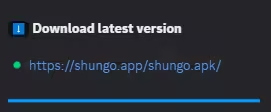
Step 2. Join Shungo Discord group and download the latest Shungo.apk from the #info channel.
Step 3. Set up your joystick app and grant SuperUser access.
Step 4. Go to Other → Enable BSOD Prevention (keeps you under daily 4,800 encounter/catch limit)
Step 5. Start Shungo and enjoy.
Pros
- Lightweight and doesn't take up much storage space.
- Highly-automated, does everything for you.
Cons
- You can't share your Shungo account, or you will end up with being revoked without refund.
- You can only run Shungo on one device with one subscription.
- You can get Error 11 or Error 12 in the game.
- The subscription fee is pricey.
Understanding and Reducing Risks of Spoofing in Pokémon GO
1 What are the risks of Spoofing Pokémon GO?
Faking your location in Pokémon GO can put your account at risk. Pokémon GO’s anti‑cheat system can detect unauthorized location changes and respond with temporary bans or permanent bans.
Frequent spoofing, using unsafe tools, or too much automation increase that risk. To lower the chance of penalties, pick a reliable, well‑maintained solution (like iMyFone AnyTo, backed by a large team) that prioritizes safety. Always spoof responsibly to protect your account.
2 Tips for safely spoofing Pokémon GOs
- Follow Cooldown Rules: Follow the Pokémon GO cooldown time chart. Leave enough time between spoofed moves to avoid triggering anti-cheat systems.
- Use Trusted Apps: Stick to reputable spoofing tools with good reviews. Choosing a reliable tool can significantly reduce the risk of getting banned.
- Don't rush to upgrade your phone system or the Pokémon GO app: New iOS, Android, or Pokémon GO updates can break compatibility or add stricter security checks. Unless it’s mandatory, wait to update your system or the game and see how the spoofing community responds first.
FAQs about Pokémon GO GPS Location Spoofing
1 Can I still spoof Pokémon GO in 2026?
Yes, spoofing is still possible in 2026, but it’s becoming more and more difficult due to Scopely’s improved anti-cheat measures. You can choose to use AnyTo to make Pokémon GO spoofing safer and easier.
2 How to spoof Pokémon GO iPhone for free?
AnyTo offers a free trial. To spoof Pokémon GO on your iPhone or Android for free, you can try AnyTo and access the core features without paying.
3 What is the best Pokémon GO spoofer app in 2026?
The best Pokémon GO spoofer is AnyTo. It offers multiple modes, including joystick, teleport, and multi-spot features, and supports all iOS and Android versions. Most importantly, AnyTo is the safest option, with 100% undetectable performance, making you account secure while spoofing.
4 Can you get banned for spoofing in Pokémon GO?
Yes. If you use an unsafe spoofer, your account may get suspended. Pokémon GO team can issue bans ranging from temporary suspensions to permanent account closures for spoofing. To prevent your account from being banned, we recommend using AnyTo as your first choice.
5 Is Pokémon GO spoofing on PC necessary?
No, AnyTo does not only has PC version, but also has iOS app and Android app versions, which allow you to directly spoof Pokémon GO on your mobile phone without using a computer. It makes your gameplay easier and much more smooth.
Conclusion
Pokémon GO spoofers have helped rural players with no PokéStops and trainers with limited mobility enjoy the game. With the right setup, a spoofer can unlock more fun and new possibilities without constantly worrying about account bans. Choosing a reliable tool like AnyTo can make spoofing both safer and more enjoyable.
If you’re still unsure which spoofer to pick, AnyTo is a solid choice for iOS and Android. Take your Pokémon GO experience up a notch with more confidence. Try it free today!


Ryan Miles is a seasoned gamer and mobile strategy writer with over 5 years of hands-on experience in Pokémon GO spoofing and GPS-based games. Known for breaking down complex location tricks into beginner-friendly guides, Ryan’s mission is simple: help you explore more, catch faster, and play smarter without ever leaving home.
-
PoGo Wizard Review: Safety, Download Guide, and Alternative
Find out all about Pogo Wizard. Learn how Pogo Wizard works, check its safety, follow the download guide, and find the best PoGo Wizard alternative!
40 mins read -
How to Get Metal Coat in Pokémon GO (2026)
A complete 2026 guide to finding and using Metal Coat in Pokémon GO. Discover drop methods, best tips, and how AnyTo helps you farm rare items faster.
4 mins read -
What Are the Pokémon GO 50km Reward and How to Get it [2026]
Discover everything about the Pokémon GO 50km Adventure Sync rewards. learn the easiest way to claim them and why your Pokémon GO is not tracking steps.
17 mins read -
WeCatch Pokémon GO: Everything You Need to Know in 2026
Wondering if WeCatch for Pokémon GO is safe in 2026? Learn its features, problems, ban risks, and why AnyTo is the best alternative for rare Pokémon hunting.
6 mins read -
How to Get Master Ball in Pokémon GO 2026 Full Guide
Learn how to get the Master Ball in Pokémon GO 2026, the rarest type with a 100% catch rate. Discover how to use it wisely & the best Pokémon to save it for.
5 mins read -
[Guide] How to Fly in Pokémon GO Without Getting Banned
Learn what “flying” means in Pokémon GO, the best tools to do it, common problems you may encounter, and what to avoid to keep your account safe!
4 mins read
Was this page helpful?
Thanks for your rating
Rated successfully!
You have already rated this article, please do not repeat scoring!