
 Top-Views
 New-Updates


Nominate new locations in your community or use AnyTo to discover more Gyms and PokéStops worldwide.
If you have ever wished for a PokéStop or Gym closer to your home, workplace, or local park, you’re not alone. Many Pokémon GO trainers want more accessible ways to collect items, complete raids, and engage with the game daily. Fortunately, Niantic offers players the ability to nominate new PokéStops through the Wayfarer system, which can even help create new Gyms under certain conditions.
In this guide, I’ll explain exactly how to make a PokéStop or Gym in Pokémon GO, what locations cannot be approved, and tips to maximize your chances of success. Plus, I’ll show you how a tool like AnyTo can expand your Pokémon GO experience beyond your neighborhood.

In this article:

How to Make a PokéStop in Pokémon GO
You cannot simply build a PokéStop out of thin air — it must be nominated and reviewed by Niantic’s Wayfarer program. To do this, you need to meet some basic requirements and follow the proper process.
Requirements
- You must be at least level 37 in Pokémon GO to unlock nomination privileges.
- A Niantic Wayfarer account (free) is required to review or submit locations.
- The location must be permanent, safe, and of community interest.
Step-by-Step Process
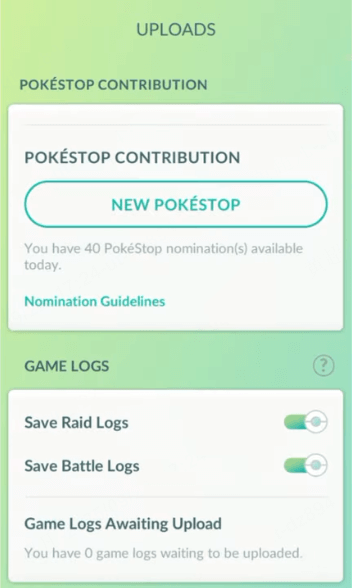
1. Open Pokémon GO → Go to the Main Menu > Settings > New PokéStop Nomination.
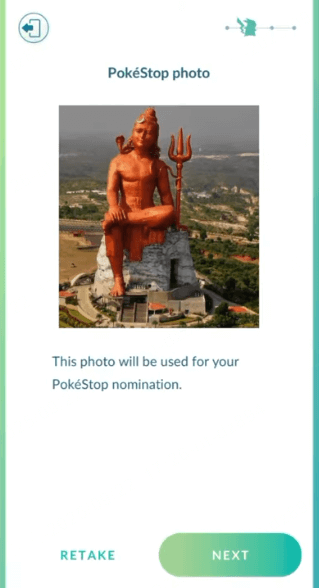
2. Take a clear photo of the candidate object or landmark (e.g., statue, mural, community board).
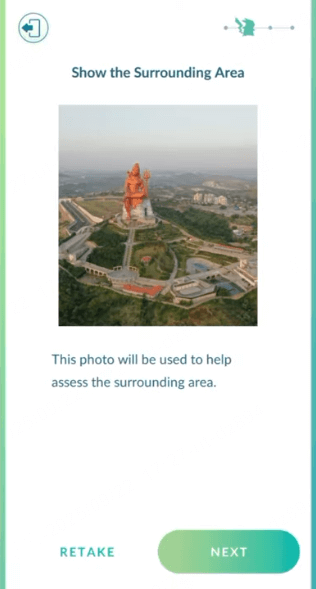
3. Add a supporting photo to show the surrounding area for safety verification.
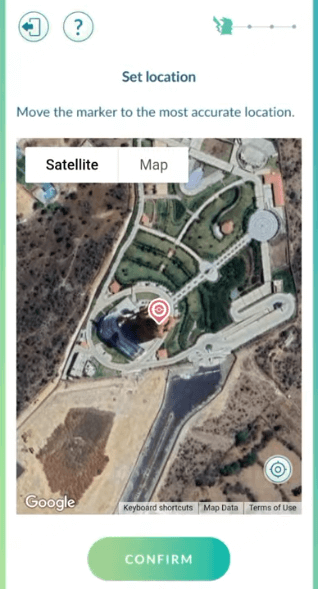
4. Pin the location accurately on the map.
5. Write a title and description that explain why this location is culturally, historically, or socially important.
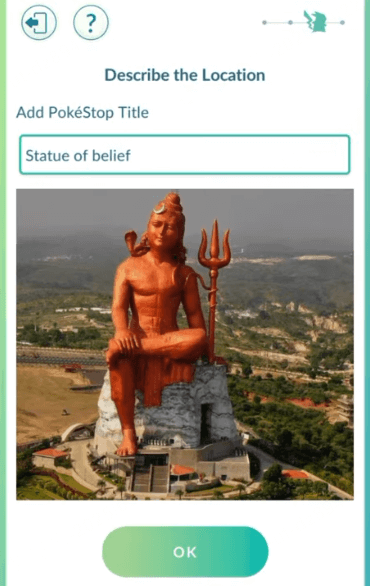
6. Submit for review. Niantic’s Wayfarer community will then evaluate your nomination.
What Makes a Good Candidate?
- Public art (murals, sculptures, statues).
- Historical or cultural sites (churches, temples, libraries, memorials).
- Community gathering spots (parks, playgrounds, hiking trail markers).
Well-photographed, safe, and meaningful locations are far more likely to be approved.
How to Make a Gym in Pokémon GO
Unlike PokéStops, you cannot directly apply for a Gym. Gyms are automatically created based on the number of PokéStops within certain areas, using Niantic’s S2 cell system.
How the S2 Cell System Works
- Pokémon GO divides the map into invisible S2 cells (a type of geographic grid).
- Each Level 14 cell can hold a maximum number of PokéStops and Gyms.
- When enough approved PokéStops exist in a single cell, one may be upgraded into a Gym.
Gym Conversion Thresholds (Approximate)
- 2 PokéStops in a cell → 1 Gym may appear.
- 6 PokéStops in a cell → A second Gym may appear.
- 20 PokéStops in a cell → A third Gym may appear.
This system means that adding new PokéStops in your area can eventually trigger a Gym upgrade, but it depends on how many Wayspots already exist in your cell.
 1-Click Change GPS Location with AnyTo!
Choose your platform and install (iOS, Android, PC).
Select a location mocking mode.
Change location anywhere you like.


What Cannot Be a PokéStop or Gym
Not every location is eligible. Niantic has strict rules to protect privacy and safety.
Disallowed Locations
- Private residences (including front yards and driveways).
- Schools for children under 18 (K-12 schools, daycares).
- Unsafe areas (train tracks, bridges, highways, restricted zones).
- Temporary structures (seasonal displays, movable signs).
- Generic objects with no cultural or social value (streetlights, mailboxes, parking meters).
If your nomination falls into one of these categories, it will almost certainly be rejected.
Tips to Increase Your Chances of Approval
Submitting a PokéStop doesn’t guarantee success. Use these strategies to improve your odds:
- Take high-quality photos – clear, daytime, and free of obstructions.
- Write a strong description – explain why the spot has cultural, historical, or social significance.
- Show safe pedestrian access – use supporting photos to highlight sidewalks or nearby walkways.
- Be precise with GPS – inaccurate pins are a common reason for rejection.
- Avoid duplicates – check if the location already exists as a PokéStop or Gym before submitting.
- Think community-first – choose locations that encourage people to gather, learn, or explore.
[Bonus] Use AnyTo to Explore New Gyms and PokéStops
Even if you’re unable to add a PokéStop or Gym near your home, you can still explore thousands of existing ones worldwide using AnyTo, a trusted location changer for Pokémon GO.
AnyTo is especially useful for trainers in rural areas where PokéStops and Gyms are sparse, helping you keep up with urban players and maximize your gameplay opportunities.

With AnyTo, you can:
- Visit active Gyms in different cities for unique raids.
- Explore rare PokéStop clusters for farming items.
- Find new communities without physically traveling.
Steps to use AnyTo:
Step 1: Download and install AnyTo. You can either download the PC version to change the location on your iOS/Android device via computer, or get the mobile app version to modify your location directly.
Step 2: Once installed, enter coordinates or a place name in the search bar and change your location with one click.
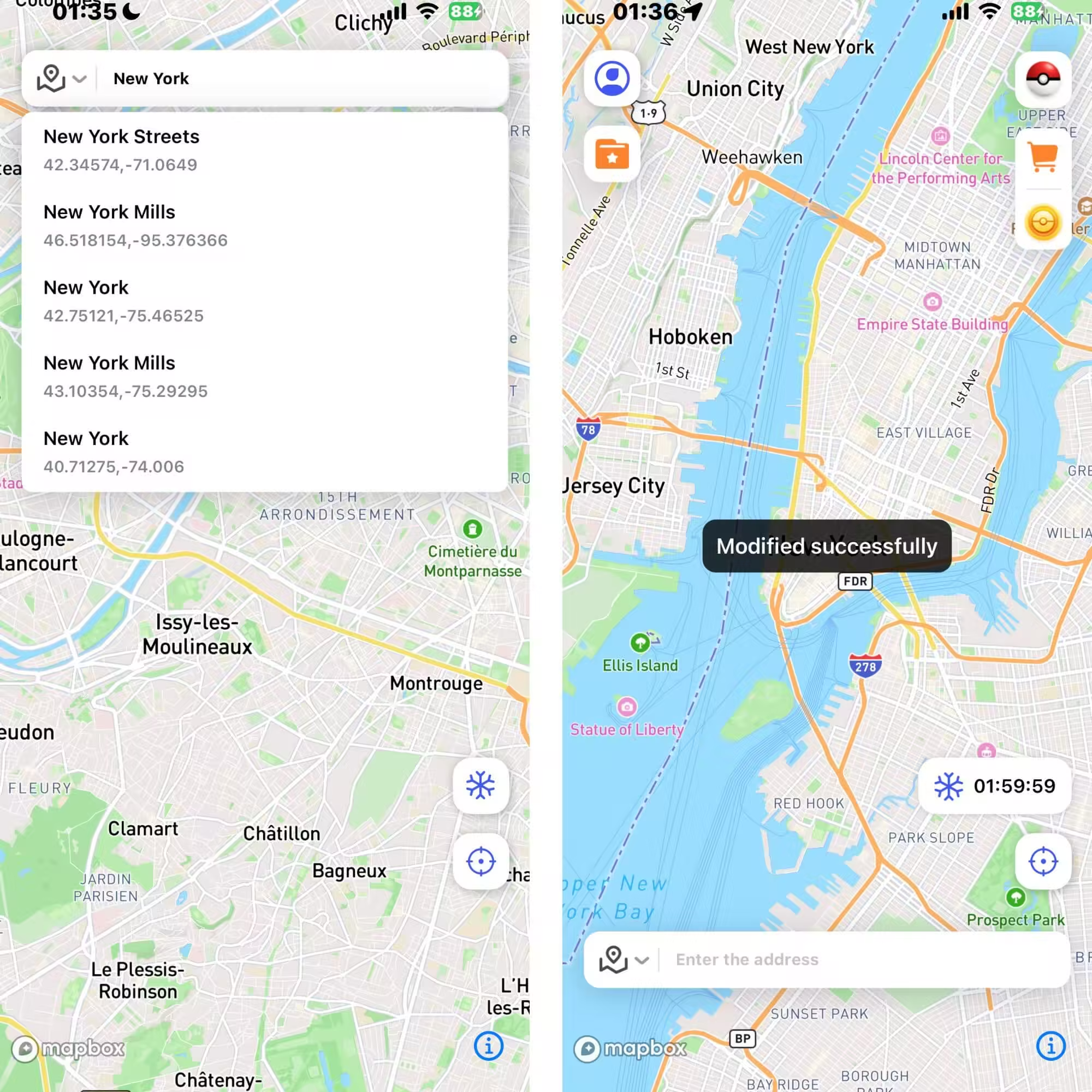
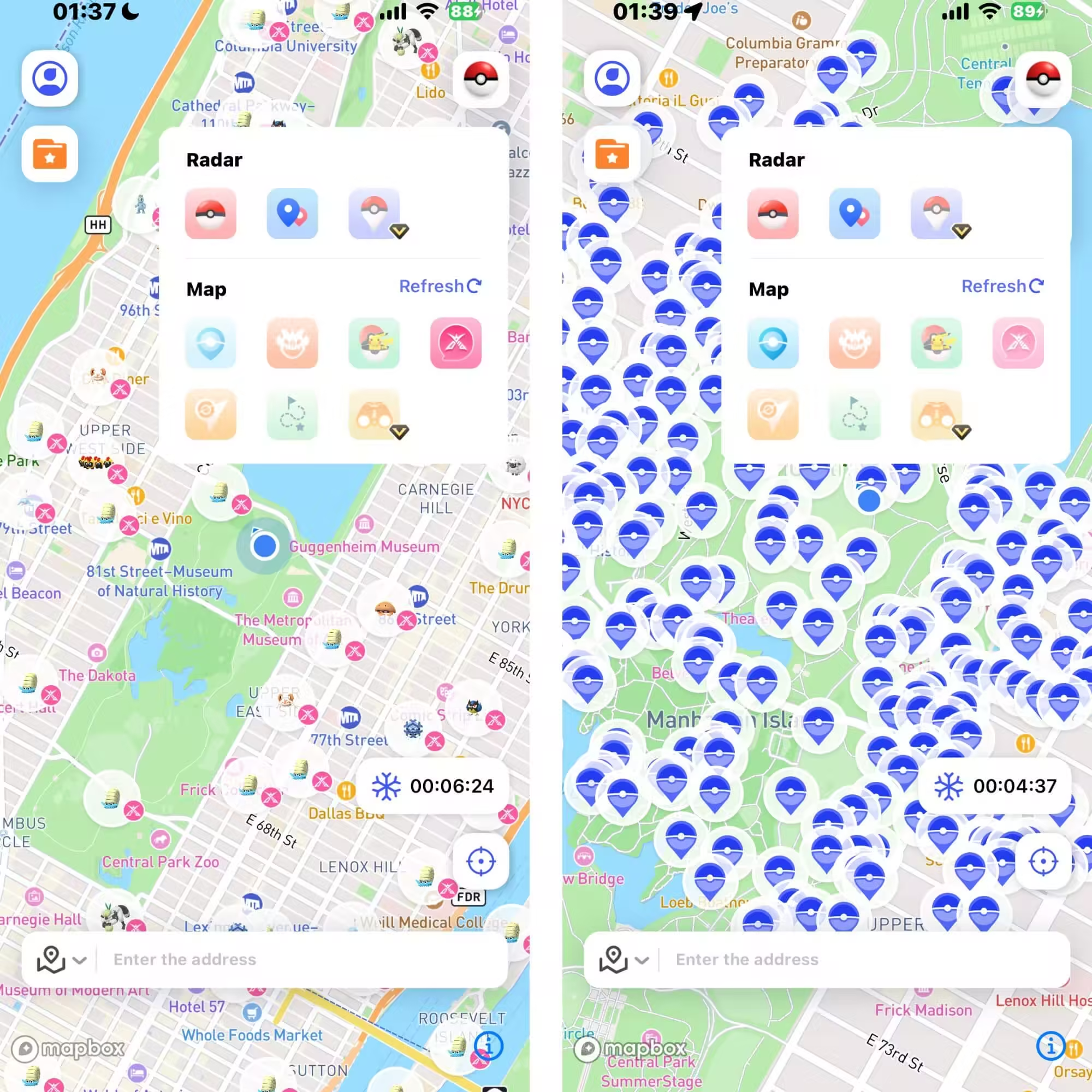
Step 3: You can also use the special game features to find nearby raids, Pokémon, PokéStops, and more.
FAQ
1.Can I create my own Gym in Pokémon GO?
No, Gyms cannot be directly created by players. They are automatically generated by Niantic when enough PokéStops exist in an area.
2.How long does it take for a PokéStop nomination to be reviewed?
The review process can take weeks or even months, depending on how active your local Wayfarer community is.
3.What types of locations are most likely to be approved as PokéStops?
Public parks, murals, libraries, historical sites, and community landmarks generally have higher chances of approval.
4.Can I use AnyTo to find more PokéStops and Gyms?
Yes. With AnyTo, you can change your GPS location to explore new Gyms, PokéStops, and raids worldwide, which is especially helpful in rural areas.
Conclusion
Creating a PokéStop or Gym in Pokémon GO isn’t about hacking the game. It’s about contributing to the community through Niantic’s Wayfarer system. By submitting meaningful landmarks, you can help grow your local Pokémon GO scene, and with enough approved PokéStops, even trigger the appearance of a Gym.
Remember: focus on quality, safety, and cultural relevance in your nominations. And if you want to go beyond your neighborhood, tools like AnyTo can open the doors to a global Pokémon GO adventure.
Whether you’re chasing raids, farming items, or building a stronger local community, understanding how PokéStops and Gyms are created is the first step to shaping your Pokémon GO journey.


Ryan Miles is a seasoned gamer and mobile strategy writer with over 5 years of hands-on experience in Pokémon GO spoofing and GPS-based games. Known for breaking down complex location tricks into beginner-friendly guides, Ryan’s mission is simple: help you explore more, catch faster, and play smarter without ever leaving home.
-
Is the iTools Bluetooth Joystick 2.5 Worth It for Spoofing Pokémon GO?
Hesitating whether you should get a iTools BT 2.5 Joystick for Pokémon GO in 2026? Check out this review, find out the pros, cons, and what its users say.
10 mins read -
How to Use Pokémon GO Auto Walker on iOS & Android in 2026
Learn how to auto walk in Pokémon GO. Use iMyFone AnyTo, one of the best auto-walker apps for iOS and Android, to hatch eggs and earn distance effortlessly.
6 mins read -
Can You Play Pokémon GO on Bluestacks? Complete 2026 Guide
Does Pokémon GO still work on Bluestacks? Is your Pokémon GO crashing on Bluestacks? How to play it on PC? This article has the answers you're looking for!
21 mins read -
DeFit Pokémon GO 2026: Still Working? Best Alternative
Wondering if DeFit still work for Pokémon GO in 2025? How do you use it? What happens if it doesn't work? Find your answers in this DeFit Pokémon GO guide!
29 mins read -
Is UnicTool TailorGo Worth It? Review, Safety & Alternative
What is UnicTool TailorGo? How does TailorGo work with Pokémon GO? Is it worth trying? Read this review on safety, features, and the best alternative now!
46 mins read -
Is TweakBox Pokémon GO Still Working? Best Alternatives!
What is TweakBox? Does TweakBox still work? Does TweakBox have Pokémon GO? What are the best alternatives for TweakBox Pokémon GO? Find the answers here!
6 mins read
Was this page helpful?
Thanks for your rating
Rated successfully!
You have already rated this article, please do not repeat scoring!