
 Top-Views
 New-Updates


Change location in Pokémon GO anywhere with 1 click. Try for free!
Thinking about quitting Pokémon GO or starting fresh with a new account? Whether you’re trying to manage your playtime, protect your privacy, or help a child move on from the game, sometimes the best option is to deactivate your Pokémon GO account. Read this blog and learn how to delete Pokémon GO account step by step.
In this article:
How to Delete Pokémon GO Account (Step-by-Step)
You can request to permanently delete your Pokémon GO account, but keep in mind that once it is gone, it cannot be restored. Here’s how to do it clearly, step by step:
1 Delete Through the Pokémon GO App
1. Sign in to the Pokémon GO account you want to remove.
2. Tap the Poké Ball, then open Settings (gear icon).
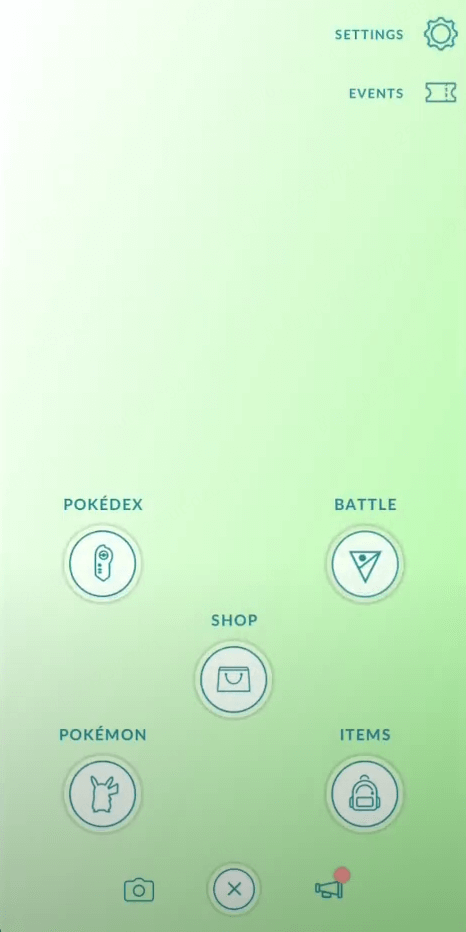
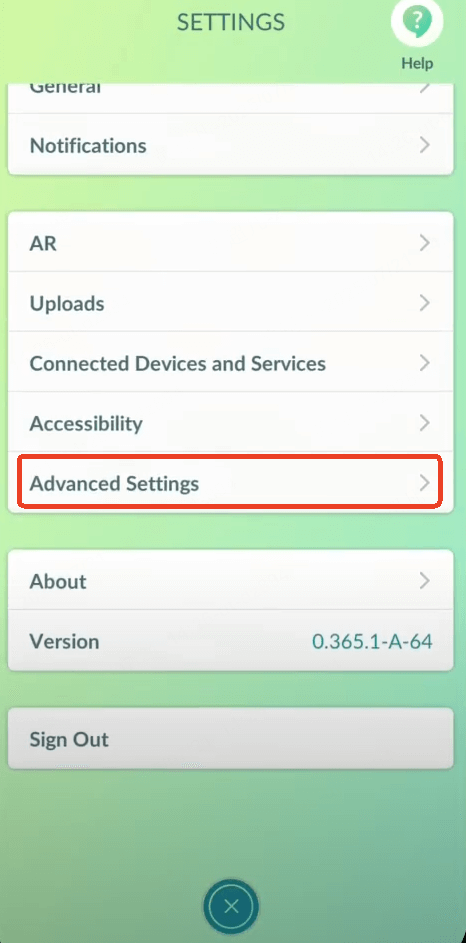
3. Scroll down and tap Advanced Settings.
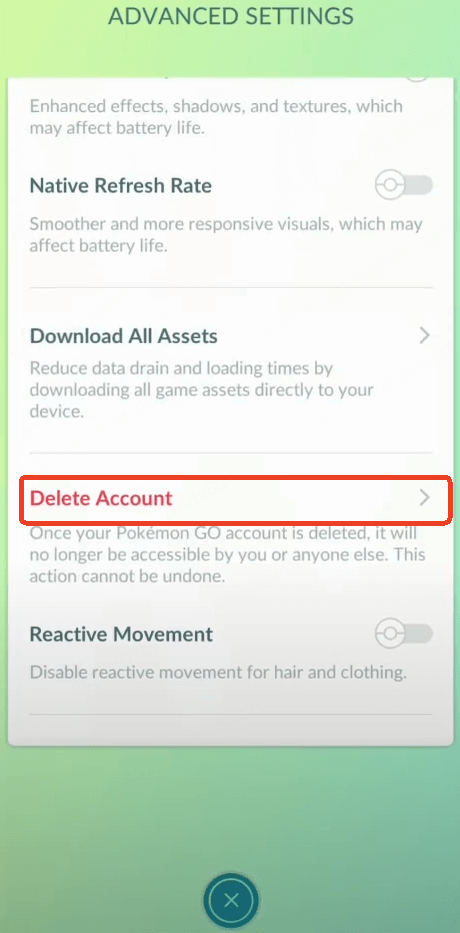
4. Choose Delete Account.
5. Follow the on-screen instructions to confirm your request.
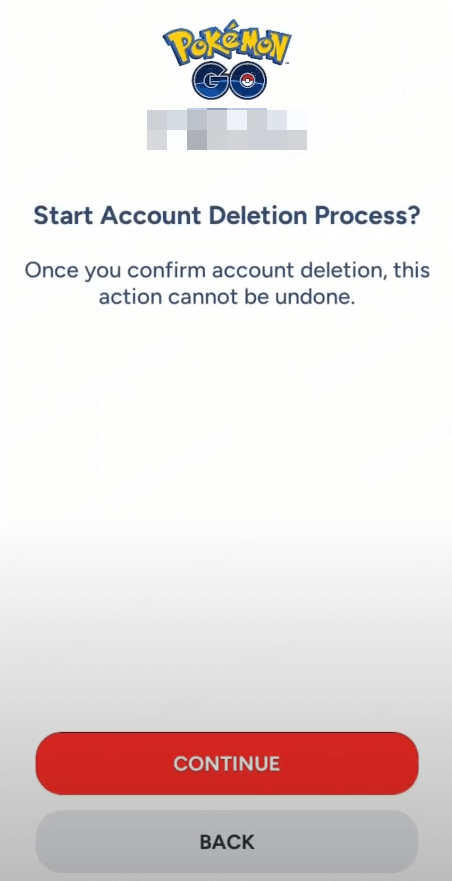
Once you confirm, this action is final and your account and all related game data will be removed.
2 Delete Through the Pokémon GO Support Website
1. Go to the official Pokémon GO Support or Help Center.
2. Find the Account Deletion Request Form.
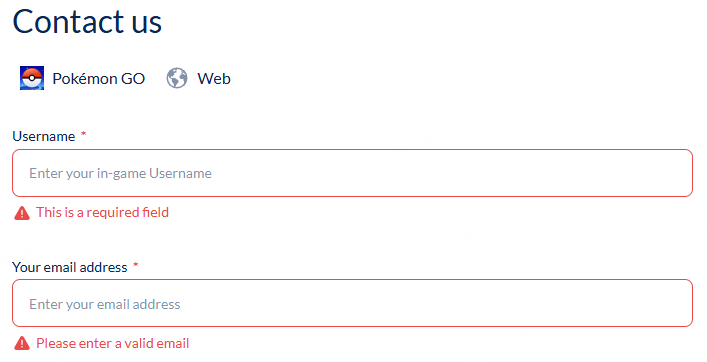
3. Fill in the form with your email address and Trainer nickname linked to the account you want to close.
4. In the Issue Category, select Delete My Account.
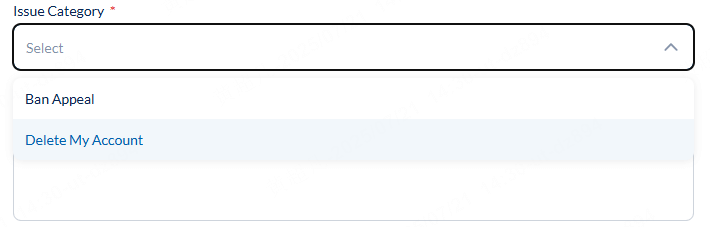
5. If you wish, explain your reason for closing the account.
6. Complete the captcha or security check and click Submit.
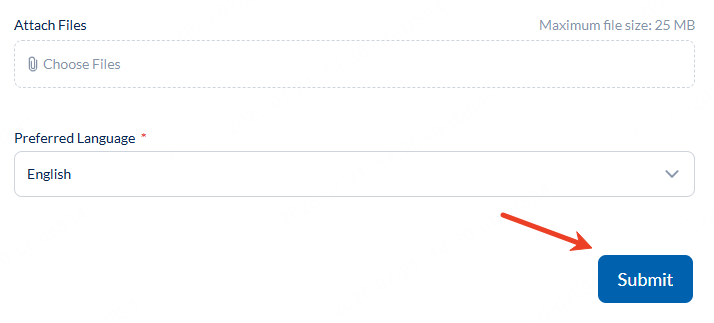
After submitting, you will not receive an immediate confirmation. Instead, check your email for a message from Pokémon GO Support. This email will include a special confirmation code and explain that it is your final chance to change your mind.
To complete the process, reply to that email with the provided code. Once verified, Scopely (formerly Niantic) will process your request and your account and all data will be permanently removed, usually within a few weeks.

Important Reminders
Deleting your account is permanent. You cannot cancel the request once it has been processed. If you decide to play Pokémon GO again in the future, you will not be able to reuse the same email address or Trainer nickname from the deleted account.
What Happens When You Delete Your Pokémon GO Account?
When you permanently delete your Pokémon GO account, all game data is wiped. This means your Pokémon, items, PokéCoins, buddy progress, shiny collection, raid stats, friends list — everything — will be erased from Scopely’s servers.
Keep in mind:
- Once your deletion request is fully processed, there’s no way to recover your account.
- If you used a Google, Facebook, or Apple ID to sign in, those sign-ins will be disconnected from Pokémon GO.
- There’s no “temporary deactivation” — once you confirm, it’s final.
How to Recover Pokémon GO Account
Accidentally deleted Pokémon GO or logged out and can’t get back in? Don’t panic — in many cases, you can recover your account, as long as it hasn’t been permanently deleted through an official deletion request.
Here’s how to recover your Pokémon GO account:
1 Try Your Original Login
Pokémon GO accounts are linked to your Google, Facebook, Apple ID, or Pokémon Trainer Club account. Make sure you’re logging in with the same method you used when you created your account.
2 Check for Typos & Multiple Emails
Sometimes the issue is as simple as logging in with the wrong email or account type. Double-check that you’re using the correct login credentials.
3 Contact Support
If you’re still locked out, visit the official Pokémon GO Help Center and submit a “Lost Account” or “Unable to Sign In” request. Provide as much info as possible, like your Trainer name, last known level, team, and linked email. Support may ask for proof to verify it’s really you.
Note
If you submitted an official account deletion request and it has already been processed, recovery is usually not possible. Once the data is wiped, it’s permanent.
Can You Deactivate Pokémon GO Account Temporarily?
Pokémon GO does not have an official “pause” or “temporary deactivation” option. If you want a break, your best bet is to simply stop logging in. Your account will stay intact, and you can return anytime without losing your Pokémon or progress.
If you don’t want reminders:
- RTurn off push notifications in the app settings.
- Disable email updates from Scopely.
- Remove the app from your device. You can reinstall it later when you’re ready to come back.
FAQ
1.Can I get my Pokémon GO account back after deleting it?
Once your deletion request is fully processed, your account is permanently removed and cannot be recovered. If you just want a break, consider logging out instead.
2.How long does it take to delete a Pokémon GO account?
It usually takes a few days to a few weeks for Scopely to process and complete an account deletion request.
3.Can I deactivate my Pokémon GO account temporarily?
Pokémon GO does not offer a true pause or temporary deactivation. If you want to stop playing, simply log out or uninstall the app. Your account will stay intact.
4.How do I recover my Pokémon GO account if I forgot my login?
Use the same login method (Google, Apple, Facebook, or Pokémon Trainer Club) you used to create the account. If you still can’t sign in, submit a request through the Help Center with as much info as possible.
Conclusion
Deleting your Pokémon GO account is a big step. Once your data is gone, it’s gone for good. Make sure you really want a clean break before submitting your request. If you just need a break, logging out or deleting the app is usually enough to put the game on pause.
Whatever you decide, now you know exactly how to delete or deactivate your Pokémon GO account safely and permanently.


Ryan Miles is a seasoned gamer and mobile strategy writer with over 5 years of hands-on experience in Pokémon GO spoofing and GPS-based games. Known for breaking down complex location tricks into beginner-friendly guides, Ryan’s mission is simple: help you explore more, catch faster, and play smarter without ever leaving home.
-
How to Get Metal Coat in Pokémon GO (2026)
A complete 2026 guide to finding and using Metal Coat in Pokémon GO. Discover drop methods, best tips, and how AnyTo helps you farm rare items faster.
4 mins read -
What Are the Pokémon GO 50km Reward and How to Get it [2026]
Discover everything about the Pokémon GO 50km Adventure Sync rewards. learn the easiest way to claim them and why your Pokémon GO is not tracking steps.
17 mins read -
WeCatch Pokémon GO: Everything You Need to Know in 2026
Wondering if WeCatch for Pokémon GO is safe in 2026? Learn its features, problems, ban risks, and why AnyTo is the best alternative for rare Pokémon hunting.
6 mins read -
How to Get Master Ball in Pokémon GO 2026 Full Guide
Learn how to get the Master Ball in Pokémon GO 2026, the rarest type with a 100% catch rate. Discover how to use it wisely & the best Pokémon to save it for.
5 mins read -
[Guide] How to Fly in Pokémon GO Without Getting Banned
Learn what “flying” means in Pokémon GO, the best tools to do it, common problems you may encounter, and what to avoid to keep your account safe!
4 mins read -
How to Make a Gym or PokéStop in Pokémon GO (2026 Guide)
Learn how to create a Gym or PokéStop in Pokémon GO, how to submit nominations, what locations are not allowed, and tips to boost your approval chances.
22 mins read
Was this page helpful?
Thanks for your rating
Rated successfully!
You have already rated this article, please do not repeat scoring!