
 Top-Views
 New-Updates


Find your next perfect Pokémon with AnyTo, the ultimate location changer that helps you search for Hundos and teleport right to the spot!
If you're serious about catching top-tier Pokémon, you must know Pokémon GO IV checkers.
These handy tools analyze your Pokémon's potential by reading data from screenshots, things like IVs, max CP, and even PvP rankings. They don't modify your game or break any rules; instead, most of them overlay on your screen (especially on Android) to calculate everything instantly.
You can use them to decide which Pokémon to power up, evolve, or trade, so as to make every Stardust investment truly worth it.

Quick Navigation

In this article, I'll focus on the top-rated IV checkers for Pokémon GO and what you need to know about these tools.
Pokémon GO IV Tools Explained: Checker vs Scanner vs Calculator
IV checker, IV calculator, and IV scanner all point to one thing: tools that help you find out your Pokémon's hidden stats, known as Individual Values (IVs). The different names mainly describe how the tool works:
- A scanner automatically reads your screen to detect a Pokémon's CP, level, and stats.
- A calculator takes your input or game appraisal data to compute the precise IV numbers.
- A checker is a catch-all term that includes both scanners and calculators.
Here's what they can do for you:
- Estimate IVs before catching: Some apps can scan the overworld encounter screen and predict IV ranges, helping you decide whether a Pokémon is worth catching.
- Calculate exact IVs: After you catch one, the calculator reveals its precise IV breakdown so you know which Pokémon to invest Stardust in.
- Assess PvP potential: Many checkers can even rank Pokémon in different PvP leagues, so you'll know if it's Great, Ultra, or Master League-worthy.
In short, whether you call it a checker, calculator, or scanner, it's your best friend for building a stronger Pokémon GO lineup.
Top 4 Pokémon GO IV Checkers in 2025
#1 PokeGenie
Poke Genie remains one of the most trusted Pokémon GO IV checker apps around. It's designed for post-catch appraisals, meaning it helps you understand how good your Pokémon really is after you've caught it. It's accurate and safe, sitting in a gray area but with zero ban risk so far. It gives you:
- The Pokémon's IV percentage and breakdown (Attack, Defense, Stamina).
- PvP league rankings and move recommendations.
- Raid and gym performance metrics.

iOS Users Tip
Poke Genie's info overlay appears as a drop-down notification instead of a floating window, so it's a bit less smooth than Android.
How to use the PokeGenie IV Checker
Step 1. Open Poke Genie and press the "Start Overlay" button.
Step 2. Input your Trainer Level, then allow Poke Genie to appear on top and other permissions.
Step 3. After the app automatically switches to Pokémon GO, go the the Pokémon details page (regular or appraisal), then press the floating button.

#2 Calcy IV
Calcy IV is a long-time favorite among Pokémon GO Trainers. Unlike most other tools, Calcy IV can estimate a wild Pokémon's IV range and level before you catch it, helping you decide whether to throw that Ultra Ball or just walk away.
It's a screenshot-based IV calculator, meaning it doesn't modify game data, and all of its main features are free (you'll only pay to remove ads).
How to use Calcy IV Checker
Step 1. Open Calcy IV, choose Automatic Scanning or Click-To-Scan, then tap Switch to Game.
Step 2. Allow the app to start recording.
Step 3. Go to the details page of a Pokémon, then tap the floating IV button.

 AnyTo Pokémon Sniper
AnyTo lets you scan IVs, snipe Pokémon, and teleport in one tap. No ads, no interruptions. Snipe all the Hundos with the best moveset!
#3 Smart IV
Smart IV is a younger lineup of Pokémon GO IV checkers, but it's already turning heads. Think of it as a hybrid between a live overlay and a deep appraisal tool with a clean and modern interface, optimized for both Android and iOS.
It displays live IV estimates right as you're catching a Pokémon. After the catch, it gives you a detailed stat breakdown, including IV spreads, potential max CP, and PvP rankings.
How to use Smart IV Checker
Step 1. Open Smart IV, then watch an ad to continue.
Step 2. Follow the prompt to grant access.
Step 3. Go the Pokémon page, and tap on the floating Smart IV button.

#4 AnyTo
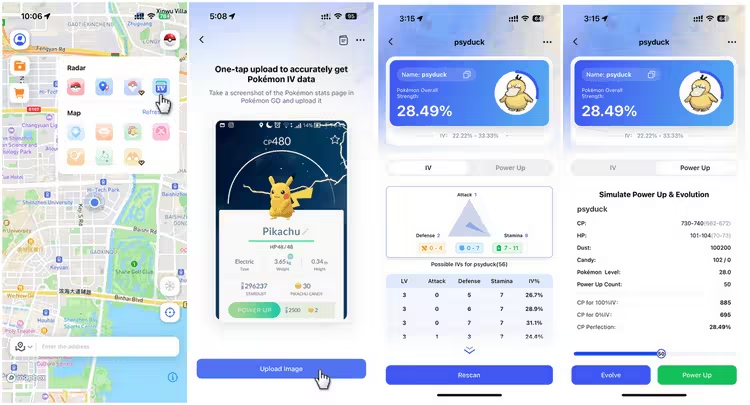
AnyTo, a Pokémon GO spoofer, includes a built-in IV scanner in its iOS app. You need to upload a screenshot of the Pokémon manually, and the tool will return its IV percentage. It can also simulate stats after powering up or evolving.
The IV checker isn’t as convenient as some alternatives, but it’s accurate and more versatile. More importantly, it doesn’t run as an overlay, so it won’t add extra strain to your phone.
How to use AnyTo's IV Checker
Step 1. Open AnyTo's IV checker.
Step 2. Upload the picture of your Pokémon
Step 3. And you'll get the result.
Get Perfect IVs in Pokémon GO—The Smart Way with AnyTo
Perfect Pokémon, the kind trainers call hundos, have 15/15/15 IVs in Attack, Defense, and Stamina. They're the crème de la crème of your collection. But getting one? It's a real grind. Here's the math:
- Purifying Shadow Pokémon (from Giovanni or Raids): ~2.7% chance
- Trading with a Lucky Friend: ~1.56% chance
- Catching in the wild: ~0.02% (practically winning the lottery)
So, if you're hoping to encounter a hundo in the wild, you'll want every bit of help you can get, and AnyTo makes that hunt a lot smarter.


AnyTo's Key Features
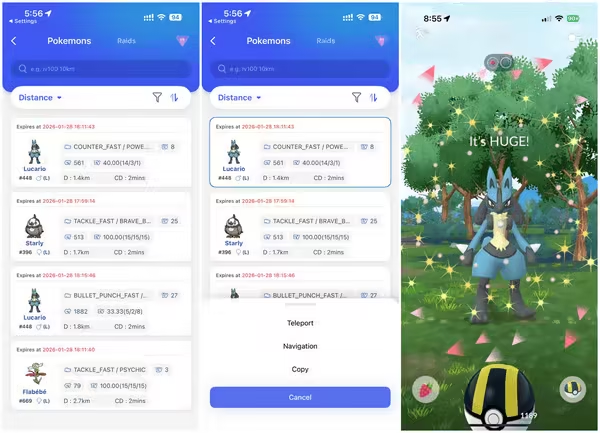
- Pokémon GO Search feature lets you snipe Pokémon by IV, CP, Level, and even moves, helping you find hundos without wandering endlessly.
- Live maps for PokéStops, Gyms, Raids, and Routes and 1-click teleportation to the spot, no more burning Remote Raid Passes.
- Unlike most spoofing tools, AnyTo connects via Bluetooth, keeping your spoofing undetected and stable while working smoothly with the official Pokémon GO app.
- It's regularly updated to stay compatible with the latest iOS, Android, and Pokémon GO versions.
- If anything feels off, Discord support team is always around to help troubleshoot and guide.
How to use AnyTo to snipe Pokémon
Step 1. Install AnyTo on your phone.
Step 2. Open PoGo Search and enter the details of the Pokémon you want, or pick one from the nearby list.
Step 3. Tap your choice, then select Teleport to jump there.
Pokémon GO IV Overlay: What Else You Need to Know
Here's a quick tech reality check: Pokémon GO's graphics look great, but they're heavy on memory. The game's poor RAM management, especially with the new avatar models, often leads to sudden slowdowns or crashes.
Now add a screen overlay from apps like Calcy IV or Poke Genie on top of that. These overlays float above the game screen, constantly scanning stats and reading screenshots. While super convenient, they also consume extra processing power and RAM, which can push Pokémon GO over the edge.
So if your game suddenly freezes, crashes mid-catch, or your phone starts heating up, those floating widgets might be the culprit. Try clearing them from the background before relaunching the game. Your device and your shiny hunt will thank you.
FAQs about IV Scanners for Pokémon GO
How are Pokémon GO IVs calculated?
The IV percentage is calculated by adding a Pokémon's three stats (Attack, Defense, Stamina), dividing by 45, then multiplying by 100. For example, a Deoxys with 15/15/14 has an IV of 97.78%.
How do you check IV on Pokémon GO?
You can check IVs manually using Pokémon GO's built-in Appraisal feature. Tap your Pokémon → tap the menu → choose Appraise. Your team leader will rate its stats with stars and bars.
However, if you want exact IV values or want to compare multiple Pokémon quickly, using an IV scanner like AnyTo, Calcy IV, PokeGenie, or Smart IV will give you more detailed and accurate results.
What is a Hundo in Pokémon GO?
“Hundo” is a Pokémon with perfect IVs (15/15/15) — the highest possible stats for Attack, Defense, and Stamina.
Hundos are rare and highly prized because they reach maximum potential when powered up. Many Trainers use IV scanners or tools like AnyTo's Pokémon search feature to help locate and catch these perfect specimens.
Final Thought
Catching a Hundo in Pokémon GO takes patience, luck, and strategy. But with the right tools, you can make that journey smoother and smarter. Pokémon GO IV checkers like AnyTo, Poke Genie, and Calcy IV are your best helpers.
So, if you're serious about improving your gameplay, mastering IVs, and catching that perfect Hundo, pairing a good IV scanner with AnyTo's smart location tools is your best move. After all, in Pokémon GO, knowledge, and location, is power.

AnyTo
Change GPS Location on iOS/Android
168,282 people have downloaded it.
- Fake iOS/Android GPS location to anywhere in the world instantly.
- 100% Work with location-based apps such as AR games, social platforms, etc.
- Joystick to simulate GPS movement freely when playing games.
- Import / Export GPX file to save your favorite routes.
- Compatible with All iOS & Android versions.


Ryan Miles is a seasoned gamer and mobile strategy writer with over 5 years of hands-on experience in Pokémon GO spoofing and GPS-based games. Known for breaking down complex location tricks into beginner-friendly guides, Ryan’s mission is simple: help you explore more, catch faster, and play smarter without ever leaving home.
-
Pokémon GO Jailbreak Guide: How to Jailbreak for Pokémon GO
Learn how to jailbreak Pokémon GO on iPhone, what Pokémon GO jailbreak tweaks to use, what you should know before jailbrekaing, and how to spoof without jailbreak.
40 mins read -
PoGo Wizard Review: Safety, Download Guide, and Alternative
Find out all about Pogo Wizard. Learn how Pogo Wizard works, check its safety, follow the download guide, and find the best PoGo Wizard alternative!
40 mins read -
11 Best Pokemon GO Spoofers for iOS & Android [2026 Free]
Learn the best Pokémon Go spoofers for iOS and Android in 2026. Try the best Pokemon GO spoofing app iMyFone AnyTo for free! No jailbreak, root or computer needed.
85 mins read -
How to Get Metal Coat in Pokémon GO (2026)
A complete 2026 guide to finding and using Metal Coat in Pokémon GO. Discover drop methods, best tips, and how AnyTo helps you farm rare items faster.
4 mins read -
What Are the Pokémon GO 50km Reward and How to Get it [2026]
Discover everything about the Pokémon GO 50km Adventure Sync rewards. learn the easiest way to claim them and why your Pokémon GO is not tracking steps.
17 mins read -
WeCatch Pokémon GO: Everything You Need to Know in 2026
Wondering if WeCatch for Pokémon GO is safe in 2026? Learn its features, problems, ban risks, and why AnyTo is the best alternative for rare Pokémon hunting.
6 mins read
Was this page helpful?
Thanks for your rating
Rated successfully!
You have already rated this article, please do not repeat scoring!